3.9. Configuring a VLL Service with CLI

This section describes how to configure Virtual Leased Line (VLL) services using the command line interface.

3.9.1. Common Configuration Tasks

This section provides a brief overview of the tasks that must be performed to configure the VLL services and provides the CLI commands.

  1. Associate the service with a customer ID.
  2. Define SAP parameters.
    1. (Optional) Select ingress QoS policies (configured in the config>qos context).
    2. (Optional) Select accounting policy (configured in the config>log context).
  3. Define spoke-SDP parameters.
    Note:

    Spoke-SDP parameters are only supported on 7210 SAS platforms operating in the network mode.

  4. Enable the service.

3.9.2. Configuring VLL Components

This section provides VLL configuration examples for the VLL services.

3.9.2.1. Creating a Cpipe Service

This section provides information about creating a Cpipe service.

3.9.2.1.1. Basic Configuration

The following fields require specific input (there are no defaults) to configure a basic Cpipe service:

  1. customer ID
  2. interface parameters
  3. spoke-SDP parameters

The following is a sample configuration of a Cpipe service:

*A:ces-A>config>service# cpipe 1 
*A:ces-A>config>service>cpipe# info  
----------------------------------------------
            sap 1/2/1.1 create
            exit
            spoke-sdp 12:1 create
            exit
            no shutdown
----------------------------------------------

Use the following syntax to create a Cpipe service. A route distinguisher must be defined in order for Cpipe to be operationally active.

CLI Syntax:
config>service# cpipe service-id [customer customer-id] -id] [vc-type {satop-e1 | satop-t1 | cesopsn | cesopsn-cas}]

The following is a sample Cpipe service configuration output:

*A:ces-A>config>service>cpipe# 
        cpipe 1 customer 1 vc-type satop-t1 create
            sap 1/2/1.1 create
                ingress
                    qos 12 
                exit
            exit
            spoke-sdp 12:1 create
            exit
            no shutdown
        exit
*A:ces-A>config>service>cpipe# exit all
 
*A:ces-A>config>service>cpipe# info detail 
----------------------------------------------
            no description
            service-mtu 1514
            sap 1/2/1.1 create
                no description
                cem
                    payload-size 192
                    report-alarm stray malformed pktloss overrun underrun 
                    no report-alarm rpktloss rfault rrdi 
                    no rtp-header
                exit
                ingress
                    qos 1 
                exit
                no collect-stats
                no accounting-policy
                no shutdown
            exit
            spoke-sdp 12:1 create
                ingress
                    no vc-label
                exit
                egress                
                    no vc-label
                exit
                no collect-stats
                no accounting-policy
                no precedence 
                no shutdown
            exit
            no shutdown
----------------------------------------------
*A:Dut-A>config>service>cpipe# info detail
----------------------------------------------
            no description
            service-mtu 1514
            endpoint "y" create
                no active-hold-delay
                no description
                no revert-time
            exit
            sap 1/2/1.2 create
                no description
                cem
                    packet jitter-buffer 32 payload-size 64
                    report-alarm stray malformed pktloss overrun underrun
                    no report-alarm rpktloss rfault rrdi
                    no rtp-header
                exit
                ingress
                    qos 1
                    no aggregate-meter-rate
                exit
                no collect-stats
                no accounting-policy
                no shutdown
            exit
            spoke-sdp 123:104 endpoint "y" create
                ingress
                    no vc-label
                exit
                egress
                    no vc-label
                exit
                no collect-stats
                no accounting-policy
                no precedence
                no shutdown
            exit
            no shutdown
----------------------------------------------
*A:Dut-A>config>service>cpipe#

3.9.2.1.2. Configuration Requirements

Before a Cpipe service can be provisioned, the following tasks must be completed:

3.9.2.1.2.1. Configuring a DS1 Port

The following is a sample DS1 port configured for CES:

*A:ces-A# configure port 1/2/1 
*A:ces-A>config>port# info 
----------------------------------------------
        tdm
            ds1 
                framing ds1-unframed
                clock-source adaptive
                report-alarm looped
                channel-group 1
                    no shutdown
                exit
                no shutdown
            exit
        exit
        no shutdown
----------------------------------------------
*A:ces-A>config>port#

3.9.2.1.2.2. Configuring a Channel Group

The following is a sample DS1 channel group configured for CES:

*A:ces-A>config>port# info 
----------------------------------------------
        tdm
            ds1 
                framing ds1-unframed
                clock-source adaptive
                report-alarm looped
                channel-group 1
                    no shutdown
                exit
                no shutdown
            exit
        exit
        no shutdown
----------------------------------------------
*A:ces-A>config>port#
 
 
*A:ces-A>config>port# info detail 
----------------------------------------------
        description "DS1/E1"
        tdm
            buildout short
            length 133
            ds1 
                framing ds1-unframed
                no loopback
                clock-source adaptive
                report-alarm ais los
                no report-alarm oof rai looped
                channel-group 1
                    description "DS0GRP"
                    mode access 
                    encap-type cem
                    timeslots 1-24
                    idle-payload-fill all-ones
                    no shutdown
                exit
                no shutdown
            exit
            line-impedance 100
        exit                          
        no shutdown
----------------------------------------------

3.9.2.1.3. Configuring Cpipe SAPs and Spoke-SDPs

The following is a sample Cpipe SAP and spoke-SDP configuration output:

*A:ces-A>config>service>cpipe# info
--------------------------------------------------
        cpipe 1 customer 1 vc-type satop-t1 create
            sap 1/2/1.1 create
                ingress
                    qos 12 
                exit
            exit
            spoke-sdp 12:1 create
            exit
            no shutdown
        exit
--------------------------------------------------
*A:ces-A>config>service>cpipe#

3.9.2.2. Creating an Epipe Service in Network Mode

Use the following syntax to create an Epipe service.

CLI Syntax:
config>service# epipe service-id [customer customer-id] [create] [vpn vpn-id]
description description-string
no shutdown

The following is a sample Epipe configuration output:

A:ALA-1>config>service# info
-------------------------------------------
...
         1101 customer 1 vpn 1101 create
            description "Default epipe description for service id 1101"
            no shutdown
        exit
----------------------------------------------
A:ALA-1>config>service#

3.9.2.3. Creating an Epipe Service in Access-uplink Mode

Note:

This section only applies to 7210 SAS-M and 7210 SAS-T operating in access-uplink mode.

Use the following syntax to create an Epipe service.

CLI Syntax:
config>service# epipe service-id [customer customer-id] [create] [svc-sap-type {null-star | dot1q | dot1q-preserve | any}] [customer- vid vlan-id] description description-string no shutdown
A:ALA-1>config>service# info
-------------------------------------------
...
     epipe 500 customer 1 svc-sap-type null-star create
          description "Local Epipe Service with NULL SVC_SAP_TYPE"
          no shutdown
     exit
----------------------------------------------
A:ALA-1>config>service#

3.9.2.3.1. Configuring Epipe SAP Parameters

A default QoS policy is applied to each ingress SAP. Additional QoS policies can be configured in the config>qos context. Filter policies are configured in the config>filter context and explicitly applied to a SAP. There are no default filter policies.

3.9.2.3.1.1. Epipe SAP

CLI Syntax:
config>service# epipe service-id [customer customer-id]
sap sap-id
accounting-policy policy-id
collect-stats
description description-string
no shutdown
egress
filter {ip ip-filter-name | mac mac-filter-name}
ingress
filter {ip ip-filter-name | mac mac-filter-name}
qos policy-id

3.9.2.3.1.2. Local Epipe SAPs

To configure a basic local Epipe service, enter the sap sap-id command twice with different port IDs in the same service configuration.

By default, QoS policy ID 1 is applied to ingress service SAPS. Existing filter policies or other existing QoS policies can be associated with service SAPs on ingress and egress ports.

Ingress and egress SAP parameters can be applied to local and distributed Epipe service SAPs.

The following is a sample of SAP configurations for local Epipe service 500 on SAP 1/1/2 and SAP 1/1/3 on ALA-1:

A:ALA-1>config>service# epipe 500 customer 5 create
config>service>epipe$ description "Local epipe service
config>service>epipe# sap 1/1/2 create
config>service>epipe>sap? ingress
config>service>epipe>sap>ingress# qos 20
config>service>epipe>sap>ingress# filter ip 1
config>service>epipe>sap>ingress# exit
config>service>epipe>sap# egress
config>service>epipe# sap 1/1/3 create
config>service>epipe>sap# ingress
config>service>epipe>sap>ingress# qos 555
config>service>epipe>sap>ingress# filter ip 1
config>service>epipe>sap>ingress# exit
config>service>epipe>sap# no shutdown
config>service>epipe>sap# exit
 
A:ALA-1>config>service# info
----------------------------------------------
...
        epipe 500 customer 5 create
            description "Local epipe service"
            sap 1/1/2 create
                ingress
                    qos 20
                    filter ip 1
                exit
            exit
            sap 1/1/3 create
                ingress
                    qos 555
                    filter ip 1
                exit
            exit
            no shutdown
        exit
----------------------------------------------
A:ALA-1>config>service#

3.9.2.3.1.3. Distributed Epipe Service

Note:

SDPs are supported on all 7210 SAS platforms as described in this document, except those operating in access-uplink mode.

To configure a distributed Epipe service, you must configure service entities on the originating and far-end nodes. You must use the same service ID on both ends (for example, Epipe 5500 on ALA-1 and Epipe 5500 on ALA-2). The spoke-sdp sdp-id:vc-id must match on both sides. A distributed Epipe consists of two SAPs on different nodes.

By default, QoS policy ID 1 is applied to ingress service SAPs. On egress, QoS policies are associated with a port. Existing filter policies can be associated with service SAPs on ingress and egress.

Meters (defined in SAP-ingress policies) can be applied on ingress, which is associated with SAPs. Scheduler policies can be applied on egress, which is associated with a port.

Ingress and egress SAP parameters can be applied to local and distributed Epipe service SAPs.

For SDP configuration information, see Configuring an SDP. For SDP binding information, see Configuring SDP Bindings.

The following example configures a distributed service between ALA-1 and ALA-2:

A:ALA-1>epipe 5500 customer 5 create
     config>service>epipe$ description "Distributed epipe service to east coast"
     config>service>epipe# sap 221/1/3:21 create 
     config>service>epipe>sap# ingress
     config>service>epipe>sap>ingress# qos 555
     config>service>epipe>sap>ingress# filter ip 1
     config>service>epipe>sap>ingress# exit
     config>service>epipe>sap# no shutdown
     config>service>epipe>sap# exit
     config>service>epipe#
 
A:ALA-2>config>service# epipe 5500 customer 5 create
     config>service>epipe$ description "Distributed epipe service to west coast"
     config>service>epipe# sap 441/1/4:550 create
     config>service>epipe>sap# ingress
     config>service>epipe>sap>ingress# filter ip 1020
     config>service>epipe>sap>ingress# exit
     config>service>epipe>sap# egress
     config>service>epipe>sap>egress# filter ip 6
     config>service>epipe>sap>egress# exit
     config>service>epipe>sap# no shutdown
     config>service>epipe#

The following is a sample of the SAP configurations for ALA-1 and ALA-2:

A:ALA-1>config>service# info
----------------------------------------------
...
        epipe 5500 customer 5 vpn 5500 create
            description "Distributed epipe service to east coast"
            sap 221/1/3:21 create
                ingress
                    qos 555
                    filter ip 1
                exit
 
            exit
        exit
...
----------------------------------------------
A:ALA-1>config>service#
 
 
A:ALA-2>config>service# info
----------------------------------------------
...
        epipe 5500 customer 5 vpn 5500 create
            description "Distributed epipe service to west coast"
            sap 441/1/4:550 create
                ingress
                    qos 654
                    filter ip 1020
                exit
 
            exit
        exit
...
----------------------------------------------
A:ALA-2>config>service#

3.9.2.3.1.4. Configuring Ingress SAP Parameters

By default, QoS policy ID 1 is applied to ingress service SAPs. Existing filter policies or other existing QoS policies can be associated with service SAPs on ingress and egress ports.

Ingress and egress SAP parameters can be applied to local and distributed Epipe service SAPs.

The following is a sample of SAP ingress and egress parameters:

ALA-1>config>service# epipe 5500 
     config>service>epipe# sap 1/1/3:21
     config>service>epipe>sap# ingress
     config>service>epipe>sap>ingress# qos 555
     config>service>epipe>sap>ingress# filter ip 1
     config>service>epipe>sap>ingress# exit
     config>service>epipe>sap#

The following is a sample Epipe SAP ingress configuration output:

A:ALA-1>config>service#
----------------------------------------------
...
        epipe 5500 customer 5 vpn 5500 create
            description "Distributed epipe service to east coast"
            sap 1/1/3:21 create
                ingress
                    qos 555
                    filter ip 1
                exit
            exit
            no shutdown
        exit
----------------------------------------------
A:ALA-1>config>service#

3.9.2.4. Creating an Epipe Service for 7210 SAS-M and 7210 SAS-Mxp with Range SAPs

The following is a sample of connection-profile used to configure a range of SAPs and an Epipe configuration output using the connection profile:

*A:7210SAS>config>connprof# info
----------------------------------------------
        ethernet
            ranges 0 2804-2805 2810-2811 2813 2832-2839
        exit
----------------------------------------------
 
*A:7210SAS>config>service>epipe# info
----------------------------------------------
            description "Default epipe description for service id 292"
            sap 1/1/4:292.* create
                description "Default sap description for service id 292"
                exit
            exit
            sap 1/1/9:cp-292 create
                description "Default sap description for service id 292"
                exit
            exit
            no shutdown
----------------------------------------------

3.9.2.5. Configuring Default QinQ SAPs for Epipe Transit Traffic in a Ring Scenario in Access-uplink Mode

Note:

Default QinQ SAPs are only supported on 7210 SAS platforms operating in the access-uplink mode.

In Figure 38, 7210-1 is used to deliver some services to customers connected to the device, and additionally it needs to pass through transit from other nodes on the ring (for example, traffic from 7210-2 to 7210-3 or from 7210-2 to 7750-SR onto the core network).

Figure 38:  Default QinQ SAP for Transit Traffic in a Ring Scenario 
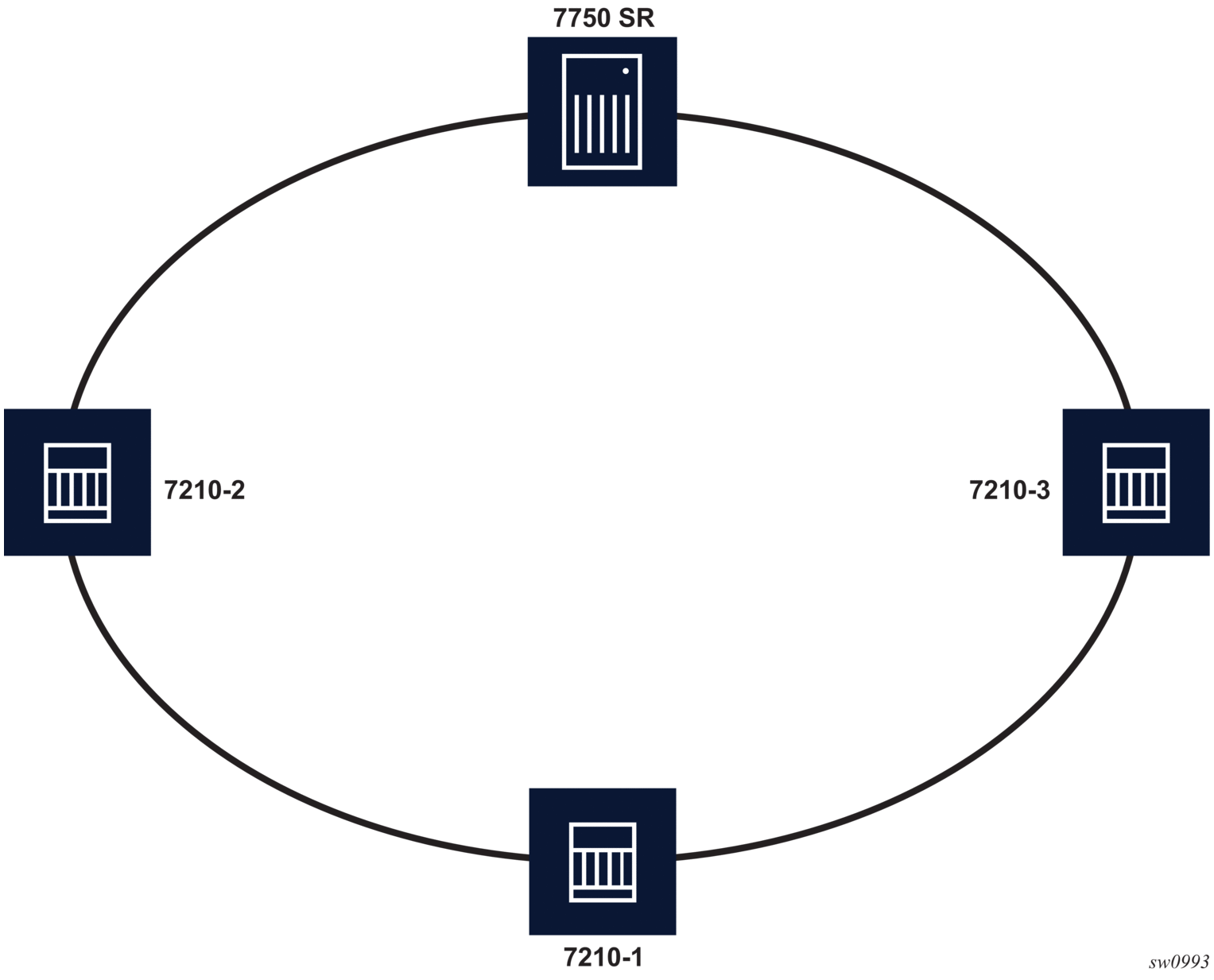
Without default QinQ SAPs, the user would need to configure a service on 7210-1, with access-uplink SAPs for each service originating on some other node in the ring. With support for default QinQ SAPs, all traffic that does not need to be delivered to any customer service configured on 7210-1 can be switched using the Epipe service.

The following is a sample configuration output:

ALA-1>config>service# epipe 8 customer 1 svc-sap-type null-star create
            sap 1/1/5:*.* create
                statistics
                    ingress
                    exit
                exit
            exit
            sap 1/1/6:*.* create
                statistics
                    ingress
                    exit
                exit
            exit
            no shutdown
        exit

3.9.2.5.1. Configuring SDP Bindings

Note:

SDPs are supported on all 7210 SAS platforms as described in this document, except those operating in access-uplink mode.

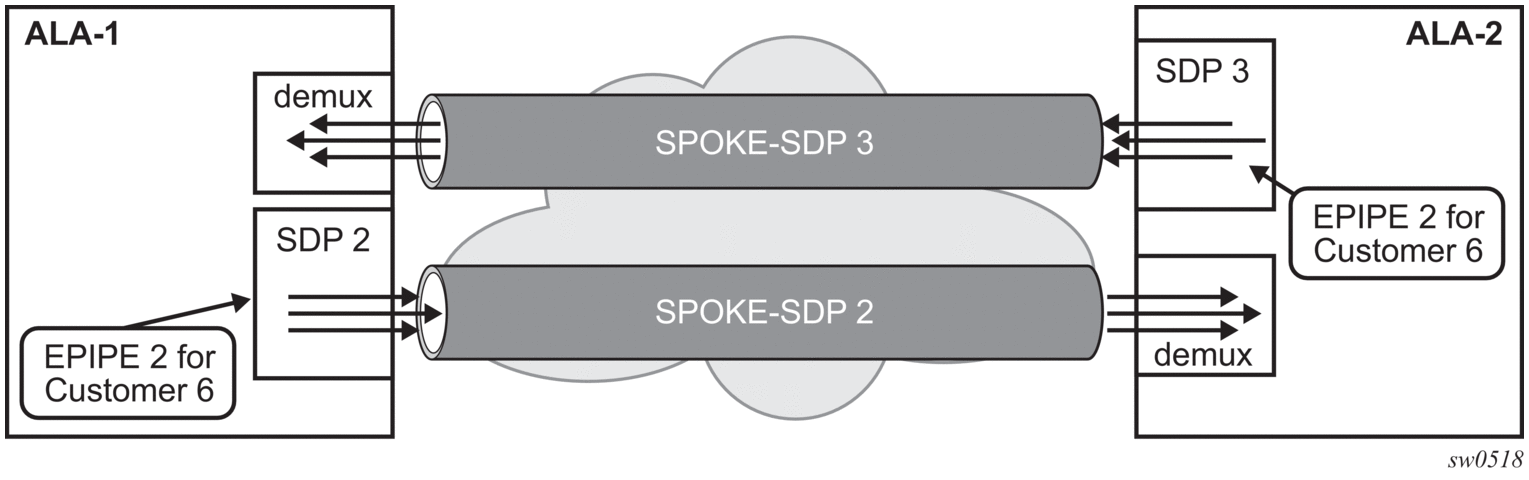
Figure 39 shows an example of a distributed Epipe service configuration between two routers, identifying the service and customer IDs, and the unidirectional SDPs required to communicate to the far-end routers.

A spoke-SDP is treated like the equivalent of a traditional bridge “port” where flooded traffic received on the spoke-SDP is replicated on all other “ports” (other spoke and mesh SDPs or SAPs) and not transmitted on the port it was received.

Figure 39:  SDPs — Unidirectional Tunnels 
Use the following syntax to create a spoke-SDP binding with an Epipe service.

CLI Syntax:
config>service# epipe service-id [customer customer-id]
spoke-sdp sdp-id:vc-id [vc-type {ether | vlan}]
vlan-vc-tag 0..4094
egress
filter {ip ip-filter-id}
vc-label egress-vc-label
ingress
filter {ip ip-filter-id}
vc-label ingress-vc-label
no shutdown

The following shows the command usage to bind an Epipe service between ALA-1 and ALA-2. This example assumes that the SAPs have already been configured (see Distributed Epipe Service).

A:ALA-1>config>service# epipe 5500
     config>service>epipe# spoke-sdp 2:123
     config>service>epipe>spoke-sdp# egress
     config>service>epipe>spoke-sdp>egress# vc-label 5500
     config>service>epipe>spoke-sdp>egress# exit
     config>service>epipe>spoke-sdp# ingress
     config>service>epipe>spoke-sdp>ingress# vc-label 6600
     config>service>epipe>spoke-sdp>ingress# exit
     config>service>epipe>spoke-sdp# no shutdown
     
     ALA-2>config>service# epipe 5500
     config>service>epipe# spoke-sdp 2:456
     config>service>epipe>spoke-sdp# egress
     config>service>epipe>spoke-sdp>egress# vc-label 6600
     config>service>epipe>spoke-sdp>egress# exit
     config>service>epipe>spoke-sdp# ingress
     config>service>epipe>spoke-sdp>ingress# vc-label 5500
     config>service>epipe>spoke-sdp>ingress# exit
     config>service>epipe>spoke-sdp# no shutdown

The following is a sample SDP binding for the Epipe service between ALA-1 and ALA-2 configuration output:

A:ALA-1>config>service# info
----------------------------------------------
...
        epipe 5500 customer 5 vpn 5500 create
            description "Distributed epipe service to east coast"
            sap 1/1/3:21 create
                ingress
                    qos 555
                    filter ip 1
                exit
            exit
            spoke-sdp 2:123 create
                ingress
                    vc-label 6600
                exit
                egress
                    vc-label 5500
                exit
            exit
            no shutdown
        exit
...
----------------------------------------------
A:ALA-1>config>service#
 
 
A:ALA-2>config>service# info
----------------------------------------------
...
exit
        epipe 5500 customer 5 vpn 5500 create
            description "Distributed epipe service to west coast"
            sap 441/1/4:550 create
                ingress
                    qos 654
                    filter ip 1020
                exit
            exit
            spoke-sdp 2:456 create
                ingress
                    vc-label 5500
                exit
                egress
                    vc-label 6600
                exit
            exit
            no shutdown
        exit
...
----------------------------------------------
A:ALA-2>config>service#

3.9.3. Using Spoke-SDP Control Words

Note:

SDPs are supported on all 7210 SAS platforms as described in this document, except those operating in access-uplink mode.

The control-word command provides the option to add a control word as part of the packet encapsulation for PW types for which the control word is optional. On the 7210 SAS, an option is provided to enable it for Ethernet PW (Epipe). The control word might be needed because when ECMP is enabled on the network, packets of a specific PW may be spread over multiple ECMP paths if the hashing router mistakes the PW packet payload for an IPv4 or IPv6 packet. This occurs when the first nibble following the service label corresponds to a value of 4 or 6.

The control word negotiation procedures described in Section 6.2 of RFC 4447 are not supported, and therefore the service will only come up if the same C-bit value is signaled in both directions. If a spoke-SDP is configured to use the control word, but the node receives a label mapping message with a C-bit clear, the node releases the label with an “Illegal C-bit” status code per Section 6.1 of RFC 4447. As soon as the user enables control of the remote peer, the remote peer withdraws its original label and sends a label mapping with the C-bit set to 1 and the VLL service is up in both nodes.

When the control word is enabled, VCCV packets also include the VCCV control word. In that case, the VCCV CC type 1 (OAM CW) is signaled in the VCCV parameter in the FEC. If the control word is disabled on the spoke-SDP, the router alert label is used. In that case, VCCV CC type 2 is signaled. Note that for a multi-segment PW (MS-PW), the CC type 1 is the only type supported, and therefore the control word must be enabled on the spoke-SDP to be able to use VCCV-ping and VCCV-trace.

The following is a sample spoke-SDP control word configuration output:

-Dut-B>config>service>epipe# info
----------------------------------------------
description "Default epipe description for service id 2100"
sap 1/2/7:4 create
description "Default sap description for service id 2100"
exit
spoke-sdp 1:2001 create
control-word
exit
no shutdown
----------------------------------------------
*A:ALA-Dut-B>config>service>epipe#
To disable the control word on spoke-sdp 1:2001:
*A:ALA-Dut-B>config>service>epipe# info
----------------------------------------------
description "Default epipe description for service id 2100"
sap 1/2/7:4 create
description "Default sap description for service id 2100"
exit
spoke-sdp 1:2001 create
exit
no shutdown
----------------------------------------------
*A:ALA-Dut-B>config>service>epipe#

3.9.4. Configuring VLL Resilience

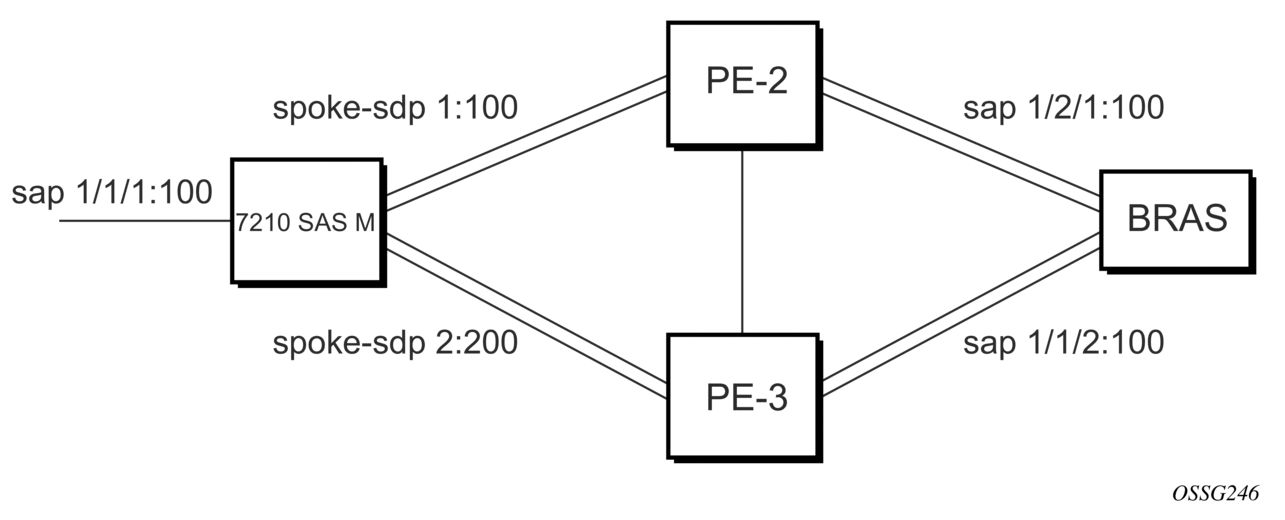
Figure 40 shows an example to create VLL resilience. Note that the zero revert-time value means that the VLL path will be switched back to the primary immediately after it comes back up.

Figure 40:  VLL Resilience 
PE1

The following is a sample configuration output on PE1:

*A:ALA-48>config>service>epipe# info
----------------------------------------------
            endpoint "x" create
            exit
            endpoint "y" create
            exit
            spoke-sdp 1:100 endpoint "y" create
                precedence primary
            exit
            spoke-sdp 2:200 endpoint "y" create
                precedence 1
            exit
            no shutdown
----------------------------------------------
*A:ALA-48>config>service>epipe#

3.9.5. Configuring VLL Resilience for a Switched Pseudowire Path

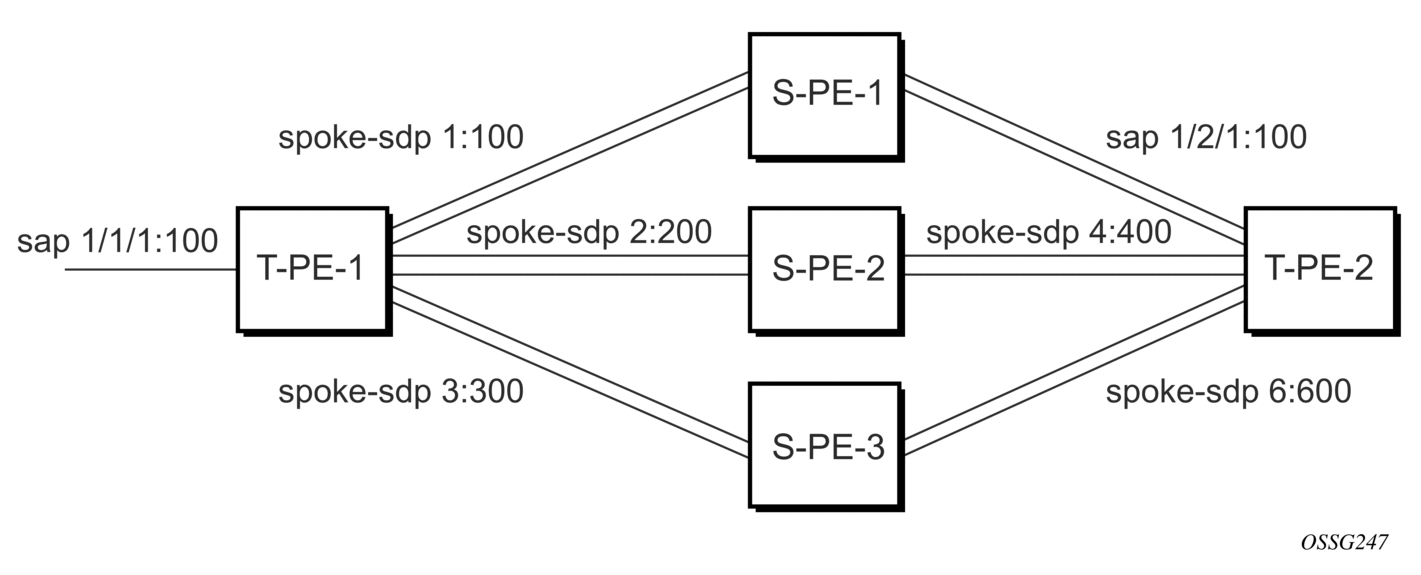
Figure 41 shows VLL resilience with pseudowire switching.

Figure 41:  VLL Resilience with Pseudowire Switching 
T-PE1

The following is a sample configuration output on TPE1:

 
*A:ALA-48>config>service>epipe# info
----------------------------------------------
            endpoint "x" create
            exit
            endpoint "y" create
            exit
            sap 1/1/1:100 endpoint "x" create
            exit
            spoke-sdp 1:100 endpoint "y" create
                precedence primary
            exit
            spoke-sdp 2:200 endpoint "y" create
                precedence 1
            exit
            spoke-sdp 3:300 endpoint "y" create
                precedence 1
            exit
            no shutdown
----------------------------------------------
*A:ALA-48>config>service>epipe#

T-PE2

The following is a sample configuration output on TPE2:

*A:ALA-49>config>service>epipe# info
----------------------------------------------
            endpoint "x" create
            exit
            endpoint "y" create
                revert-time 100
            exit
            spoke-sdp 4:400 endpoint "y" create
                precedence primary
            exit
            spoke-sdp 5:500 endpoint "y" create
                precedence 1
            exit
            spoke-sdp 6:600 endpoint "y" create
                precedence 1
            exit
            no shutdown
----------------------------------------------
*A:ALA-49>config>service>epipe#

S-PE1

The following is a sample configuration output on S-PE1:

*A:ALA-50>config>service>epipe# info
----------------------------------------------
...
            spoke-sdp 1:100 create
            exit
            spoke-sdp 4:400 create
            exit
            no shutdown
----------------------------------------------
*A:ALA-49>config>service>epipe#

3.9.6. Service Management Tasks

This section provides information about VLL service management tasks.

3.9.6.1. Modifying a Cpipe Service

The following is a sample Cpipe service configuration output:

*A:ces-A>config>service>cpipe# info
----------------------------------------------
        cpipe 1 customer 1 vc-type satop-t1 create
            sap 1/2/1.1 create
                ingress
                    qos 12 
                exit
            exit
            spoke-sdp 12:1 create
            exit
            no shutdown
        exit
----------------------------------------------
*A:ces-A>config>service>cpipe 

3.9.6.2. Deleting a Cpipe Service

A Cpipe service cannot be deleted until SAPs are shut down and deleted. If a spoke-SDP is defined, it must be shut down and removed from the configuration as well.

Use the following syntax to delete a Cpipe service.

CLI Syntax:
config>service#
[no] cpipe service-id [customer customer-id]
[no] spoke-sdp sdp-id
[no] shutdown
shutdown

3.9.6.3. Modifying Epipe Service Parameters

The following shows the command usage to add an accounting policy to an existing SAP.

Example:
config>service# epipe 2
config>service>epipe# sap 1/1/3:21
config>service>epipe>sap# accounting-policy 14
config>service>epipe>sap# exit

The following is a sample SAP configuration output:

ALA-1>config>service# info
----------------------------------------------
     epipe 2 customer 6 vpn 2 create
            description "Distributed Epipe service to east coast"
            sap 1/1/3:21 create
               accounting-policy 14
            exit
            no shutdown
        exit
----------------------------------------------
ALA-1>config>service#

3.9.6.4. Disabling an Epipe Service

Use the following syntax to shut down an Epipe service without deleting the service parameters.

CLI Syntax:
config>service> epipe service-id
shutdown
Example:
config>service# epipe 2
config>service>epipe# shutdown
config>service>epipe# exit

3.9.6.5. Re-Enabling an Epipe Service

Use the following syntax to re-enable an Epipe service that was shut down.

CLI Syntax:
config>service# epipe service-id
no shutdown
Example:
config>service# epipe 2
config>service>epipe# no shutdown
config>service>epipe# exit

3.9.6.6. Deleting an Epipe Service

Perform the following steps before deleting an Epipe service.

  1. Shut down the SAP.
  2. Delete the SAP.
  3. Shut down the service.

Use the following syntax to delete an Epipe service.

CLI Syntax:
config>service
[no] epipe service-id
shutdown
[no] sap sap-id
shutdown
Example:
config>service# epipe 2
config>service>epipe# sap 1/1/3:21
config>service>epipe>sap# shutdown
config>service>epipe>sap# exit
config>service>epipe# no sap 1/1/3:21
config>service>epipe# epipe 2
config>service>epipe# shutdown
config>service>epipe# exit
config>service# no epipe 2