2. Packet forwarding control protocol association
This chapter provides an overview of the BNG CUPS UPF Packet Forwarding Control Protocol (PFCP) association configuration, heartbeat and headless mode operation, and operational management and debugging options.
2.1. UPF PFCP association overview
A BNG CUPS UPF requires an active PFCP association with the BNG CUPS CPF. Through the PFCP association, the BNG CPF installs the rules that determine how the BNG UPF forwards subscriber traffic.
The BNG UPF requires the PFCP association to be preconfigured using the configure subscriber-mgmt pfcp association command.
Each PFCP association is linked to a specific peer, interface, and router instance. The loopback interface is the recommended interface because it allows resiliency over multiple physical interfaces.
As soon as the PFCP association is configured and administratively enabled, the UPF connects to the BNG CPF by sending PFCP Association Setup Request messages. The UPF sends the messages periodically, until the association is either set up or administratively disabled.
To configure the retry interval for the PFCP association setup, use the association-setup-retry command.
The UPF can also set up the PFCP association when receiving a PFCP Association Setup Request from the configured peer. However, the UPF will not accept an association setup from a non-configured peer.
Figure 1 shows the PFCP association setup flow for the BNG UPF.
Figure 1: BNG UPF PFCP association setup flow
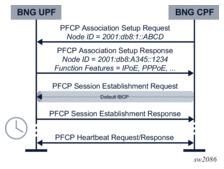
The PFCP protocol supports node identification using node IDs. The node ID can be either an IP address or a FQDN. By default, the IP address of the linked interface is chosen; however, this can be overridden using the node-id command. All the UPFs in a deployment require different node IDs.
PFCP messages sent for an active association use the configuration under the PFCP association tx command to define the following:
- ttlthe outgoing TTL
- timeoutthe request message timeout (T1)
- retriesthe number of times a request message is retried (N1)
 | Note:
|
The QoS of the outgoing PFCP messages is managed through sgt-qos command configuration in the routing instance used by the PFCP. In the application list command, a pfcp keyword can be mapped to its own DSCP value (default NC2), after which that DSCP value can be mapped to a specific Forwarding Class (FC).
For more information, refer to the 7450 ESS, 7750 SR, 7950 XRS, and VSR Quality of Service Guide, section “QoS for Self-Generated (CPU) Traffic on Network Interfaces”.
When a PFCP association is administratively disabled, it is not immediately brought down. The BNG UPF requests a graceful CPF release and keeps the PFCP association up until the BNG CPF removes it, or the association release timeout expires.
To configure the PFCP association release timeout, use the association-release-timeout command.
To force an immediate PFCP association removal, configure the association release timeout to none.
Example PFCP association configuration
The following example shows a BNG UPF PFCP association configuration:
2.2. PFCP heartbeats and headless mode
Connectivity between the BNG UPF and CPF is defined by the following two concepts:
- PFCP associationOnly one association per BNG CPF and UPF is allowed. The identifiers of the association are the BNG UPF and CPF node IDs.For information about how PFCP associations are negotiated, see UPF PFCP association overview.
- PFCP pathMultiple paths are supported per BNG CPF and UPF. The identifier of a PFCP path is the pair of IP addresses that are communicated with. Paths are not negotiated but are learned while using PFCP signaling.
| Note: Typically, there is only a single PFCP path per PFCP association; therefore, these terms are often used interchangeably. |
The BNG UPF only uses one IP address, but starts heartbeats for each PFCP path it learns. The frequency, timeout, and retry values of the heartbeats are configured for the PFCP association using the following commands:
configure subscriber-mgmt pfcp association heartbeat
- interval
- retries
- timeout
Whenever a heartbeat fails, the BNG UPF starts a timer based on the path-restoration-time configured under the PFCP association. When the timer expires, or if it is not configured, all sessions associated with that path are removed. If the path recovers before the timer expires, the timer is canceled, and no sessions are removed.
| Note: For correct operation, the heartbeat configuration must be identical on both the BNG UPF and CPF. Nokia strongly recommends configuring the path-restoration-time to at least twice the sum of the heartbeat interval plus the total timeout (heartbeat retries x heartbeat timeout = N1 x T1). |
2.3. Default IBCP session
The BNG UPF always enables the IPoE and PPPoE BBF function features. A compatible BNG CPF uses this as an indication to set up a default IBCP tunnel to send control plane packets, such as DHCP discover or PADI, that do not match an existing session. The default tunnel is signaled as a special PFCP session without a PDN type. The special PFCP session can apply traffic-matching rules just as any other PFCP session that the UPF applies.
For more information about IBCP, see In-band control plane.
2.4. Operational commands and debugging
This section describes commands that can be used for operational and debugging purposes.
To display the number of PFCP associations and sessions, use the show subscriber-mgmt pfcp summary command.
To display PFCP message statistics, including information about packets that are received and transmitted and any transmission errors, use the show subscriber-mgmt pfcp statistics command.
To reset these statistics to zero, use the clear subscriber-mgmt pfcp-association statistics command.
To display association information including association-level parameters such as function features and node IDs, use the show subscriber-mgmt pfcp association command.
To display path state information, use the show subscriber-mgmt pfcp peer command.
For information about the distinction between PFCP association and path, see PFCP heartbeats and headless mode.
To display details about a specific session, use the show subscriber-mgmt pfcp session detail command.
Various filters can be applied to narrow a specific session or set of sessions. This command provides an overview for the PFCP parameters of the session. For more information, see Operational commands.
To forcefully remove a PFCP session, use the clear subscriber-mgmt pfcp-session command.
 | Caution: Although it is possible to forcefully remove a PFCP session, Nokia does not recommend invoking this command in a live network because this may cause the BNG CPF to be out of sync with the UPF. If the BNG UPF contains a session that is not on the CPF, it is preferable to first run a manual PFCP audit. |
To perform basic PFCP debugging, use the debug subscriber-mgmt pfcp. command.
The output of this command allows inspection of PFCP packets received and transmitted. As well, any session-specific failure is reported in the PFCP response to the BNG CPF, which can display the specific error as part of session debugging.