5. NETCONF
5.1. NETCONF Overview
NETCONF is a standardized IETF configuration management protocol specified in RFC 6241, Network Configuration Protocol (NETCONF). It is secure, connection-oriented, and runs on top of the SSHv2 transport protocol as specified in RFC 6242, Using the NETCONF Configuration Protocol over Secure Shell (SSH). NETCONF is an XML-based protocol that can be used as an alternative to CLI or SNMP for managing an SR OS router.
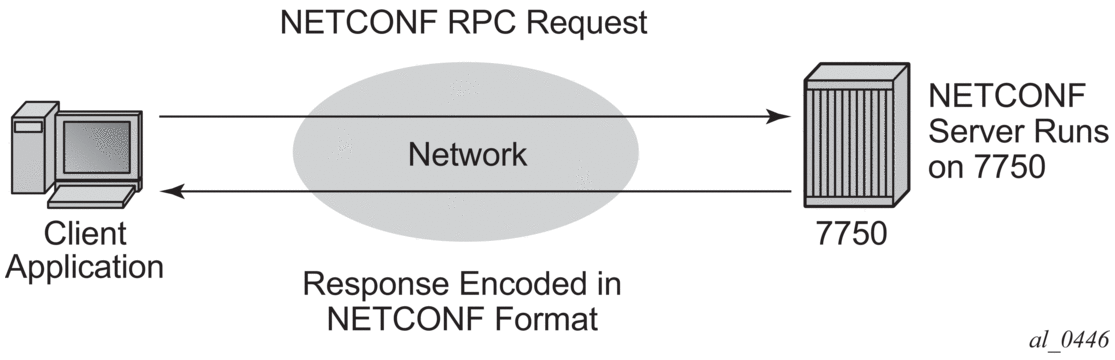
NETCONF uses RPC messaging for communication between a NETCONF client and the NETCONF server running on SR OS. An RPC message and configuration data is encapsulated within an XML document. These XML documents are exchanged between a NETCONF client and a NETCONF server in a request/response type of interaction. The SR OS NETCONF interface supports both configuration and retrieval of operational information. Figure 15 shows a NETCONF RPC request.
Figure 15: NETCONF RPC Request
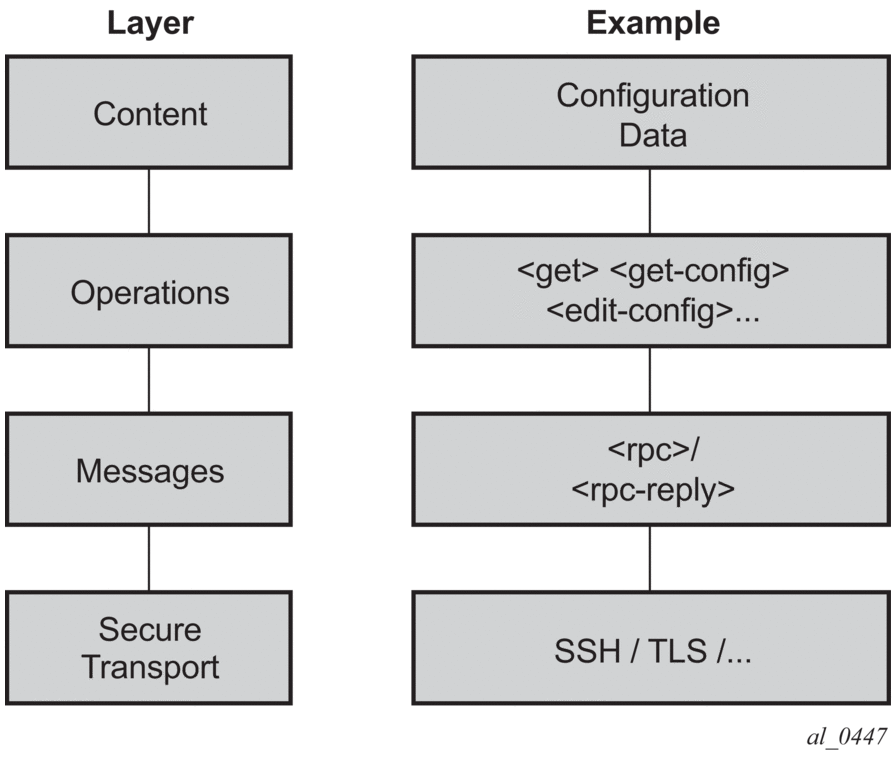
NETCONF can be conceptually partitioned into four layers as described in RFC 6241. Figure 16 shows the NETCONF layers.
Figure 16: NETCONF Layers (RFC 6241)
5.2. NETCONF in SR OS
NETCONF can be used on an SR OS router to perform router management operations including:
- changing the configuration of the router (using the <edit-config> operation)
- reading the configuration of the router (using the <get-config> operation, equivalent to the info command while in the configure branch of the SR OS CLI)
- reading operational status and data using the <get> operation (equivalent to the show commands in the SR OS CLI, or executing the info command while in the state branch of MD-CLI)
- notifications on an SR OS router (equivalent to the SR OS log events)
The equivalent of some admin commands are available using the SR OS NETCONF interface:
- admin save can be performed using the <copy-config> operation from the <running> datastore to the <startup> datastore
- classic CLI admin rollback commands are supported using a CLI content layer <cli-action> RPC. For more information, see NETCONF Using the CLI Content Layer.
SR OS NETCONF does not support the bof, debug, tools, clear, and other general CLI operational commands (for example, telnet or ping).
The SR OS NETCONF server supports both the base:1.1 capability and the base:1.0 capability.
SR OS NETCONF supports an XML-based content layer and a CLI content layer.
5.2.1. Transport and Sessions
SSH transport for NETCONF is supported on TCP port 830 (default) or port 22 with IPv4 or IPv6 in the “Base” routing instance or within a VPRN.
NETCONF SSH sessions (the same as CLI, SCP, and sFTP sessions) are subject to any configurable and non-configurable session limits; for example, inbound-max-sessions.
Both the SSH server and NETCONF protocol must be enabled in the router configuration in order to use NETCONF.
NETCONF sessions do not time out automatically and are not subject to the CLI session timeout. Operators can disconnect sessions manually using the admin disconnect command.
A client establishing a NETCONF session must log in to the router so user accounts must exist for NETCONF on SR OS. An access type netconf is provided. For access to the Nokia SR OS YANG data models, only netconf access is necessary.
Authentication using the local user database is supported for NETCONF users. Also, NETCONF runs over SSH, and SSH supports RADIUS/TACACS+ user authentication. By adding "access netconf" under the default RADIUS/TACACS+ user template, the NETCONF user is granted access.
Authorization is supported for configuration and state elements in NETCONF. The local, RADIUS, or TACACS+ authorization rules are translated and applied to NETCONF requests to modify or see configuration or state data.
5.2.2. Datastores and URLs
SR OS supports the following datastores:
- <running>
- <candidate>
- <intended>
- <startup>
Some NETCONF functions use data from <url> locations.
The supported datastores can be obtained through the “/yang-library” state data model that contains a list of supported datastores, as defined in RFC 8525.
The :candidate capability is advertised in the SR OS NETCONF server <hello> as:
Configuration changes (using the Nokia SR OS YANG data models) made to the <candidate> datastore take effect after a successful <commit> operation.
The <intended> datastore is a read-only datastore that stores the active configurations (in the <running> datastore) and the expanded configurations (configuration group inheritance).
The <startup> datastore and <url> can only be used with <copy-config> and <delete-config> and are not supported with any other operations (including <edit-config>, <get-config>, <get>, <validate>, and so on).
The :startup capability is advertised in the SR OS NETCONF server <hello> as:
The <url> supports the same options as CLI <file-url>: local urls (CF) and remote urls (ftp and tftp).
The :url capability is advertised in the SR OS NETCONF server <hello> as:
The following examples show the format of each URL scheme:
- <url>ftp://name:passwd@IP_ADDRESS/myfiles/myfile.cfg</url>
- <url>tftp://name:passwd@IP_ADDRESS/myfiles/myfile.cfg</url>
- <url>file:///cf3:/myfiles/myfile.cfg</url>
- <url>cf3:/myfiles/myfile.cfg</url>
 | Note: The examples use “///” for the file URL. Also, the file://localhost/... format is not supported. |
The BOF is not considered part of any configuration datastore.
Debug configuration (such as debug mirrors, or anything saved with admin debug-save) is not considered part of any configuration datastore.
Lawful Intercept (LI) configurations can be performed using the NETCONF Nokia SR OS YANG modules (including configuring any LI log-ids needed to subscribe/receive LI NETCONF notifications). The same user permissions apply using NETCONF as with MD-CLI (in other words, only LI users can access LI data).
The <candidate> datastore supports the XML content layer only. Requests/replies to/from the <candidate> datastore cannot contain the CLI content layer.
5.2.3. NETCONF Operations and Capabilities
Each RPC request can only contain one operation. Table 71 summarizes the protocol operations and capabilities supported on the 7450 ESS, 7750 SR, and 7950 XRS.
Table 71: Summary of Operations and Capabilities
Support | Capabilities | Operations |
Base Protocol Operations | — |
|
RFC 6241 1 | writable-running capability | — |
candidate configuration capability | ||
confirmed commit | <cancel-commit> | |
validate | ||
startup | — | |
URL | — | |
rollback-on-error | — | |
RFC 6243 | with-defaults | — |
RFC 5277 | notification | <create-subscription> |
interleave | — | |
RFC 6022 | ietf-network-monitoring | |
RFC 8525 | ietf-yang-library | — |
- Optional capabilities defined in RFC 6241 are supported
Note:
Table 72 shows supported NETCONF operations.
Table 72: Supported NETCONF Operations
Operation | Arguments |
get-config | source/[configuration-region] [filter] |
edit-config | target/[configuration-region] [default-operation] [test-option] [error-option] config |
copy-config | target/[configuration-region] source/[configuration-region] |
delete-config | target |
lock | target/[configuration-region] |
unlock | target/[configuration-region] |
get | [filter] [configuration-region] |
close-session | — |
kill-session | session-id |
discard-changes | [configuration-region] |
validate | source/[configuration-region] |
commit | [confirmed] [confirm-timeout] [persist] [persist-id] [configuration-region] |
cancel-commit | [persist-id] |
create-subscription | [stream] [startTime] [stopTime] |
get-schema | identifier [version] [format] |
get-data | datastore [subtree-filter] [max-depth] [with-defaults] |
| Note: Bracketed arguments are optional. X/[configuration-group] means that the [configuration-group] can only be used as a child of X. |
Table 73 lists protocol operations and level of support in SR OS NETCONF servers, and limitations, if any, in the current implementation.
Table 73: Protocol Operations and Level of Support in Nokia SR OS NETCONF Servers
Protocol Operation | Example | Supported | Notes |
get-config | <?xml version="1.0" encoding="UTF-8"?> <rpc message-id="101" xmlns="urn:ietf:params:xml:ns:netconf:base:1.0"> <get-config> <source> <running/> </source> </get-config> </rpc> ]]>]]> | Yes | — |
<source> <startup/> </source> | No | — | |
<source> <candidate/> </source> | Yes | — | |
<source> <config/> </source> | No | — | |
<source> <url/> </source> | No | — | |
<?xml version="1.0" encoding="UTF-8"?> <rpc message-id="101"xmlns="urn:ietf:params:xml:ns:netconf:base:1.0"> <get-config> <source><running/></source> <filter type="subtree"> </filter> </get-config> </rpc> ]]>]]> | Yes | A <filter> is an optional argument. All subtree filters are supported in SR OS except for “attribute match expressions”. | |
<filter type="xpath"> </filter> | No | — | |
<source> <configuration-region/> </source> | Yes | Optional. Can be "li" or "configure". The default if not specified is "configure". Can only be used with the Nokia SR OS modules. A datastore must be specified inside the <source> if the <configuration-region> is used. | |
get | <?xml version="1.0" encoding="UTF-8"?> <rpc message-id="101" xmlns="urn:ietf:params:xml:ns:netconf:base:1.0"> <get/> </rpc> ]]>]]> | Yes | Retrieves both configuration and state data if in XML content layer. Retrieves state data but no configuration data if in CLI content layer. |
<?xml version="1.0" encoding="UTF-8"?> <rpc message-id="101" xmlns="urn:ietf:params:xml:ns:netconf:base:1.0"> <get> <filter type="subtree"> </filter> </get> </rpc> ]]>]]> | Yes | A <filter> is an optional argument. Subtree filters are supported except for "attribute match expressions". | |
<filter type="xpath"> </filter> | No | — | |
<configuration-region/> | Yes | Optional. Can be "li" or "configure". The default if not specified is "configure". Can only be used with the Nokia SR OS modules. | |
edit-config | <?xml version="1.0" encoding="UTF-8"?> <rpc message-id="101" xmlns="urn:ietf:params:xml:ns:netconf:base:1.0"> <edit-config> <target/> <default-operation/> <test-option/> <error-option/> <config/> </edit-config> </rpc> ]]>]]> | Yes | <default-operation>, <test-option>, and <error-option> are optional arguments. |
<target> <url/> </target> | No | — | |
<target> <running/> </target> | Yes | Can be used when all of the following are true:
| |
<target> <startup/> </target> | No | — | |
<target> <candidate/> </target> | Yes | — | |
<default-operation>merge</default-operation> | Yes | Default | |
<default-operation>none</default-operation> | Yes | With the Nokia SR OS YANG modules, an operation of "none" (inherited or direct) on a leaf node that does not exist in the data model causes SR OS to return an error with an <error-tag> value of “data-missing”. | |
<default-operation>replace</default-operation> | Yes | — | |
<test-option>test-then-set</test-option> | Yes | — | |
<test-option>set</test-option> | Yes | — | |
<test-option>test-only</test-option> | Yes | — | |
<error-option>continue-on-error</error-option> | No | — | |
<error-option>rollback-on-error</error-option> | Yes | — | |
<error-option>stop-on-error</error-option> | Yes | Default. This can be specified but, starting in Release 20.2.R1, behaves the same as a rollback-on-error. | |
<target> <configuration-region/> </target> | Yes | Optional. Default if not specified is "configure". Can be "li" or "configure". Can only be used with the Nokia SR OS modules. | |
close-session | <?xml version="1.0" encoding="UTF-8"?> <rpc message-id="101" xmlns="urn:ietf:params:xml:ns:netconf:base:1.0"> <close-session/> </rpc> ]]>]]> | Yes | When a session is closed, any locks held are released and the session is terminated. Any pending RPC requests are discarded. |
commit | <?xml version="1.0" encoding="UTF-8"?> <rpc message-id="101" xmlns="urn:ietf:params:xml:ns:netconf:base:1.0"> <commit/> </rpc> ]]>]]> | Yes | When commit is issued, any configuration stored in the <candidate> datastore is written to the running configuration unless the device is locked by a NETCONF client or <running> datastore is locked by any other NETCONF session. The startup configuration is also written if system management-interface netconf auto-config-save is configured. |
<commit><confirmed/></commit> | Yes | Optional. Can only be used with non-li configurations. | |
<commit> <confirmed/> <confirm-timeout/> </commit> | Yes | Optional. Can only be used with non-li configurations. | |
<commit> <confirmed/> <confirm-timeout/> <persist/> </commit> | Yes | Optional. Can only be used with non-li configurations. | |
<commit> <confirmed/> <confirm-timeout/> <persist/> <persist-id/> </commit> | Yes | Optional. Can only be used with non-li configurations. | |
<commit> <configuration-region/> </commit> | Yes | Optional. Default if not specified is "configure". Can be "li" or "configure". Can only be used with the Nokia SR OS modules. | |
cancel-commit | <?xml version="1.0" encoding="UTF-8"?> <rpc message-id="101" xmlns="urn:ietf:params:xml:ns:netconf:base:1.0"> <cancel-commit/> </rpc> | Yes | Can only be used with non-li configurations. |
<cancel-commit> <persist-id/></cancel-commit> | Yes | Optional. When a <commit> <persist> is used, the value of a <cancel-commit> <persist-id> must be equal to the value used in the <commit> <persist>. | |
copy-config | <?xml version="1.0" encoding="UTF-8"?> <rpc message-id="101" xmlns:nc="urn:ietf:params:xml:ns:netconf:base:1.0"> <copy-config> <target/> <source/> </copy-config> </rpc> ]]>]]> | Yes | The <copy-config> operation is supported for specific combinations of source and target datastores. When the specified <configuration-region> is "li", the <source><running/> to <target><startup/> becomes the only valid <copy-config> combination. |
<target><running/></target> | No | The running datastore cannot be a <target> for a <copy-config>. | |
<target><candidate/></target> <source><running/></source> | No | Use <discard-changes>. | |
<target><startup/></target> <source><running/></source> | Yes | Equivalent to admin save. An index file is also saved in classic management-interface configuration-mode if persist on is configured in the BOF. | |
<target><url/></target> <source><running/></source> | Yes | Equivalent to admin save file-url. An index file is also saved in classic management-interface configuration-mode if persist on is configured in the BOF. | |
<target><candidate/></target> <source><startup/></source> | Yes | — | |
<target><url/></target> <source><startup/></source> | Yes | Supported if both source and target are not remote URLs. Only configuration changes are saved; for example, an index file is not saved in classic management-interface configuration-mode even if persist on is configured in the BOF. | |
<target><running/></target> <source><startup/></source> | No | — | |
<target><startup/></target> <source><candidate/></source> | Yes | — | |
<target><url/></target> <source><candidate/></source> | Yes | — | |
<target><running/></target> <source><candidate/></source | No | Use <commit> instead. | |
<target><running/></target> <source><url/></source> | No | — | |
<target><candidate/></target> <source><url/></source> | Yes | — | |
<target><startup/></target> <source><url/></source> | Yes | Supported if both source and target are not remote URLs. Only configuration changes are saved; for example, an index file is not saved in classic management-interface configuration-mode even if persist on is configured in the BOF. | |
<target><url/></target> <source><url/></source> | Yes | Supported if both source and target are not remote URLs. | |
<target><config/></target> | No | — | |
<target><candidate/></target> <source><config/></source> | Yes | — | |
<target><startup/></target> <source><config/></source> | Yes | — | |
<target><url/></target> <source><config/></source> | Yes | — | |
<target> <configuration-region/> </target> | Yes | Optional. Default if not specified is "configure”. Can be "li" or "configure". Can only be used with the Nokia SR OS modules. | |
<source> <configuration-region/> </source> | Yes | Optional. Default if not specified is "configure". Can be "li" or "configure". Can only be used with the Nokia SR OS modules. | |
kill-session | <?xml version="1.0" encoding="UTF-8"?> <rpc message-id="101" xmlns="urn:ietf:params:xml:ns:netconf:base:1.0"> <kill-session> <session-id/> </kill-session> </rpc> ]]>]]> | Yes | A NETCONF session cannot kill itself. A NETCONF session cannot kill a non-NETCONF session. When a session is killed, any operations pending in that session are discarded. Any locks held by that session are released. Only a NETCONF user that belongs to a profile with base-op-authorization/kill-session enabled, can kill a NETCONF session. |
lock | <?xml version="1.0" encoding="UTF-8"?> <rpc message-id="101" xmlns="urn:ietf:params:xml:ns:netconf:base:1.0"> <lock> <target/> </lock> </rpc> ]]>]]> | Yes | Only a NETCONF user that belongs to a profile with base-op-authorization/lock enabled, can lock a datastore. |
<target><candidate/></target> | Yes | Locking the <candidate> datastore implicitly locks both the <running> and <candidate> datastores. | |
<target><running/></target> | Yes | Locking the <running> datastore locks both the <running> and <candidate> datastores. | |
<target><startup/></target> | No | — | |
<target><url/></target> | No | — | |
<target> <configuration-region/> </target> | Yes | Optional. Default if not specified is "configure". Can be "li" or "configure". Can only be used with the Nokia SR OS modules. | |
unlock | <?xml version="1.0" encoding="UTF-8"?> <rpc message-id="101" xmlns="urn:ietf:params:xml:ns:netconf:base:1.0"> <unlock> <target/> </unlock> </rpc> ]]>]]> | Yes | Only a NETCONF user that belongs to a profile with base-op-authorization/lock enabled, can unlock a datastore. A datastore lock is unlocked when: - using <unlock> - disconnecting a NETCONF session (from CLI using the admin disconnect command, by using Ctrl-c, by performing <kill-session>, or by performing <close-session>) Upon unlocking/disconnecting a NETCONF session that had acquired a datastore lock, SR OS: - releases the lock - discards any “uncommitted” changes |
<target><candidate/></target> | Yes | — | |
<target><running/></target> | Yes | — | |
<target><startup/></target> | No | — | |
<target><url/></target> | No | — | |
<target> <configuration-region/> </target> | Yes | Optional. Default if not specified is "configure". Can be "li" or "configure". Can only be used with the Nokia SR OS modules. | |
validate | <?xml version="1.0" encoding="UTF-8"?> <rpc message-id="101" xmlns:nc="urn:ietf:params:xml:ns:netconf:base:1.0"> <validate> <source/> </validate> </rpc> ]]>]]> | Yes | XML content layer only. Only syntax validation is performed. If more than one error exists, SR OS returns multiple errors. No semantic validation is performed. |
<source><candidate/></source> | Yes | — | |
<source><running/></source> | Yes | — | |
<source><startup/></source> | No | — | |
<source><url/></source> | No | — | |
<source><config/></source> | Yes | — | |
<source> <configuration-region/> </source> | Yes | Optional. Default if not specified is "configure". Can be "li" or "configure". Can only be used with the Nokia SR OS modules. | |
delete-config | <?xml version="1.0" encoding="UTF-8"?> <rpc message-id="101" xmlns:nc="urn:ietf:params:xml:ns:netconf:base:1.0"> <delete-config> <target/> </delete-config> </rpc> ]]>]]> | Yes | — |
<target><startup/></target> | Yes | — | |
<target><url/></target> | Yes | — | |
<target><running/></target> | No | — | |
<target><candidate/></target> | No | — | |
discard-changes | <?xml version="1.0" encoding="UTF-8"?> <rpc message-id="101" xmlns:nc="urn:ietf:params:xml:ns:netconf:base:1.0"> <discard-changes/> </rpc> ]]>]]> | Yes | — |
<discard-changes> <configuration-region/> </discard-changes> | Yes | Optional. Default if not specified is "configure". Can be "li" or "configure". Can only be used with the Nokia SR OS modules. | |
create-subscription | <?xml version="1.0" encoding="UTF-8"?> <rpc message-id="101" xmlns:nc="urn:ietf:params:xml:ns:netconf:base:1.0"> <create-subscription/> </rpc> ]]>]]> | Yes | — |
<create-subscription><stream/></create-subscription> | Yes | Optional | |
<create-subscription><startTime/></create-subscription> | Yes | Optional | |
<create-subscription><stopTime/></create-subscription> | Yes | Optional | |
<create-subscription><filter/></create-subscription> | No | Optional | |
get-schema | <?xml version="1.0" encoding="UTF-8"?> <rpc message-id="101" xmlns="urn:ietf:params:xml:ns:netconf:base:1.0"> <get-schema xmlns="urn:ietf:params:xml:ns:yang:ietf-netconf-monitoring"> </get-schema> </rpc> ]]>]]> | Yes | — |
<get-schema><identifier/></get-schema> | Yes | Mandatory | |
<get-schema><version/></get-schema> | Yes | Optional | |
<get-schema><format/></get-schema> | Yes | Optional | |
get-data | <?xml version="1.0" encoding="UTF-8"?> <rpc message-id="101" xmlns="urn:ietf:params:xml:ns:netconf:base:1.0"> <get-data> </get-data> </rpc> ]]>]]> | Yes | — |
<get-data><datastore/></get-data> | Yes | Mandatory | |
<get-data><subtree-filter/></get-data> | Yes | Optional | |
<get-data><max-depth/></get-data> | Yes | Optional | |
<get-data><config-filter/></get-data> | No | Optional | |
<get-data><origin-filters/></get-data> | No | Optional | |
<get-data><with-origin/></get-data> | No | Optional | |
<get-data><with-defaults/></get-data> | Yes | Optional | |
<get-data><xpath-filter/></get-data> | No | Optional |
5.2.3.1. <get>
A <get> request can retrieve both the configuration and state data from the "urn:nokia.com:sros:ns:yang:sr:conf" namespace (the Nokia SR OS YANG modules).
If any nodes from the configure tree are included in a <get> request filter then, at minimum, the <configure> tag must contain a namespace. If the namespace is not specified, SR OS returns an error.
A <get> request is first analyzed for syntax errors before any execution starts. If a syntax error is found, a single global <rpc-error> for the entire request is sent in the reply.
Responses are provided for each item in the request until the first item with an error is found. The item with an error has a <response> tag containing some error information, followed by an <rpc-error> tag (and sub-tags). The reply is then returned, and subsequent items are not executed.
The <rpc-error> for an individual item (that is, for a non-syntax error) is after the </response> information and not inside the <response>.
See the <get-config> section for details about subtree filtering support.
To retrieve LI configurations, the “li” <configuration-region> must be specified within the <get> RPC. For example:
When a <configuration-region> is not specified, by default the <configuration-region> is considered to be “configure” (that is, the main non-LI configuration region).
When a mismatched namespace or <configuration-region> combination is specified, SR OS returns an empty <data>.
See Table 73 for more details.
See the following sections for examples of <get> request and response messages:
5.2.3.1.1. Example: Namespace Specified in <configure> Tag
The following shows a <configure> tag that contains a namespace.
The following example shows the reply, which returns no errors.
5.2.3.1.2. Example: Namespace Error in <configure> Tag
The following example shows a <configure> tag that does not contain a namespace.
The following example shows the reply, which returns SR OS errors.
5.2.3.1.3. Example: Namespace Specified in <state> Tag
The following example shows a <state> tag that contains a namespace.
The following example shows the reply, which returns no errors.
5.2.3.1.4. Example: Namespace Error in <state> Tag
The following example shows a <state> tag that does not contain a namespace.
The following example shows the reply, which returns errors.
5.2.3.2. <get-config>
A <get-config> operation is supported on the <candidate> datastore.
The <get-config> requests on the <candidate> datastore return only XML-formatted content. Using the <candidate> datastore, if no filter is specified, SR OS returns the Nokia SR OS configurations only.
Using the Nokia SR OS YANG modules, <get-config> requests that specify a nonexistent list node or presence container result in an <rpc-error> response.
Using the “report-all” value with the <with-defaults> tag (RFC 6243) in an XML- content layer <get-config> returns the equivalent of the CLI command info detail (the returned data includes attributes that are set to their default values).
Subtree filtering is supported for <get-config> (and <get> requests). The subtree filtering behavior is as follows:
- Containment nodes are supported (section 6.2.3 of RFC 6241). Nodes that contain children nodes (containers) can be used for subtree filtering. See Example: Containment Node for more information.
- Attribute match expressions (section 6.2.2 of RFC 6241) are not supported.
- Selection nodes are supported (section 6.2.4 of RFC 6241). Empty leaf nodes and list name nodes can be used as selection nodes. A selection node that is a list and does not have a key specified is supported. See Example: List with Non-key Leaf Specified as Selection Node for more information.
- Content match nodes are supported (section 6.2.5 of RFC 6241). Content match nodes that are leafs but not keys are also supported. See Example: Non-key Leaf Specified as a Content Match Node for more information.
The <get-config> operation returns data nodes that were set by a client to their default values for the Nokia SR OS models (the “explicit” mode as per RFC 6243).
To retrieve LI configurations, the “li” <configuration-region> must be specified within the <get-config> <source>. For example:
Alternatively, the <source> can be specified in the format of “configuration-region”-”datastore”. For example:
When both the <configuration-region> and the “configuration-region”-”datastore” format are used, SR OS applies the last tag used in the XML request. For example:
In the preceding example, the <get-config> is used to retrieve the “li” configuration data from the “li” candidate datastore.
When a mismatched namespace or <configuration-region> combination is specified, SR OS returns an empty <data>.
See Table 73 for more details.
The following sections contain examples of <get-config> request and response messages.
5.2.3.2.1. Example: Reply with Defaults
The following example shows the use of <with-defaults> with a value of "report-all".
The following example shows the reply, which returns all attributes, even those with with default values.
5.2.3.2.2. Example: Reply Without Default Values
The following example shows a <get-config> request using <with-defaults>.
The following output shows the reply, which does not return attributes with default values.
5.2.3.2.3. Example: Containment Node
The following example shows a containment node.
5.2.3.2.4. Example: List Without a Key Specified
The following example shows a selection node that is a list and does not have a key specified.
5.2.3.2.5. Example: List with Non-key Leaf Specified as Selection Node
The following example shows a list with a non-key leaf specified as a selection node. Keys are returned as well.
5.2.3.2.6. Example: Non-key Leaf Specified as a Content Match Node
The following example shows a non-key leaf specified as a content match node.
5.2.3.2.7. Example: Content Match Node on a List Key
Multiple key leafs for the same key cannot be requested inside the same instance of the list name node. Instead, each key value must be inside its own instance of the list name node; for example, <interface><interface-name>abc</interface-name></interface><interface> <interface-name>def</interface-name></interface>.
The following example shows a content match node on a list key.
5.2.3.2.8. Example: Content Match Node on a Leaf-list
A content match node can be performed on a leaf-list but SR OS requires that all of the leaf-list elements and nodes must be specified. The full configuration (equivalent to the classic CLI command admin display-config or the MD-CLI command admin show configuration) can be obtained using a <get-config> request both when a <filter> tag is not present and when the <configure> tag is present inside a <filter> tag.
The following example shows a content match node on a lead-list when the <filter> tag is not present.
The following example shows a content match node on a lead-list when only the <configure> tag is present inside the <filter> tag.
5.2.3.3. <edit-config>
An <edit-config> operation is supported on the <candidate> datastore. The <edit-config> requests that specify the <running> datastore as a target while using the "urn:nokia.com:sros:ns:yang:sr:conf" namespace (the Nokia SR OS YANG modules) result in an error response.
The <edit-config> requests to the <candidate> datastore only result in XML- formatted content.
There is an internal "implicit" lock on the <running> datastore that has a scope of all configuration commands in SR OS (not just the "urn:nokia.com:sros:ns:yang:sr:conf" namespace). The following actions affect the "implicit" lock:
- The first NETCONF <edit-config> on a global <candidate> datastore triggers the "implicit" lock.
- The completion of a NETCONF <commit> releases the "implicit" lock.
- The NETCONF <discard-changes> operation releases the "implicit" lock.
The following scenarios are impacted when the "implicit" lock is in place:
- A classic CLI command is blocked while in model-driven configuration mode, and SR OS returns an error.
- An SNMP set request is blocked while in model-driven configuration mode, and SR OS returns an error.
- A NETCONF session attempting an <edit-config> using the Alcatel-Lucent Base-R13 SR OS data models on the <running> datastore is blocked, and SR OS replies with an error. The <error-info> element includes the <session-id> of the lock owner. For more details, see NETCONF Using the Legacy Alcatel-Lucent Base-R13 SR OS YANG Modules.
One or more <edit-config> requests can be performed on the <candidate> datastore before the changes are committed or discarded.
The supported <edit-config> operation attribute values are listed in Table 74.
Table 74: <edit-config> Operation Attribute Values
Command | Notes |
urn:nokia.com:sros:ns:yang:sr:conf namespace Nokia SR OS YANG modules | |
merge (Nokia SR OS modules) | Supported |
remove (Nokia SR OS modules) | A <remove> operation removes the deleted configuration and returns it to the default value. A <remove> operation automatically removes all child objects of a deleted object (leaves, lists, containers, and so on). Explicit shutdown of the object being removed (or any child) is not required and results in an error if a merge operation is specified on a tag that inherits a <remove> operation. A <remove> operation is allowed on non-presence containers. The non-presence container and all of its children are removed (for example, a non-presence container with no child nodes is not displayed in a <get> or <get-config> reply). A <remove> operation is allowed on an object where all child branches and dependencies are automatically removed (but the <remove> operation fails if any outside objects refer to the object being removed). A <remove> operation is allowed on a <shutdown/> leaf (which returns it to its default value). A <remove> operation is allowed on a non-Boolean leaf. Upon specifying a <remove> operation on a node where none of its children belong to the urn:nokia.com:sros:ns:yang:sr:conf namespace (the Nokia SR OS YANG modules), SR OS does not return an error and completes the node removal. A <remove> operation for a leaf, where the request also specifies a value for the leaf, results in an error. |
delete (Nokia SR OS modules) | SR OS returns an error if a <delete> operation is performed on a list that does not specify a key (that is, an attempt to delete all members of a list). SR OS returns an error if a <delete> operation is performed on a leaf or presence container that is already deleted (or has the default value and the default-handling is trim). SR OS may return an error and may not complete the deletion operation when a <delete> operation is performed on a node where any of its children do not belong to the urn:nokia.com:sros:ns:yang:sr:conf namespace (the Nokia SR OS YANG modules). A <delete> operation removes the deleted configuration and returns it to the default value. A <delete> operation automatically deletes all child objects of a deleted object (leaves, lists, containers, and so on). Explicit shutdown of the object being deleted (or any of its children) is not required and results in an error if a merge operation is specified on a tag that inherits a <delete> operation. A <delete> operation is allowed on non-presence containers. The non-presence container and all of its children are deleted (for example, a non-presence container with no child nodes is not displayed in a <get> or <get-config> reply). A <delete> operation is allowed on an object where all child branches and dependencies are automatically deleted (but the <delete> operation fails if any outside objects refer to the object being deleted). A <delete> operation is allowed on a <shutdown/> leaf (which returns it to its default value). A <delete> operation is allowed on a non-boolean leaf. Upon specifying a <delete> operation on a node where none of its children belong to the urn:nokia.com:sros:ns:yang:sr:conf namespace (the Nokia SR OS YANG modules), SR OS does not return an error and completes the node deletion. A <delete> operation for a leaf, where the request also specifies a value for the leaf, will result in an error. |
create (Nokia SR OS modules) | When a <create> operation for a leaf or presence container is performed, SR OS returns an error if the leaf or presence container is being set to the same value (unless the default-handling is trim and the value being set is the default value). |
replace (Nokia SR OS modules) | Supported |
The <edit-config> operation <default-operation> parameter is supported with the following values:
- replace
- merge
- none
- In the urn:nokia.com:sros:ns:yang:sr:conf namespace (the Nokia SR OS YANG modules), an operation of "none" (inherited or direct) on a leaf node that does not exist in the data model causes SR OS to return an error with an <error-tag> value of data-missing.
For <delete> and <remove> operations in the Nokia SR OS namespace, the SR OS NETCONF server will recursively unwind any children of the node being deleted or removed first before removing the node. The deepest child branch of the request is examined first, and any leaves are processed, after which the server works backwards out of the deepest branches back up to the object where the delete operation was specified.
The following applies to the urn:nokia.com:sros:ns:yang:sr:conf namespace (the Nokia SR OS YANG modules):
- SR OS returns an error if an explicitly defined <edit-config> operation (such as "delete") is specified on a "key" leaf.
- The "operation" attribute is inherited from the parent node if not explicitly specified (similar to namespaces). If no parent node is available, the "default-operation" value is used. This means that the "operation" attribute has a "scope" that it applies to the nested nodes until it is redefined.
See Example: Application of Default Operation Value for Parent and Child Nodes and Example: Exceptions to the Default Operation Handling for more information.
The following scenarios simplify “operation" inheritance, where the first line in each scenario represents the operation value of the parent node and the following lines represent the possible operation values for the child nodes and the SR OS behavior in each case:
- CreateCreate/Merge: SR OS processes the request, which succeeds or fails based on the behavior of this operation.Delete/Remove: SR OS returns an error.
- MergeCreate/Merge/Delete/Remove: SR OS processes the request, which succeeds or fails based on the behavior of this operation.
- Delete/RemoveCreate/Merge: SR OS returns an error.Delete/Remove: SR OS processes the request, which succeeds or fails based on the behavior of this operation.
The <error-option> is supported. SR OS implements the rollback-on-error behavior at all times, when:
- the error-option is not specified
- the error-option is specified and set to either stop-on-error or rollback-on-error
As per RFC 6020, YANG - A Data Modeling Language for the Network Configuration Protocol (NETCONF), the “insert” and “value” attributes are supported with user-ordered leaf-lists to insert or move a user-ordered leaf-list entry in the candidate datastore.
As per RFC 6020, the “insert” and “key” attributes are supported with user-ordered lists to insert or move a user-ordered list entry in the candidate datastore.
With a NETCONF <edit-config> RPC, SR OS authorizes all configuration changes in the <candidate> datastore; that is, it checks the YANG tree and authorizes every changed managed object (MO).
The deletion of a container results in the deletion of any children containers that are authorized for deletion, as well as their contents. Children containers that are not authorized for deletion, as well as their contents, are retained. For example, upon deletion of configure system, configure system security is not deleted because the deletion of that child container is not authorized.
| Note: A “no change” for a value does not require authorization. Therefore, it is possible to execute a non-authorized command if there is no change in value. For example, when a user is not authorized to change access li, but attempts to change it for another a user who already has access li, SR OS allows that action because there is no change in value. |
To edit LI configurations, the “li” <configuration-region> must be specified within the <edit-config> <target>. For example:
Alternatively, the <target> can be specified in the format of “configuration-region”-”datastore”. For example:
When both the <configuration-region> and the “configuration-region”-”datastore” format are used, SR OS applies the last tag used in the XML request. For example:
When a mismatched namespace or <configuration-region> combination is specified, SR OS returns an error.
The <edit-config> RPC can only be used to push LI configuration changes if all of the following conditions are true:
- The NETCONF user is a LI user.
- The NETCONF session has an exclusive lock on the LI configuration region and <candidate> datastore.
- The specified <configuration-region> is “li”.
- The YANG modules that are used are the Nokia SR OS YANG modules.
If any of the preceding conditions are false, SR OS returns an error.
See Table 73 for more details.
See the following sections for examples of <edit-config> request and response messages:
5.2.3.3.1. Example: <running> Datastore with the “urn:nokia.com:sros:ns:yang:sr:conf” Namespace
The following example shows the use of the <running> datastore with the “urn:nokia.com/sros:ns:yang:sr:conf” namespace.
The following example shows the reply, which returns SR OS errors.
5.2.3.3.2. Example: Application of Default Operation Value for Parent and Child Nodes
The following example shows that the default (operation=”merge”) applies to all parent and child nodes.
The following example shows the reply.
5.2.3.3.3. Example: Exceptions to the Default Operation Handling
The following example shows that the default (operation=”merge”) applies to all parent and child nodes except for <description>, which has a (operation=”delete”).
The following example shows the reply.
5.2.3.4. <copy-config>
To <copy-config> LI configurations, the “li” <configuration-region> must be specified within the <copy-config> RPC <source> and <target>. When the <configuration-region> is “li”, SR OS can only <copy-config> from the <running> datastore to the <startup> datastore. For example:
<copy-config> between datastores from different <configuration-region> is not allowed. Mismatching the source or target <configuration-region> causes SR OS to return an error.
Alternatively, the <target>/<source> can be specified in the format of “configuration-region”-”datastore”. For example:
When both the <configuration-region> and the “configuration-region”-”datastore” format are used, SR OS applies the last tag used in the XML request. For example:
In the preceding example, the <copy-config> is used to copy the configuration data from the “li” <running> datastore to the “li” <startup> datastore.
See Table 73 for more details.
5.2.3.5. <delete-config>
See Table 73 for more details.
5.2.3.6. <lock>
Taking the <candidate> datastore lock is equivalent to starting a CLI exclusive session. A NETCONF session cannot take the <candidate> datastore lock if there were any uncommitted configuration changes in the <candidate> datastore.
It is recommended that a NETCONF session should always take the <candidate> datastore lock before reading or writing configurations to ensure the <candidate> datastore is not changed by other model-driven sessions. Release the <candidate> datastore lock after all configurations are successfully read or committed.
When either the <running> datastore lock or the <candidate> datastore lock is taken by a NETCONF session:
- no NETCONF session can take the <running> datastore lock
- no NETCONF session can take the <candidate> datastore lock
- no other NETCONF session can do an <edit-config> on the <running> datastore
- no other NETCONF session can do an <edit-config> on the <candidate> datastore
- no other NETCONF session can do a <commit> on the <candidate> datastore
- no other NETCONF session can do a <discard-changes> on the <candidate> datastore
- CLI becomes read-only
- classic CLI rollback revert is blocked
A datastore lock is unlocked when disconnecting a NETCONF session (either from the CLI using the admin disconnect command, using Ctrl-c, or by performing a <kill-session> / <close-session> operation). Upon disconnecting a NETCONF session that had acquired a datastore lock, SR OS:
- releases the lock
- discards any “uncommitted” changes
| Note: The behavior is different if the disconnected NETCONF session was using the global <candidate> datastore and had uncommitted configuration changes. In that case, SR OS keeps the “uncommitted” changes in the global <candidate> datastore. |
Timeouts for locks are not supported. No specific admin/tools commands are provided to release the lock without disconnecting the session that holds it, but the session that holds the lock can be administratively disconnected through a CLI command to release the lock.
Using a CLI show command, the operator can determine if the <running> datastore is locked, the <candidate> datastore is locked, or both are locked, and the session ID of the session that holds the lock; see the NETCONF Show and Debug Command Reference.
From CLI, the operator can configure whether users that belong to a specific profile have permission to lock NETCONF sessions; see the NETCONF Configuration Command Reference.
An active NETCONF session can be disconnected from the CLI using the session ID. The user can use the show command to find the NETCONF session ID, then use the admin command to disconnect the NETCONF session using the session ID obtained from the show command. For details, see the NETCONF Show and Debug Command Reference.
To lock an LI datastore, the “li” <configuration-region> must be specified within the <lock> <target>. For example:
Alternatively, the <target> can be specified in the format of “configuration-region”-”datastore”. For example:
When both the <configuration-region> and the “configuration-region”-”datastore” format are used, SR OS applies the last tag used in the XML request. For example:
In the preceding example, the <lock> is used to lock the “li” <candidate> datastore.
The LI datastores have independent locks from the main configuration datastores.
See Table 73 for more details.
5.2.3.7. <unlock>
Because there is a single lock per datastore regardless of what the scope of that lock is:
- The <running> datastore lock is unlocked by using the <unlock> command only on the <running> datastore. An error results and the lock stays if a different datastore is used with the <unlock> operation.
- The <candidate> datastore lock is unlocked by using the <unlock> command only on the <candidate> datastore. An error results and the lock stays if a different datastore is used with the <unlock> operation.
Performing an <unlock> operation on the <candidate> datastore discards all pending (not committed) <candidate> datastore changes.
To unlock an LI datastore, the “li” <configuration-region> must be specified within the <unlock> <target>. For example:
Alternatively, the <target> can be specified in the format of “configuration-region”-”datastore”. For example:
When both the <configuration-region> and the “configuration-region”-”datastore” format are used, SR OS applies the last tag used in the XML request. For example:
In the preceding example, the <unlock> is used to unlock the “li” <candidate> datastore.
See Table 73 for more details.
5.2.3.8. <commit>
The <commit> command has the following characteristics:
- It represents the equivalent of the CLI command commit.
- When a <commit> operation fails and more than one error exists, SR OS returns multiple errors.
- When SR OS is not able to commit all the changes in the <candidate> datastore, SR OS keeps the <running> datastore unchanged.
- When a NETCONF session is disconnected (using the CLI command, Ctrl-c, or <kill-session>) in the middle of a <commit> operation, SR OS keeps the <running> datastore unchanged.
- The persistency of changes made using a <commit> operation is operator-controlled. A copy of the <running> datastore to the <startup> datastore can be automatically performed after each successful <commit> operation. This behavior can be enabled or disabled through a CLI command.
- When some changes exist in the <candidate> datastore (before being committed to the <running> datastore), there are impacts to:
- a CLI user trying to make immediate changes, as SR OS may block some CLI immediate configurations
- an SNMP set request, as SR OS may block the request and returns an error
- an <edit-config> to the <running> datastore using the Alcatel-Lucent Base-R13 SR OS YANG models, as SR OS blocks all <edit-config> requests to the running datastore and returns an error. For more details, see NETCONF Using the Legacy Alcatel-Lucent Base-R13 SR OS YANG Modules.
To commit LI configurations, the “li” <configuration-region> must be specified within the <commit> RPC. For example:
The <commit> RPC can only be used with LI configuration changes if all of the following conditions are true:
- The NETCONF user is a LI user.
- The NETCONF session has an exclusive lock on the LI configuration region and <candidate> datastore.
- The specified <configuration-region> is “li”.
- The YANG modules used are the Nokia SR OS YANG modules.
If any of the preceding conditions are false, SR OS returns an error.
The :confirmed-commit capability cannot be used with LI configuration changes.
The :confirmed-commit capability is advertised in the SR OS NETCONF server <hello> as:
<capability>urn:ietf:params:netconf:capability:confirmed-commit:1.1</capability>
The :confirmed-commit capability has the following characteristics:
- The capability is not advertised if the operator disables the <candidate> datastore capability using the available SR OS CLI command.
- The parameters listed in Table 75 are supported for the <commit> operation.
Table 75: Parameters for a <commit> Operation
Parameter
Description
<confirmed>
Indicates a confirmed <commit> operation.
<confirm-timeout>
Specifies the timeout period for confirmed commit (in seconds). If unspecified, the confirmed commit timeout defaults to 600 seconds (10 minutes).
<persist>
Configures the confirmed commit changes to survive a session termination. It sets a token on the ongoing confirmed commit. If <persist> is not in the confirmed commit operation, any follow-up commit and the confirming commit must be issued on the same session that issued the confirmed commit. If <persist> is in the confirmed commit operation, a follow-up commit and the confirming commit can be on any session. However, they must include a <persist-id> element with a value equal to the value of the <persist> element in the confirmed commit. The <persist> element cannot be changed through a follow-up confirmed commit.
<persist-id>
Issues a follow-up confirmed commit or the confirming commit from any session, using the same token from the <persist> element of the confirmed commit. The <persist-id> element cannot be changed through a follow-up confirmed commit.
- If <persist> was specified in the confirmed commit, the configuration changes are rolled back only if the timeout expires before receiving a confirming commit. The confirming commit must include a <persist-id> tag with a value equal to the value of the <persist> tag that was in the confirmed commit.
- If the NETCONF session that initiated the confirmed commit is closed while waiting for the confirming commit (for example, disconnected), SR OS restores the configuration to its state before the confirmed commit was issued. This is valid only if <persist> was not defined in the confirmed commit.If a follow-up confirmed commit is issued before the timer expires, the timer is reset to the new value.
- The confirming commit and the follow-up confirmed commit cannot introduce additional changes to the configuration.The <cancel-commit> operation is supported. It can cancel an ongoing confirmed commit (that is, cancel the timer and rollback the changes introduced with the confirmed commit).
- Without the <persist> parameter, the <cancel-commit> operation must be issued on the same session that issued the confirmed commit.
- If the configuration changes involve changing the configuration-mode to classic, a confirmed commit should not be used to commit those configuration changes, as SR OS would switch to classic mode before sending the second commit.
See Table 73 for more details.
5.2.3.9. <discard-changes>
The <discard-changes> operation causes the <candidate> datastore to revert back to match the <running> datastore and discard any uncommitted configuration changes.
To discard LI configuration changes, the “li” <configuration-region> must be specified within the <discard-changes> RPC. For example:
The <discard-changes> RPC can only be used with LI configuration changes if all of the following conditions are true:
- The NETCONF user is a LI user.
- The NETCONF session has an exclusive lock on the LI configuration region and <candidate> datastore.
- The specified <configuration-region> is “li”.
- The YANG modules used are the Nokia SR OS YANG modules.
If any of the preceding conditions are false, SR OS returns an error.
See Table 73 for more details.
5.2.3.10. <validate>
The :validate capability is supported in the following ways:
- The validate:1.1 and :validate:1.0 capabilities are advertised in the NETCONF server <hello> as:<capability>urn:ietf:params:netconf:capability:validate:1.0</capability><capability>urn:ietf:params:netconf:capability:validate:1.1</capability>
- The <validate> operation is not supported for a CLI content layer request. Detection of a <config-format-cli-block> or <oper-data-format-cli-block> tag in a <validate> request will result in an “operation not supported” error response.
To validate LI configurations, the “li” <configuration-region> must be specified within the <validate> <source>. For example:
Alternatively, the <source> can be specified in the format of “configuration-region”-”datastore”. For example:
When both the <configuration-region> and the “configuration-region”-”datastore” format are used, SR OS applies the last tag used in the XML request. For example:
In the preceding example, the <validate> is used on the “li” <candidate> datastore.
See Table 73 for more details.
5.2.3.11. <get-schema>
A <get-schema> operation is supported for explicit schema retrieval using NETCONF. See NETCONF Monitoring for more information.
See Table 73 for more details.
5.2.3.12. <get-data>
A <get-data> operation is similar to the <get-config> operation. When applied to the <running/> or <candidate/> datastores, it returns the same data as the <get-config> operation. A <get-data> operation can be applied to the <intended/> datastore, whereas a <get-config> operation cannot be used on the <intended/> datastore.
See Table 73 for more details.
5.2.4. Datastore and Operation Combinations
Table 76 shows which operations are supported by the Nokia modules and datastore combination.
Table 76: Datastore and Nokia Modules Combinations
Operation | Nokia Modules | ||
<running> | <candidate> | <intended> | |
<edit-config> | ✓ | ||
<get-config> | ✓ | ✓ | |
<get-data> | ✓ | ✓ | ✓ |
<get>* | Retrieves both configuration and state data (XML format only) | ||
- The <running> or <candidate> datastores are not applicable for a <get> operation.
- Retrieves both configuration and state data (XML format only)
Notes:
5.2.5. General NETCONF Behavior
Using Ctrl-c in a NETCONF session will immediately terminate the session.
The SR OS NETCONF implementation supports XML namespaces (xmlns).
If an invalid namespace is specified within the client hello message, no error will be returned because the NETCONF server is still waiting for the client to send a valid <hello/>. For further NETCONF requests (without sending a proper hello message), even though correct, SR OS returns an error indicating that “Common base capability not found.”
In the <rpc> element, the allowed XML namespaces are:
- standard NETCONF “urn:ietf:params:xml:ns:netconf:base:1.0” namespace
- NOKIA SR OS namespaces; for example, “urn:nokia.com:sros:ns:yang:sr:conf” namespace or “urn:nokia.com:sros:ns:yang:sr:state” namespace
- SR OS “urn:alcatel-lucent.com:sros:ns:yang:conf-r13” namespace. For more information, see NETCONF Using the Legacy Alcatel-Lucent Base-R13 SR OS YANG Modules.
In the <rpc> element, prefixes are accepted and have to be specified with a valid URI. If an incorrect URI is declared with a prefix, SR OS detects the invalid URI and sends an <rpc-error> response.
If any other XML namespace is declared (or assigned to a prefix) in the <rpc> element, SR OS returns an error.
Any prefix declarations in the rest of the request are ignored and unused. The SR OS NETCONF server puts the correct NETCONF namespace declaration (“urn:ietf:params:xml:ns:netconf:base:1.0”) in all replies.
An <edit-config> request must specify which data model (for example, Nokia SR OS YANG modules) is being used in the top-level <configure> element.
- SR OS accepts a single namespace at the top-level <configure> element. For example:<configure xmlns="urn:nokia.com:sros:ns:yang:sr:conf"><system>....
- The NETCONF client can declare the namespaces with prefixes at the <rpc> element and use the corresponding prefixes later in the request message <configure/> block.
- SR OS returns an error if the request contains one or more incorrect namespaces.
The chunked framing mechanism is supported in addition to the EOM mechanism. As per RFC 6242, Section 4.1 - Framing Protocol, “[...] If the :base:1.1 capability is advertised by both peers, the chunked framing mechanism (see Section 4.2) is used for the remainder of the NETCONF session. Otherwise, the end-of-message-based mechanism is used.” See Example: Chunked Frame Mechanism for more information.
Handling of default data (for example, info vs info detail) uses the mechanisms described in RFC 6243. The SR OS NETCONF server supports the “explicit” method as the default for the Nokia SR OS YANG modules. It also supports the “report-all” method.
The advertised capability changes depending on which YANG modules are enabled or disabled in SR OS. For example, when Nokia modules are enabled and all other modules are disabled, the following capability is advertised:
<capability>urn:ietf:params:netconf:capability:with-defaults:1.0?basic-mode=explicit&also-supported=report-all</capability>
A debug system netconf info command can be used to dump NETCONF debug message streams. For more information and an example, see the NETCONF Show and Debug Command Reference.
5.2.5.1. Example: Multiple Use of Standard NETCONF Namespace
The following example shows the standard NETCONF namespace “urn:ietf:params:xml:ns:netconf:base:1.0” is used more than once in the <rpc> element:
In the following reply, the namespace is accepted and no error message is returned.
5.2.5.2. Example: Non-default NETCONF Base Namespace
The following example shows an allowed non-default NETCONF base namespace used in the <rpc> element.
In the following reply, a non-NETCONF base namespace is allowed and no error is returned.
5.2.5.3. Example: Invalid NETCONF Namespace Declaration
The following example shows an invalid NETCONF namespace declared in the <rpc> element.
In the following reply, SR OS returns an error.
5.2.5.4. Example: Non-default NETCONF Namespace or Prefix Declaration in a Child Tag
The following example shows a non-default NETCONF namespace or prefix declared in any child tag overriding the one declared under the <rpc> tag.
In the following reply, the non-standard NETCONF namspace or prefix used in the tag is ignored.
5.2.5.5. Example: Chunked Frame Mechanism
The following example shows a chunked message.
The following example shows the reply.
5.2.6. Establishing a NETCONF Session
The following example shows a client on a Linux PC initiating a connection to an SR OS NETCONF server. The SSH session must be invoked using an SSH subsystem (as recommended in RFC 6242).
The following example shows an exchange of hello messages, which include advertisement of capabilities.
From the SR OS server:
A NETCONF client can reply with a hello message as shown in either of the following:
5.2.6.1. Example: Checking NETCONF Status
The following example shows a <get-config> request on the <running> datastore that checks on whether NETCONF is shut down or not on the router.
The following example shows the reply.
5.2.6.2. Example: Retrieving System Configurations, QoS, and Log Branches
The following example shows a <get-config> request on the <candidate> datastore to get the full configurations of the system, QoS, and log branches.
The following example shows the reply.
5.2.6.3. Example: Creating an Epipe Service
The following example shows an <edit-config> request on the <candidate> datastore to create a basic Epipe service.
The following example shows the reply.
5.2.6.4. Example: Returning Multiple Errors
The following example shows SR OS returning multiple errors with the <commit>.
5.3. NETCONF Notifications
NETCONF notifications support is a standard IETF asynchronous notification delivery service for the NETCONF that is specified in RFC 5277.
The :notification capability and the :interleave capability are advertised in the SR OS NETCONF server <hello> as:
<capability>urn:ietf:params:netconf:capability:notification:1.0</capability> <capability>urn:ietf:params:netconf:capability:interleave:1.0</capability>
The following are characteristics of the NETCONF notifications capabilities supported in SR OS:
- The :notification capability allows the SR OS NETCONF server can process a subscription and send event notifications to the NETCONF client.
- The :interleave capability allows the SR OS NETCONF server supports receiving, processing, and responding to NETCONF requests on the same NETCONF session that has an active notification subscription.
- A NETCONF client needs to maintain an open NETCONF session with the NETCONF server in order to receive NETCONF notifications.
- A NETCONF client can send a <create-subscription> RPC to the SR OS NETCONF server to start receiving notification messages.
- If the SR OS NETCONF server can satisfy the request, SR OS sends an <OK> element within the <rpc-reply>.
- If the SR OS NETCONF server cannot satisfy the request, SR OS sends an <rpc-error> element within the <rpc-reply>.
- Subscriptions are nonpersistent and their lifetime is defined by their NETCONF session (not maintained with a router reboot).
- An optional parameter that can be defined for a <create-subscription> RPC is [stream]. The following are characteristics of the [stream] parameter:
- An event stream is a set of event notifications matching a specified forwarding criteria and available to the NETCONF clients for subscription.
- A NETCONF session can subscribe to only one stream at a time.
- One stream can be subscribed-to by many NETCONF sessions.
- The SR OS NETCONF server maintains one or more event streams.
- SR OS uses the SR OS event reporting framework for NETCONF notifications.
- A log-id can be configured to be a NETCONF stream. A “netconf-stream” exists for each log-id to assign a NETCONF "stream" name to the log-id. A netconf-stream is unique per SR OS device. The netconf-stream must be configured with “to netconf” for subscriptions to be accepted. If a netconf-stream is changed, active subscriptions to the changed NETCONF stream name are terminated by SR OS.
- There is one preconfigured stream with the netconf-stream set to “to netconf”, that is, log-id 101. It is used by default if the [stream] parameter is not specified. The preconfigured stream is modifiable but not deletable.
- Other streams can be configured using NETCONF or CLI. These streams are user-configured, which means that they are modifiable and can be deleted. A user-configured stream netconf-stream cannot be set to “to netconf” because “to netconf” is reserved for the preconfigured stream (that is, log-id 101).
- When a NETCONF client tries to subscribe to the SNMP log-id or a non-configured log-id, SR OS returns an error.
- SR OS supports a maximum number of 64 concurrent subscriptions to all streams.
- Notifications can be filtered out using a log-id “filter” or using base-op for create-subscriptions RPC.
- After the NETCONF server receives an SR OS event through a stream, a <notification> element is ready to be sent to all NETCONF sessions subscribed to that stream as per their filters.
- SR OS supports the following NETCONF notifications (see NETCONF Notification Examples for more information):
- sros-config-change-event: sent with every configuration change; that is, any new, deleted, or modified configuration
- sros-state-change-event: sent with every state change
- sros-command-accounting-event: sent to keep track of which user did what activity on the SR OS device
- sros-log-generic-event: contains the rest of the SR OS log events (except for the LI ones)
- netconf-config-change: A notification based on the model-driven configuration change log event (the “mdConfigChange” log event). It is sent upon any configuration change happening by a model-driven management interface to the running datastore in the system. By default, this notification is disabled because the log event is also disabled by default. The notification uses the standard notification: netconf-config-change (as per RFC 6470) augmented with a value leaf.A single configuration change may involve editing more than one object (target). Each “mdConfigChange” log event contains only a single object edit. As a result, only one object (target) edit can exist per netconf-config-change notification. Bundling of edits in a single netconf-config-change notification is not allowed.
- sros-md-rpc-accounting-event: A notification based on the NETCONF/gRPC local command accounting log events (the netconf_auth, netconf_unauth, grpc_auth, and grpc_unauth log events). This notification is sent upon receiving any RPC from a NETCONF/gRPC client. The NETCONF/gRPC local command accounting log events and NETCONF notification do not show the details of the configuration changes sent using the NETCONF/gRPC RPCs.
- SR OS supports the following LI NETCONF notifications:
- sros-li-config-change-event: Sent with every LI configuration change; that is, any new, deleted, or modified configuration
- sros-li-state-change-event: Sent with every LI state change
- sros-li-command-accounting-event: Sent to keep track of each LI user’s activities on the SR OS device
- sros-li-log-generic-event: Contains the remaining SR OS LI log events
- netconf-li-config-change: A notification based on the model-driven configuration change log event (the “mdLiConfigChange” log event). It is sent to the running datastore in the system for all configuration changes to a model-driven management interface. By default, this notification is enabled, because the log event is also enabled by default.
- sros-md-li-rpc-accounting-event: A notification based on the NETCONF/gRPC local command accounting LI log events (the netconf_auth, netconf_unauth, grpc_auth, and grpc_unauth log events). This notification is sent upon receiving any RPC from a NETCONF/gRPC client. The NETCONF/gRPC local command accounting LI log events and LI NETCONF notification do not show the details of the LI configuration changes sent using the RPCs.
In a <create-subscription>, a <filter> is an optional argument that is not supported by SR OS.
In a <create-subscription>, a <startTime> is an optional argument. This argument triggers the starting time of a replay. If it is not present, the subscription cannot be used to replay. A <startTime> cannot specify a time that is later than the current time (that is, in the future). SR OS supports timezones.
In a <create-subscription>, a <stopTime> is another optional argument. If this argument is not present, notifications continue to be sent until the subscription is terminated. A <stopTime> can specify a time that is later than the current time (that is, in the future). SR OS supports timezones.
A replay buffer is maintained by the SR OS server (per stream) and sorted by the order they were initially sent out (that is, by sequence-id, and not by timestamps).
- A replay request from the client causes stored events to be sent to the client for the specified time interval.
- A stream that supports replay is not expected to have an unlimited supply of saved notifications available to accommodate any replay request.
- The <startTime> and <stopTime> arguments specify when collections begin and end, respectively.
- A <replayComplete> notification is sent to indicate that all the replay notifications have been sent.
- If a <stopTime> was specified, the session then becomes a normal NETCONF session, and the NETCONF server accepts <rpc> operations. A <notificationComplete> notification is expected after the <replayComplete> if a <stopTime> was specified. The following is an example of a session with a <stopTime> specified:C S| || capability exchange ||-------------------------->||<------------------------->|| || <create-subscription> | (startTime,|-------------------------->| stopTime)|<--------------------------|| <rpc-reply> || || <notification> ||<--------------------------|| || <notification> ||<--------------------------|| <notification> | (replayComplete)|<--------------------------|| <notification> |(notificationComplete)|<--------------------------|| || || || <rpc> ||-------------------------->||<--------------------------|| <rpc-reply> || |
- If a <stopTime> was not specified, the session will continue to send notifications as they arise in the system. The following is an example of a session without a <stopTime> specified:C S| || capability exchange ||-------------------------->||<------------------------->|| || <create-subscription> | (startTime)|-------------------------->||<--------------------------|| <rpc-reply> || || <notification> ||<--------------------------|| || <notification> ||<--------------------------|| <notification> | (replayComplete)|<--------------------------|| || || || <notification> ||<--------------------------|| || || <notification> ||<--------------------------|| || |
- If neither <startTime> and <stopTime> arguments are present, no replay is present and notifications continue to be sent until the subscription is terminated.
5.3.1. 5.3.1 NETCONF Notification Examples�
This section provides examples of NETCONF notifications.
5.3.1.1. Example: <create-subscription> Operation
The following example shows a create-subscription> operation.
The following examples show the reply.
5.3.1.2. Example: sros-config-change-event Notification
The following example shows an sros-config-change-event notification.
5.3.1.3. Example: sros-state-change-event Notification
The following example shows an sros-state-change-event notification.
5.3.1.4. Example: sros-cli-accounting-event Notification
The following example shows an sros-cli-accounting-event notification.
5.3.1.5. Example: sros-log-generic-event Notification
The following shows an sros-log-generic-event notification.
5.3.1.6. Example: netconf-config-change Notification
The following example shows a netconf-config-change notification.
5.3.1.7. Example: sros-md-rpc-accounting-event Notification�
The following example shows an sros-md-rpc-accounting-event notification.
5.4. NETCONF Monitoring
The :ietf-netconf-monitoring capability is advertised in the SR OS NETCONF server <hello> as:
<capability>urn:ietf:params:xml:ns:yang:ietf-netconf-monitoring</capability>
The advertised capability provides information about the schemas supported by SR OS, which allows a NETCONF client to query and retrieve schema information from the SR OS NETCONF server.
SR OS supports the "/netconf-state/schemas" subtree only from the YANG model that is used to monitor the NETCONF protocol as per RFC 6022 (that is, ":ietf-netconf-monitoring" capability).
SR OS links retrieve the supported schemas for all the CLI commands that are used to enable and disable the YANG modules. The following are examples:
- A "/netconf-state/schemas" path returns all supported Nokia models (modules and sub-modules) when the nokia-modules parameter is set to true.
- A "/netconf-state/schemas" path returns the supported combined Nokia (flat) models when the nokia-combined-modules parameter is set to true.
- A "/netconf-state/schemas" path returns the ietf modules (for example, ietf-inet-types or ietf-yang-types) and the Nokia types in the returned list of schemas when either the nokia-modules or nokia-combined-modules is enabled.
The following example shows a request and the received response.
The following example shows the reply.
A <get-schema> operation is supported for explicit schema retrieval using NETCONF (YANG data models' discovery and download as per RFC 6022). The following parameters are supported:
- identifier: A mandatory string. Specifies an identifier for the schema list entry (YANG file). It can be the name of a module or a submodule.
- version: An optional string. Specifies a version of the schema requested (for example, YANG file). It represents the most recent YANG revision statement in a module or submodule. Empty string if no revision statement is present. As multiple versions may be supported by the NETCONF server, each version must be reported individually in the schema list (it can have the same identifier but different versions).
- format: An optional string. Specifies the data modeling language that the schema is written in. Default value is “yang” when not specified; “yang” shall be the only value supported if specified.
Unless the user intentionally specifies a schema path destination from which to acquire the YANG schema files, the software upgrade process manages the YANG schema files to ensure the schema files are synchronized with the software image on both the primary and standby CPM.
When an SR OS image boots (from bof primary-image), the associated YANG files shall match the image. If the primary SR OS image fails to boot and the secondary (or tertiary) SR OS image (from bof secondary-image or bof tertiary-image) loads, the YANG schema files associated with the loaded image shall be installed and available to the <get-schema> NETCONF RPC. It is recommended that each of the primary-image, secondary-image, and tertiary-image strings do not exceed 120 characters for the <get-schema> request to work properly with all schema files.
The configure system management-interface schema-path CLI command can be used to configure the schema path. See the schema-path command description in Classic and Model-Driven Management Interfaces Command Reference for more information. If schema-path is configured, all the YANG files must be manually copied to the specified schema-path URL prior to using the <get-schema> RPC successfully.
When the requested schema does not exist, the <error-tag> returned is "invalid-value". The maximum length of a schema path URL is 180 characters, however, Nokia recommends that a URL string be less than or equal to 135 characters, to guarantee that a <get-schema> will work properly with the longest YANG module name in SR OS.
When more than one schema matches the requested parameters, the <error-tag> returned is "operation-failed".
The following example shows a <get-schema> request.
The following example shows the reply.
5.5. NETCONF Using the YANG Library
SR OS supports a mechanism, a YANG library, to identify the YANG modules and submodules that are implemented by the NETCONF server. NETCONF clients should be able to query or cache the YANG library contents and identify whether their cache is out-of-date.
The SR OS NETCONF server supports the “/yang-library” state model and advertises the following capability in the <hello> message (in accordance with RFC 8525):
The following is the YANG tree diagram for the “/yang-library”model:
The SR OS NETCONF server advertises the following capability in the <hello> message:
The following is the YANG tree diagram for the modules-state model:
The module-set-id is a mandatory leaf that identifies a set of YANG modules that the SR OS NETCONF server supports. The value of this leaf changes whenever there is a change in the set of modules or submodules in the YANG library. When this change occurs, SR OS changes the module-set-id value advertised in the NETCONF server <hello> message.
The modules-state can be used by the NETCONF client to fetch the YANG library, cache it, and re-fetch it only if the value of the module-set-id changes again. The YANG library is returned in the module list.
Example
If the SR OS NETCONF server advertises the following capability, the NETCONF client can use the advertised module-set-id to query the YANG library:
The following example shows the NETCONF client using the advertised module-set-id to query the YANG library.
The following example shows the reply.
5.6. NETCONF Using the Legacy Alcatel-Lucent Base-R13 SR OS YANG Modules
For more details about the Alcatel-Lucent Base-R13 YANG modules, see SR OS YANG Data Models.
This section describes variations in the SR OS NETCONF behavior when it uses the legacy Base-R13 SR OS YANG data modules.
For access to the Alcatel-Lucent Base-R13 SR OS YANG data models, both console and NETCONF access must be configured for the NETCONF user.
Using SR OS NETCONF with the legacy Alcatel-Lucent Base-R13 SR OS YANG modules is not recommended. These modules are supported only until customers currently using them migrate to the NOKIA SR OS YANG modules, then will be deprecated.
5.6.1. Operations and Capabilities
A client establishing a NETCONF session must log into the router so user accounts must exist for NETCONF on SR OS. An access type “netconf” is provided. For access to the Base-R13 SR OS YANG data models, both console and netconf access must be configured for the NETCONF user.
Table 77 lists only the exceptions from Table 73 when using the Alcatel-Lucent Base-R13 SR OS YANG modules. For more details about the supported operations and capabilities, see Table 73.
Table 77: Exceptions to Protocol Support for Base-R13 compared to Nokia YANG
Protocol Operation | Example | Supported | Notes |
get-config | <?xml version="1.0" encoding="UTF-8"?> <rpc message-id="101" xmlns="urn:ietf:params:xml:ns:netconf:ba se:1.0"> <get-config> <source> <candidate/> </source> </get-config> </rpc> ]]>]]> | No | Not supported with the Alcatel-Lucent Base-R13 SR OS YANG modules. |
get | <?xml version="1.0" encoding="UTF-8"?> <rpc message-id="101" xmlns="urn:ietf:params:xml:ns:netconf:ba se:1.0"> <get/> </rpc> ]]>]]> | No | Not supported with the Alcatel-Lucent Base-R13 SR OS YANG modules. |
edit-config | <target> <running/> </target> | Yes | Can be used when all of the following are true: The Alcatel-Lucent Base-R13 SR OS YANG modules are used. The writeable-running capability is set to "true". The configuration mode is set to "mixed-mode". |
<target> <candidate/> </target> | No | Not supported when using the Alcatel-Lucent Base-R13 SR OS YANG modules. | |
<default-operation>none</default- operation> | Yes | With the Alcatel-Lucent Base-R13 SR OS YANG modules, an operation of "none" on a leaf node (inherited or direct) causes that leaf statement to be ignored. No error is returned if the leaf does not exist in the data model. | |
get-schema | <?xml version="1.0" encoding="UTF-8"?> <rpc message-id="101" xmlns="urn:ietf:params:xml:ns:netconf:ba se:1.0"> <get-schema xmlns="urn:ietf:params:xml:ns:yang:ietf- netconf-monitoring"> </get-schema> </rpc> ]]>]]> | No | Cannot be used to acquire the Alcatel-Lucent Base-R13 SR OS YANG modules. |
The following rules apply to using the Alcatel-Lucent Base-R13 SR OS YANG models:
- The <get-config> operation returns non-default configurations by default (the “trim” mode as per RFC 6243, With-defaults capability for NETCONF).
- The SR OS NETCONF server supports the “trim” method as the default. Also, it supports the “report-all” method. When the base-r13-modules setting is enabled and all other modules are disabled, the following capability is advertised:<capability>urn:ietf:params:netconf:capability:with-defaults:1.0?basic- mode=trim&also-supported=report-all</capability>
- The user must specify at least a top-level tag and a namespace in the filter. If the namespace is not specified, SR OS returns an error.
- A <get-config> request that specifies a non-existent list node or presence container will result in a reply that contains no data for those list nodes or containers. An <rpc-error> is not sent in this case.
- An <edit-config> request must specify the namespace used in the top-level <configure> element because SR OS accepts only a single namespace at the top-level <configure> element. For example:<configure xmlns="urn:alcatel-lucent.com:sros:ns:yang:conf-r13"><system>....
- Any <edit-config> configuration changes can be made on the <running> datastore only and take immediate operational effect. The Alcatel-Lucent Base-R13 SR OS YANG modules are not applicable to the <candidate> datastore.
The supported <edit-config> operation attribute values for the Alcatel-Lucent Base-R13 SR OS YANG modules are listed in Table 78.
Table 78: <edit-config> Operation Attribute Values for Alcatel-Lucent Base-R13 SR OS YANG Modules
Command | Notes |
urn:alcatel-lucent.com:sros:ns:yang:conf-*-r13 namespace Alcatel-Lucent Base-R13 SR OS YANG modules | |
merge (Base-R13 SR OS modules) | For a merge operation, the operations and tags specified in an <edit-config> request are order-aware and order-dependent, and the sequence of merge operations must follow the required sequence of the equivalent CLI commands. The <edit-config> request is processed and executed in a top-down order. The same leaf can be enabled and disabled multiple times in the request and the final result is whatever was last specified for that leaf in the <edit-config> request. |
remove (Base-R13 SR OS modules) | A <remove> operation is not supported for boolean leaves. For example, any of the following example commands will return an error:
For this last case, <shutdown operation="merge">true</shutdown> could be used instead to make the request valid. A <remove> operation is the equivalent of no command in the CLI. This no command is applied whether the default for the command is enabled (command), disabled (no command), or a specific value. The <remove> operation is not aware of the default value of the object or leaf being removed. A <remove> operation for a leaf, where the request also specifies a value for the leaf, will result in an error. |
delete (Base-R13 SR OS modules) | A <delete> operation for a leaf or a presence container will not return an error if the item is already deleted. An error is returned if attempting to delete a list node that does not exist. A <delete> operation for a container without presence will return an error. A <delete> operation is not supported for boolean leaves. For example, any of the following example commands will return an error:
For this last case, <shutdown operation="merge">true</shutdown> could be used instead to make the request valid. A <delete> operation is the equivalent of no command in the CLI. This no command is applied whether the default for the command is enabled (command), disabled (no command), or a specific value. The <delete> operation is not aware of the default value of the object/leaf being deleted. A <delete> operation on a node will ignore any values provided for that node (it will not check if that value is configured or valid), and it will ignore any data below that node (it will not check if that data exists or is valid). |
create (Base-R13 SR OS modules) | A <create> operation for a leaf or a presence container will not return an error if the item is being set to the same value. An error is returned if attempting to create a list node that already exists. A <create> operation for a container without presence will result in an "OK" response (no error) but will be silently ignored. For a <create> operation, the operations and tags specified in an <edit-config> request are order-aware and order-dependent, and the sequence of create operations must follow the required sequence of the equivalent CLI commands. The <edit-config> request is processed and executed in a top-down order. The same leaf can be enabled and disabled multiple times in the request and the final result is whatever was last specified for that leaf in the <edit-config> request. |
replace (Base-R13 SR OS modules) | Not supported |
For the <edit-config> operation <default-operation> value of "none", an operation of "none" on a leaf node (inherited or direct) causes that leaf statement to be ignored. No error will be returned if the leaf does not exist in the data model.
If the children branches of an object are required to be removed before deleting the object in the CLI, the equivalent delete request in a NETCONF <edit-config> request must contain all those children if they exist).
In the following example, SR OS shuts down the test interface, deletes the interface, shuts down the VPLS service, and removes it.
| Note: In the urn:alcatel-lucent.com:sros:ns:yang:conf-*-r13 namespace (the Alcatel-Lucent Base-R13 SR OS YANG modules), the operation="merge" is required in the shutdown nodes; otherwise, the inherited operation is delete, which is not supported on boolean leaves. |
In the preceding example, if other children of VPLS service 11 exist in the configuration besides the interface test specified in the preceding delete request, and those children are required in the CLI to be deleted before removing VPLS service11, then the deletion request will fail. All configured children must be specified in the delete request.
SR OS supports the "/netconf-state/schemas" subtree but the Alcatel-Lucent Base-R13 SR OS YANG schema is not returned whether the base-r13-modules command is set to true or false.
The <configuration-region/> cannot be used with the Alcatel-Lucent Base-R13 SR OS YANG modules.
5.7. NETCONF Using the CLI Content Layer
When using the CLI format at the NETCONF content layer, configuration changes and configuration information retrieved are expressed as untagged (non-XML) CLI commands; for example, CLI script.
Access to various CLI config and show commands using the CLI content layer is controlled by the user profile that is used to authenticate the underlying SSH session.
If a NETCONF request attempts to execute a CLI command that is outside the scope of its access profile, an error response will be sent.
The following example shows a user request where the show command usage is outside the scope of the user's access profile.
The following example shows the reply.
When the Alcatel-Lucent Base-R13 SR OS YANG modules are used, a user can save a rollback checkpoint using the CLI content layer (before doing an <edit-config> or a series of <edit-config>) and perform a rollback revert if needed later using the <cli-action> RPC.
The set of supported actions are as follows:
- admin rollback compare [to checkpoint2]
- admin rollback compare checkpoint1 to checkpoint2
- admin rollback delete checkpoint | rescue
- admin rollback save [comment comment] [rescue]
- admin rollback revert checkpoint | rescue [now]
- admin rollback view [checkpoint | rescue]
The following example shows two rollback items with responses.
The following example shows the reply.
The script must be correctly ordered and has the same dependencies and behavior as CLI. The location of CR/LF (ENTER) within the CLI for an <edit-config> is significant and affects the processing of the CLI commands, such as what CLI branch is considered the “working context”. In the following two examples, the “working context” after the commands are issued are different.
Example 1
Example 2
After Example 1, the CLI working context is the root and immediately sending “dst-zone CEST” would return an error. After Example 2, the CLI working context is config>system>time and sending “dst-zone CEST” would work as expected.
Configuration changes using NETCONF trigger the same “change” log events (for example, tmnxConfigCreate) as a normal CLI user doing the same changes.
The <with-defaults> tag (RFC 6243, With-defaults capability for NETCONF) is not supported in a CLI content layer request.
The operator can get a full configuration (equivalent to the CLI command admin display-config [detail]), including defaults for a CLI content layer, using an empty <cli-info-detail>. The full configuration can be obtained using a <get-config> request in a CLI content layer format with an empty <cli-info> or <cli-info-detail> tag inside a <config-format-cli-block>. <report-all> is not supported.
Post-processing commands are ignored: "| match" (pipe match), "| count" (pipe count), and ">" (redirect to file) and CLI ranges are not supported for any command; for example, show card [1..5].
5.7.1. CLI Content Layer Examples
The following examples can be used after a NETCONF session has been established including the exchange of the <hello> messages.
5.7.1.1. Example: Configuration Change
The following example shows a configuration change request and response.
| Note:
|
The following example shows a configuration change request and response.
The following example shows the reply.
5.7.1.2. Example: Retrieving Configuration Information�
The following example shows a <get-config> request and response to retrieve configuration information.
The following example shows the reply.
5.7.1.3. Example: Retrieving Full Configuration Information�
The following example shows a <get-config> request and response to retrieve full configuration information.
| Note: The <cli-info-detail/> request can be used to get the full configuration, including default settings. |
The following example shows the reply.
5.7.1.4. Example: <get> Request
The following example shows a <get> request.
The following example shows the reply.
5.7.1.5. Example: <get> Request with Non-Syntax Error in the Second Item
The following example shows a <get> request with a non-syntax error in the second item.
The following example shows the reply.