4.6. Configuring IS-IS with CLI

This section provides information to configure IS-IS using the command line interface.

4.6.1. IS-IS Configuration Overview

4.6.1.1. Router Levels

The router’s level capability can be configured globally and on a per-interface basis. The interface-level parameters specify the interface’s routing level. The neighbor capability and parameters define the adjacencies that are established.

IS-IS is not enabled by default. When IS-IS is enabled, the global default level capability is Level 1/2 which enables the router to operate as either a Level 1 and/or a Level 2 router with the associated databases. The router runs separate shortest path first (SPF) calculations for the Level 1 area routing and for the Level 2 multi-area routing to create the IS-IS routing table.

The level value can be modified on both or either of the global and interface levels to be only Level 1-capable, only Level 2-capable or Level 1 and Level 2-capable.

If the default value is not modified on any routers in the area, then the routers try to form both Level 1 and Level 2 adjacencies on all IS-IS interfaces. If the default values are modified to Level 1 or Level 2, then the number of adjacencies formed are limited to that level only.

4.6.1.2. Area Address Attributes

The area-id command specifies the area address portion of the NET which is used to define the IS-IS area to which the router will belong. At least one area-id command should be configured on each router participating in IS-IS. A maximum of three area-id commands can be configured per router.

The area address identifies a point of connection to the network, such as a router interface, and is called a network service access point (NSAP). The routers in an area manage routing tables about destinations within the area. The Network Entity Title (NET) value is used to identify the IS-IS area to which the router belongs.

NSAP addresses are divided into three parts. Only the Area ID portion is configurable.

  1. Area ID — A variable length field between 1 and 13 bytes long. This includes the Authority and Format Identifier (AFI) as the most significant byte and the area ID.
  2. System ID — A six-byte system identification. This value is not configurable. The system ID is derived from the system or router ID.
  3. Selector ID — A one-byte selector identification that must contain zeros when configuring a NET. This value is not configurable. The selector ID is always 00.

The following example displays ISO addresses in IS-IS address format:

MAC address 00:a5:c7:6b:c4:9049.0011.00a5.c76b.c490.00 IP address: 218.112.14.5 49.0011.2181.1201.4005.00

4.6.1.3. Interface Level Capacity

The level capability value configured on the interface level is compared to the level capability value configured on the global level to determine the type of adjacencies that can be established. The default level capability for routers and interfaces is Level 1/2.

Table 39 displays configuration combinations and the potential adjacencies that can be formed.

Table 39:  Potential Adjacency  

Global Level

Interface Level

Potential Adjacency

L 1/2

L 1/2

Level 1 and/or Level 2

L 1/2

L 1

Level 1 only

L 1/2

L 2

Level 2 only

L 2

L 1/2

Level 2 only

L 2

L 2

Level 2 only

L 2

L 1

L 1

L 1/2

Level 1 only

L 1

L 2

L 1

L 1

Level 1 only

4.6.1.4. Route Leaking

Nokia’s implementation of IS-IS route leaking is performed in compliance with RFC 2966, Domain-wide Prefix Distribution with Two-Level IS-IS. As previously stated, IS-IS is a routing domain (an autonomous system running IS-IS) which can be divided into Level 1 areas with a Level 2-connected subset (backbone) of the topology that interconnects all of the Level 1 areas. Within each Level 1 area, the routers exchange link state information. Level 2 routers also exchange Level 2 link state information to compute routes between areas.

Routers in a Level 1 area typically only exchange information within the Level 1 area. For IP destinations not found in the prefixes in the Level 1 database, the Level 1 router forwards PDUs to the nearest router that is in both Level 1/Level 2 with the attached bit set in its Level 1 link-state PDU.

There are many reasons to implement domain-wide prefix distribution. The goal of domain-wide prefix distribution is to increase the granularity of the routing information within the domain. The routing mechanisms specified in RFC 1195 are appropriate in many situations and account for excellent scalability properties. However, in certain circumstances, the amount of scalability can be adjusted which can distribute more specific information than described by RFC 1195.

Distributing more prefix information can improve the quality of the resulting routes. A well-known property of default routing is that loss of information can occur. This loss of information affects the computation of a route based upon less information which can result in sub-optimal routes.

4.6.2. Basic IS-IS Configuration

For IS-IS to operate on the routers, IS-IS must be explicitly enabled, and at least one area address and interface must be configured. If IS-IS is enabled but no area address or interface is defined, the protocol is enabled but no routes are exchanged. When at least one area address and interface are configured, then adjacencies can be formed and routes exchanged.

To configure IS-IS, perform the following tasks:

  1. Enable IS-IS (specifying the instance ID of multi-instance IS-IS is to be enabled).
  2. If necessary, modify the level capability on the global level (default is level-1/2).
  3. Define area addresses.
  4. Configure IS-IS interfaces.

The following output displays IS-IS default values.

*A:Dut-D>config>router>isis# info detail
----------------------------------------------
           no system-id
           no router-id
           level-capability level-1/2
           no graceful-restart
           no auth-keychain
           no authentication-key
           no authentication-type
           authentication-check
           csnp-authentication
           no ignore-lsp-errors
           no ignore-narrow-metric
           lsp-lifetime 1200
           lsp-mtu-size 1492
           lsp-refresh-interval 600
           no export-limit
           no export
           no import
           hello-authentication
           psnp-authentication
           no traffic-engineering
           no reference-bandwidth   
           no default-route-tag
           no disable-ldp-sync
           no advertise-passive-only
           no advertise-router-capability
           no hello-padding
           no ldp-over-rsvp
           no advertise-tunnel-link
           no ignore-attached-bit
           no suppress-attached-bit
           no iid-tlv-enable
           no poi-tlv-enable
           no prefix-limit
           no loopfree-alternates
           no rib-priority high
           ipv4-routing
           no ipv6-routing
           ipv4-multicast-routing native
           ipv6-multicast-routing native
           no multi-topology
           no unicast-import-disable both
           no multicast-import both
           no strict-adjacency-check
           igp-shortcut
               shutdown
               tunnel-next-hop
                   family ipv4
                       resolution disabled
                       resolution-filter
                           no rsvp
                           no sr-te
                   exit
                   family ipv6
                       resolution disabled
                       resolution-filter
                           no rsvp
                           no sr-te
                   exit
                   family srv4
                       resolution disabled
                       resolution-filter
                           no rsvp
                           no sr-te
                   exit
                   family srv6
                       resolution disabled
                       resolution-filter
                           no rsvp
                           no sr-te
                   exit
               exit
           exit
           timers
               lsp-wait 5000 lsp-initial-wait 10 lsp-second-wait 1000
               sfp-wait 10000 sfp-initial-wait 1000 sfp-second-wait 1000
           exit
           level 1
               advertise-router-capability
               no hello-padding
               no lsp-mtu-size
               no auth-keychain
               no authentication-key
               no authentication-type
               csnp-authentication
               external-preference 160
               hello-authentication
               no loopfree-alternate-exclude
               preference 15
               psnp-authentication
               no wide-metrics-only
               default-metric 10
              default-ipv4-multicast-metric 10
               default-ipv6-unicast-metric 10
               default-ipv6-multicast-metric 10
           exit
           level 2
               advertise-router-capability
               no hello-padding
               no lsp-mtu-size
               no auth-keychain
               no authentication-key
               no authentication-type
               csnp-authentication
               external-preference 165
              hello-authentication
               no loopfree-alternate-exclude
               preference 18
               psnp-authentication
               no wide-metrics-only
               default-metric 10
               default-ipv4-multicast-metric 10
               default-ipv6-unicast-metric 10
               default-ipv6-multicast-metric 10
           exit                     
           segment-routing
               shutdown
               adj-sid-hold 15
               no export-tunnel-table
               no prefix-sid-range
               no tunnel-table-pref
               no tunnel-mtu
               mapping-server
                   shutdown
               exit
           exit
           no shutdown

4.6.3. Common Configuration Tasks

To implement IS-IS in your network, you must enable IS-IS on each participating router.

To assign different level to the routers and organize your network into areas, modify the level capability defaults on end systems from Level 1/2 to Level 1. Routers communicating to other areas can retain the Level 1/2 default.

On each router, at least one area ID also called the area address should be configured as well as at least one IS-IS interface.

  1. Enable IS-IS.
  2. Configure global IS-IS parameters.
    1. Configure area addresses.
  3. Configure IS-IS interface-specific parameters.

4.6.4. Configuring IS-IS Components

Use the CLI syntax displayed in the following subsections to configure IS-IS components.

4.6.4.1. Enabling IS-IS

IS-IS must be enabled in order for the protocol to be active.

Caution:

Careful planning is essential to implement commands that can affect the behavior of global and interface levels.

To configure IS-IS on a router, enter the following command:

CLI Syntax:
isis
Example:
config>router# isis

IS-IS also supports the concept of multi-instance IS-IS which allows separate instances of the IS-IS protocol to run independently of the SR OS router.

Separate instances are created by adding a different instance ID as the optional parameter to the config>router>isis command.

4.6.4.2. Modifying Router-Level Parameters

When IS-IS is enabled, the default level-capability is Level 1/2. This means that the router operates with both Level 1 and Level 2 routing. To change the default value in order for the router to operate as a Level 1 router or a Level 2 router, you must explicitly modify the level value.

If the level is modified, the protocol shuts down and restarts. Doing this can affect adjacencies and routes.

The level-capability value can be configured on the global level and also on the interface level. The level-capability value determines which level values can be assigned on the router level or on an interface-basis.

In order for the router to operate as a Level 1 only router or as a Level 2 only router, you must explicitly specify the level-number value.

  1. Select level-1 to route only within an area.
  2. Select level-2 to route to destinations outside an area, toward other eligible Level 2 routers.

To configure the router level, enter the following commands:

CLI Syntax:
config>router# isis
level-capability {level-1|level-2|level-1/2}
level {1|2}
Example:
config>router# isis
config>router>isis# level-capability 1/2
config>router>isis# level 2

The following example displays the configuration:

A:ALA-A>config>router>isis# info
#------------------------------------------
echo "ISIS"
#------------------------------------------
 
level-capability level-1/2
level 2
 
----------------------------------------------
A:ALA-A>config>router>isis#

4.6.4.3. Configuring ISO Area Addresses

Use the following CLI syntax to configure an area ID also called an address. A maximum of 3 area-id can be configured.

CLI Syntax:
config>router# isis area-id area-address

The following example configures the router’s area ID:

Example:
config>router>isis#
config>router>isis# area-id 49.0180.0001
config>router>isis# area-id 49.0180.0002
config>router>isis# area-id 49.0180.0003

The following example displays the area ID configuration:

A:ALA-A>config>router>isis# info
----------------------------------------------
        area-id 49.0180.0001
        area-id 49.0180.0002
        area-id 49.0180.0003
----------------------------------------------
A:ALA-A>config>router>isis#

4.6.4.4. Configuring Global IS-IS Parameters

Commands and parameters configured on the global level are inherited to the interface levels. Parameters specified in the interface and interface-level configurations take precedence over global configurations.

The following example displays global-level IS-IS configuration command usage:

Example:
config>router# isis
config>router>isis# level-capability level-2
config>router>isis# authentication-check
config>router>isis# authentication-type password
config>router>isis# authentication-key test
config>router>isis# overload timeout 90
config>router>isis# traffic-engineering

The following example displays the modified global-level configuration.

A:ALA-A>config>router>isis# info
----------------------------------------------
        level-capability level-2
        area-id 49.0180.0001
        area-id 49.0180.0002
        area-id 49.0180.0003
        authentication-key "H5KBAWrAAQU" hash
        authentication-type password
        overload timeout 90 
        traffic-engineering
----------------------------------------------
A:ALA-A>config>router>isis#

4.6.4.5. Migration to IS-IS Multi-Topology

To migrate to IS-IS multi-topology for IPv6, perform the following tasks:

Enable the sending/receiving of IPv6 unicast reachability information in IS-IS MT TLVs on all the routers that support MT.

CLI Syntax:
config>router# isis multi-topology ipv6-unicast
A:ALA-49>config>router>isis# info detail
----------------------------------------------
...
        ipv4-routing
        ipv6-routing native
        multi-topology
            ipv6-unicast
        exit
...
----------------------------------------------
A:ALA-49>config>router>isis#

Ensure that all MT routers have the IPv6 reachability information required by MT TLVs:

CLI Syntax:
show>router# isis topology ipv6-unicast
A:ALA-49>config>router>isis# show router isis topology ipv6-unicast
==============================================================================
Topology Table
===============================================================================
Node                                Interface                  Nexthop
-------------------------------------------------------------------------------
No Matching Entries
===============================================================================
A:ALA-49>config>router>isis#
CLI Syntax:
show>router# isis database detail
A:ALA-49>config>router>isis# show router isis database detail
===============================================================================
Rtr Base ISIS Instance 0 Database (detail)
===============================================================================
Displaying Level 1 database
-------------------------------------------------------------------------------
LSP ID    : ALA-49.00-00                                Level     : L1
Sequence  : 0x22b                  Checksum  : 0x60e4   Lifetime  : 1082
Version   : 1                      Pkt Type  : 18       Pkt Ver   : 1
Attributes: L1L2                   Max Area  : 3
SysID Len : 6                      Used Len  : 404      Alloc Len : 1492
 
TLVs :
Area Addresses  :
  Area Address    : (13) 47.4001.8000.00a7.0000.ffdd.0007
Supp Protocols  :
  Protocols       : IPv4 IPv6
IS-Hostname     :
  Hostname        : ALA-49
TE Router ID    :
  Router ID       : 10.10.10.104
Internal Reach  :
  IP Prefix       : 10.10.10.104/32    (Dir. :Up)  Metric  : 0 (I)
  IP Prefix       : 10.10.4.0/24       (Dir. :Up)  Metric  : 10 (I)
  IP Prefix       : 10.10.5.0/24       (Dir. :Up)  Metric  : 10 (I)
  IP Prefix       : 10.10.7.0/24       (Dir. :Up)  Metric  : 10 (I)
  IP Prefix       : 10.10.0.0/24       (Dir. :Up)  Metric  : 10 (I)
  IP Prefix       : 10.0.0.0/24        (Dir. :Up)  Metric  : 10 (I)
MT IPv6 Reach.  :
  MT ID           : 2
  IPv6 Prefix     : 3ffe::101:100/120
                    Flags : Up Internal Metric : 10
  IPv6 Prefix     : 10::/64
                    Flags : Up Internal Metric : 10
I/f Addresses   :
  IP Address      : 10.10.10.104
  IP Address      : 10.10.4.3
  IP Address      : 10.10.5.3
  IP Address      : 10.10.7.3
  IP Address      : 10.10.0.16
  IP Address      : 10.0.0.104
I/f Addresses IPv6 :
  IPv6 Address    : 3FFE::101:101
  IPv6 Address    : 10::104
TE IP Reach.    :
  IP Prefix       : 10.10.10.104/32      (Dir. :Up)  Metric  : 0
  IP Prefix       : 10.10.4.0/24         (Dir. :Up)  Metric  : 10
  IP Prefix       : 10.10.5.0/24         (Dir. :Up)  Metric  : 10
  IP Prefix       : 10.10.7.0/24         (Dir. :Up)  Metric  : 10
  IP Prefix       : 10.10.0.0/24         (Dir. :Up)  Metric  : 10
  IP Prefix       : 10.0.0.0/24          (Dir. :Up)  Metric  : 10
Authentication  :
  Auth Type       : Password(1) (116 bytes)
 
Level (1) LSP Count : 1
 
Displaying Level 2 database
-------------------------------------------------------------------------------
LSP ID    : ALA-49.00-00                                Level     : L2
Sequence  : 0x22c                  Checksum  : 0xb888   Lifetime  : 1082
Version   : 1                      Pkt Type  : 20       Pkt Ver   : 1
Attributes: L1L2                   Max Area  : 3
SysID Len : 6                      Used Len  : 304      Alloc Len : 1492
 
TLVs :
Area Addresses  :
  Area Address    : (13) 47.4001.8000.00a7.0000.ffdd.0007
Supp Protocols  :
  Protocols       : IPv4 IPv6
IS-Hostname     :
  Hostname        : ALA-49
TE Router ID    :
  Router ID       : 10.10.10.104
Internal Reach  :
  IP Prefix       : 10.10.10.104/32    (Dir. :Up)  Metric  : 0 (I)
  IP Prefix       : 10.10.4.0/24       (Dir. :Up)  Metric  : 10 (I)
  IP Prefix       : 10.10.5.0/24       (Dir. :Up)  Metric  : 10 (I)
  IP Prefix       : 10.10.7.0/24       (Dir. :Up)  Metric  : 10 (I)
  IP Prefix       : 10.10.0.0/24       (Dir. :Up)  Metric  : 10 (I)
  IP Prefix       : 10.0.0.0/24        (Dir. :Up)  Metric  : 10 (I)
MT IPv6 Reach.  :
  MT ID           : 2
  IPv6 Prefix     : 3ffe::101:100/120
                    Flags : Up Internal Metric : 10
  IPv6 Prefix     : 10::/64
                    Flags : Up Internal Metric : 10
I/f Addresses   :
  IP Address      : 10.10.10.104
  IP Address      : 10.10.4.3
  IP Address      : 10.10.5.3
  IP Address      : 10.10.7.3
  IP Address      : 10.10.0.16
  IP Address      : 10.0.0.104
I/f Addresses IPv6 :
  IPv6 Address    : 3FFE::101:101
  IPv6 Address    : 10::104
TE IP Reach.    :
  IP Prefix       : 10.10.10.104/32      (Dir. :Up)  Metric  : 0
  IP Prefix       : 10.10.4.0/24         (Dir. :Up)  Metric  : 10
  IP Prefix       : 10.10.5.0/24         (Dir. :Up)  Metric  : 10
  IP Prefix       : 10.10.7.0/24         (Dir. :Up)  Metric  : 10
  IP Prefix       : 10.10.0.0/24         (Dir. :Up)  Metric  : 10
  IP Prefix       : 10.0.0.0/24          (Dir. :Up)  Metric  : 10
Authentication  :
  Auth Type       : MD5(54) (16 bytes)
 
Level (2) LSP Count : 1
------------------------------------------------------------------------------
Flags : D = Prefix Leaked Down
      : N = Node Flag
      : R = Re-advertisement Flag
      : S = Sub-TLVs Present
      : X = External Prefix Flag
===============================================================================
A:ALA-49>config>router>isis#

Configure MT TLVs for IPv6 SPF:

CLI Syntax:
config>router# isis ipv6-routing mt
A:ALA-49>config>router>isis# info detail
----------------------------------------------
...
        ipv4-routing
        ipv6-routing mt
        multi-topology
            ipv6-unicast
        exit
...
----------------------------------------------
A:ALA-49>config>router>isis#

Verify IPv6 routes:

CLI Syntax:
show>router# isis routes ipv6-unicast
A:ALA-49>config>router>isis# show router isis routes ipv6-unicast
===============================================================================
Rtr Base ISIS Instance 0 Route Table 
===============================================================================
Prefix[Flags]                     Metric     Lvl/Typ     Ver.  SysID/Hostname
  NextHop                                                MT     AdminTag/SID[F]
-------------------------------------------------------------------------------
No Matching Entries
===============================================================================
A:ALA-49>config>router>isis#
CLI Syntax:
show>router# route-table ipv6
A:ALA-48>show>router# route-table ipv6
===============================================================================
IPv6 Route Table (Router: Base)
===============================================================================
Dest Prefix                                   Type    Proto    Age         Pref
       Next Hop[Interface Name]                                     Metric
-------------------------------------------------------------------------------
10::/64                                       Local   Local    05h35m28s   0
       to-104                                                       0
-------------------------------------------------------------------------------
No. of Routes: 1
===============================================================================
A:ALA-48>show>router#

4.6.4.6. Configuring Interface Parameters

There are no interfaces associated with IS-IS by default. An interface belongs to all areas configured on a router. Interfaces cannot belong to separate areas. There are no default interfaces applied to the router’s IS-IS instance. You must configure at least one IS-IS interface in order for IS-IS to work.

To enable IS-IS on an interface, first configure an IP interface in the config>router> interface context. Then, apply the interface in the config>router>isis>interface context.

You can configure both the Level 1 parameters and the Level 2 parameters on an interface. The level-capability value determines which level values are used.

Note:

For point-to-point interfaces, only the values configured under Level 1 are used regardless of the operational level of the interface.

The following example displays the modified interface parameters:

Example:
config>router# isis
config>router>isis# level 1
config>router>isis>level# wide-metrics-only
config>router>isis>level# exit
config>router>isis# level 2
config>router>isis>level# wide-metrics-only
config>router>isis>level# exit
config>router>isis# interface ALA-1-2
config>router>isis>if# level-capability level-2
config>router>isis>if# exit
config>router>isis# interface ALA-1-3
config>router>isis>if# level-capability level-1
config>router>isis>if# interface-type point-to-point
config>router>isis>if# exit
config>router>isis# interface ALA-1-5
config>router>isis>if# level-capability level-1
config>router>isis>if# interface-type point-to-point
config>router>isis>if# exit
config>router>isis# interface to-103
config>router>isis>if# level-capability level-1/2
config>router>isis>if# exit
config>router>isis#

The following example displays the global and interface-level configurations.

A:ALA-A>config>router>isis# info
----------------------------------------------
        level-capability level-2
        area-id 49.0180.0001
        area-id 49.0180.0002
        area-id 49.0180.0003
        authentication-key "H5KBAWrAAQU" hash
        authentication-type password
        traffic-engineering
        level 1
            wide-metrics-only
        exit
        level 2
            wide-metrics-only
        exit
        interface "system"
        exit
        interface "ALA-1-2"
            level-capability level-2
        exit
        interface "ALA-1-3"
            level-capability level-1
            interface-type point-to-point
        exit
        interface "ALA-1-5"
            level-capability level-1
            interface-type point-to-point
        exit
        interface "to-103"
        exit
----------------------------------------------
A:ALA-A>config>router>isis#

4.6.4.6.1. Example: Configuring a Level 1 Area

Interfaces are configured in the config>router>interface context, as shown in Figure 31.

Figure 31:  Configuring a Level 1 Area 
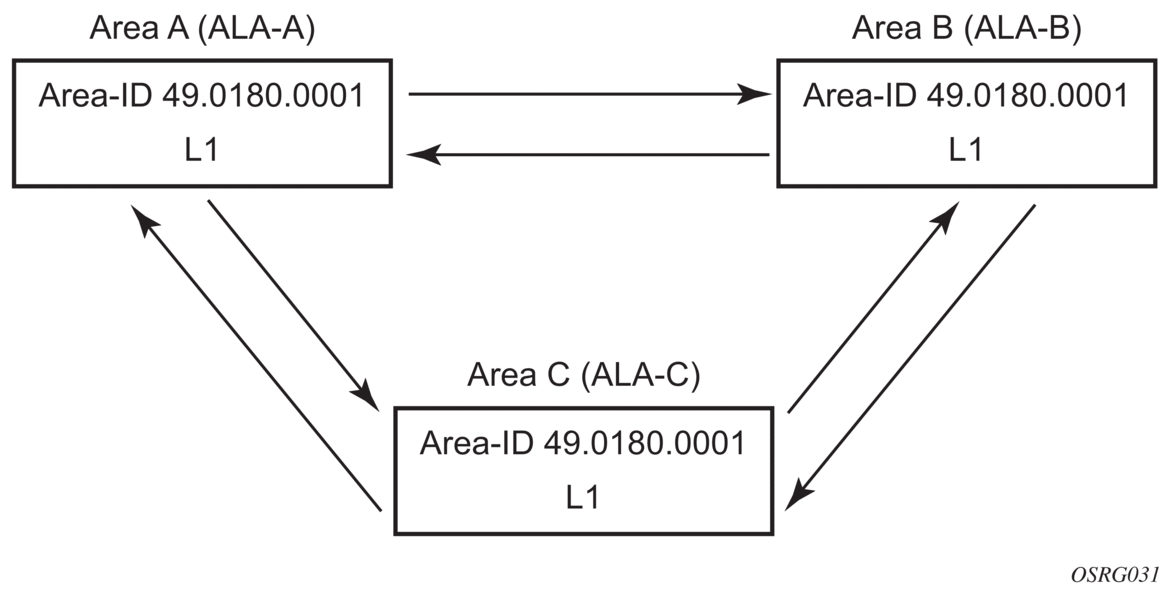
The following example displays the command usage to configure a Level 1 area.

A:ALA-A>config>router# isis
A:ALA-A>config>router>isis# area-id 47.0001
A:ALA-A>config>router>isis# level-capability level-1
A:ALA-A>config>router>isis# interface system
A:ALA-A>config>router>isis>if# exit
A:ALA-A>config>router>isis# interface A-B
A:ALA-A>config>router>isis>if# exit
A:ALA-A>config>router>isis# interface A-C
A:ALA-A>config>router>isis>if# exit
A:ALA-A>config>router>isis#
 
A:ALA-B>config>router# isis
A:ALA-B>config>router>isis# area-id 47.0001
A:ALA-B>config>router>isis# level-capability level-1
A:ALA-B>config>router>isis# interface system
A:ALA-B>config>router>isis>if# exit
A:ALA-B>config>router>isis# interface B-A
A:ALA-B>config>router>isis>if# exit
A:ALA-B>config>router>isis# interface B-C
A:ALA-B>config>router>isis>if# exit
A:ALA-B>config>router>isis#
 
A:ALA-C>config>router# isis 
A:ALA-C>config>router>isis# area-id 47.0001
A:ALA-C>config>router>isis# level-capability level-1
A:ALA-C>config>router>isis# interface system
A:ALA-C>config>router>isis>if# exit
A:ALA-C>config>router>isis# interface "C-A"
A:ALA-C>config>router>isis>if# exit
A:ALA-C>config>router>isis# interface "C-B"
A:ALA-C>config>router>isis>if# exit
 
 
A:ALA-A>config>router>isis# info
----------------------------------------------
        level-capability level-1
        area-id 49.0180.0001
        interface "system"
        exit
        interface "A-B"
        exit
        interface "A-C"
        exit
----------------------------------------------
A:ALA-A>config>router>isis#
 
A:ALA-B>config>router>isis# info
----------------------------------------------
        level-capability level-1
        area-id 49.0180.0001
        interface "system"
        exit
        interface "B-A"
        exit
        interface "B-C"
        exit
----------------------------------------------
A:ALA-B>config>router>isis#
 
A:ALA-C>config>router>isis# info
#------------------------------------------
echo "ISIS"
----------------------------------------------
        level-capability level-1
        area-id 49.0180.0001
        interface "system"
        exit
        interface "C-A"
        exit
        interface "C-B"
        exit
----------------------------------------------
A:ALA-C>config>router>isis#

4.6.4.6.2. Example: Modifying a Router’s Level Capability

In the previous example, ALA-A, ALA-B, and ALA-C are configured as Level 1 systems. Level 1 systems communicate with other Level 1 systems in the same area. In this example, ALA-A is modified to set the level capability to Level 1/2, as shown in Figure 32. Now, the Level 1 systems in the area with NET 47.0001 forward PDUs to ALA-A for destinations that are not in the local area.

Figure 32:  Configuring a Level 1/2 Area 
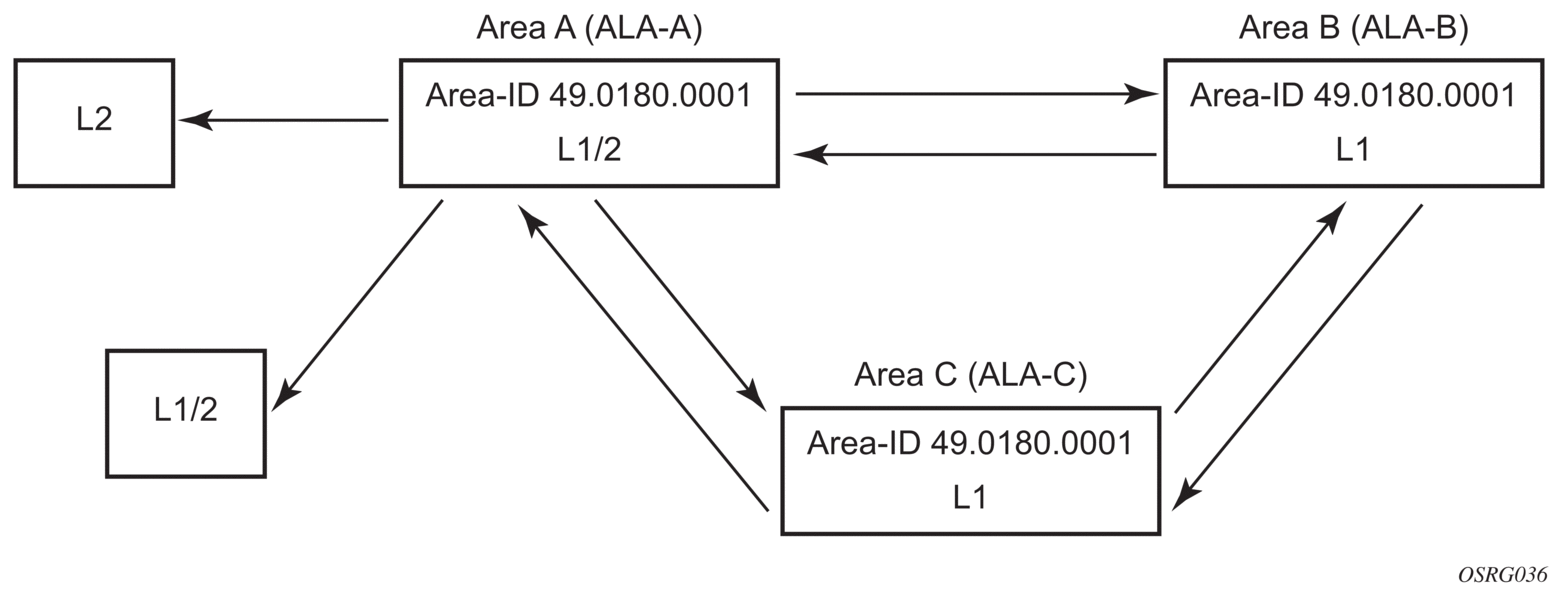
The following example displays the command usage to configure a Level 1/2 system.

A:ALA-A>config>router# isis
A:ALA-A>config>router>isis# level-capability level-1/2

4.6.4.7. Configuring IS-IS Link Groups

IS-IS Link-Groups allows the creation of an administrative grouping of multiple IS-IS member interfaces that should be treated as a common group for ECMP purposes. If the number of operational links in the link-group drops below the operational-member value, then all links associated with that IS-IS link group will have their interface metric increased by the configured offset amounts. As a result, IS-IS will then try to reroute traffic over lower cost paths.

After it is triggered, the higher metric will not be reset to the originally configured IS-IS interface metric values until the number of active interfaces in the link bundle reaches the configured revertive threshold (revert-members).

Prerequisite are the following:

  1. 1 or more interface members.
  2. A configured operational-member (oper-members) value.
  3. A configured revertive-member (revert-members) value.
  4. Configured offset values for the appropriate address families.

4.7. IS-IS Configuration Management Tasks

This section discusses IS-IS configuration management tasks.

4.7.1. Disabling IS-IS

The shutdown command disables the IS-IS protocol instance on the router. The configuration settings are not changed, reset, or removed.

To disable IS-IS on a router, enter the following commands:

CLI Syntax:
config>router# isis
shutdown

4.7.2. Removing IS-IS

The no isis command deletes the IS-IS protocol instance. The IS-IS configuration reverts to the default settings.

To remove the IS-IS configuration enter the following commands:

CLI Syntax:
config>router#
no isis

4.7.3. Modifying Global IS-IS Parameters

You can modify, disable, or remove global IS-IS parameters without shutting down entities. Changes take effect immediately. Modifying the level capability on the global level causes the IS-IS protocol to restart.

The following example displays command usage to modify various parameters:

Example:
config>router>isis# overload timeout 500
config>router>isis# level-capability level-1/2
config>router>isis# no authentication-check
config>router>isis# authentication-key secretkey

The following example displays the global modifications.

A:ALA-A>config>router>isis# info
----------------------------------------------
        area-id 49.0180.0001
        area-id 49.0180.0002
        area-id 49.0180.0003
        authentication-key "//oZrvtvFPn06S42lRIJsE" hash
        authentication-type password
        no authentication-check
        overload timeout 500 on-boot
        level 1
            wide-metrics-only
        exit
        level 2
            wide-metrics-only
        exit
        interface "system"
        exit
        interface "ALA-1-2"
            level-capability level-2
        exit
        interface "ALA-1-3"
            level-capability level-1
            interface-type point-to-point
        exit
        interface "ALA-1-5"
            level-capability level-1
            interface-type point-to-point
        exit
        interface "to-103"
        exit
        interface "A-B"
        exit
        interface "A-C"
        exit
----------------------------------------------
A:ALA-A>config>router>isis#

4.7.4. Modifying IS-IS Interface Parameters

You can modify, disable, or remove interface-level IS-IS parameters without shutting down entities. Changes take effect immediately. Modifying the level capability on the interface causes the IS-IS protocol on the interface to restart.

To remove an interface, issue the no interface ip-int-name command. To disable an interface, issue the shutdown command in the interface context.

The following example displays interface IS-IS modification command usage. For specific interface configuration and modification examples also see, Example: Configuring a Level 1 Area and Example: Modifying a Router’s Level Capability.

Example:
config>router# isis
config>router>isis# interface ALA-1-3
config>router>isis>if# passive
config>router>isis>if# exit
config>router>isis# interface to-103
config>router>isis>if# hello-authentication-type message-digest
config>router>isis>if# hello-authentication-key secretkey
config>router>isis>if# exit

The following example displays the modified interface parameters.

A:ALA-A>config>router>isis# info
----------------------------------------------
        area-id 49.0180.0001
        area-id 49.0180.0002
        area-id 49.0180.0003
        authentication-key "//oZrvtvFPn06S42lRIJsE" hash
        authentication-type password
        no authentication-check
        overload timeout 500 on-boot
        level 1
            wide-metrics-only
        exit
        level 2
            wide-metrics-only
        exit
        interface "system"
        exit
        interface "ALA-1-2"
            level-capability level-2
        exit
        interface "ALA-1-3"
            level-capability level-1
            interface-type point-to-point
            passive
        exit
        interface "ALA-1-5"
            level-capability level-1
            interface-type point-to-point
        exit
        interface "to-103"
            hello-authentication-key "DvR3l264KQ6vXMTvbAZ1mE" hash
            hello-authentication-type message-digest
        exit
        interface "A-B"
        exit
----------------------------------------------
A:ALA-A>config>router>isis#

4.7.5. Configuring Authentication using Keychains

The use of authentication mechanism is recommended to protect against malicious attack on the communications between routing protocol neighbors. These attacks could aim to either disrupt communications or to inject incorrect routing information into the systems routing table. The use of authentication keys can help to protect the routing protocols from these types of attacks. In addition, the use of authentication keychains provides the ability to configure authentication keys and make changes to them without affecting the state of the routing protocol adjacencies.

To configure the use of an authentication keychain within IS-IS, use the following steps:

  1. Configure an authentication keychain within the config>system>security context. The configured keychain must include at least on valid key entry, using a valid authentication algorithm for the IS-IS protocol.
  2. Associate the configure authentication keychain with IS-IS. Authentication keychains can be used to specify the authentication at the IS-IS global, and level context as well as for hello authentication at the interface and interface-level context.

The association of the authentication keychain is established through the auth-keychain keychain-name command at the global and level context. The hello authentication association is established through the hello-auth-keychain keychain-name command.

For a key entry to be valid, it must include a valid key, the current system clock value must be within the begin and end time of the key entry, and the algorithm specified in the key entry must be supported by the IS-IS protocol.

The IS-IS protocol supports the following algorithms:

  1. Clear text password (RFC 5304 and RFC 5310 formats)
  2. HMAC-MD5 (RFC 5304 and RFC 5310 formats)
  3. HMAC-SHA-1 (RFC 5310 format)
  4. HMAC-SHA-256 (RFC 5310 format)

The IS-IS key entry may also include the option parameter to determine how the IS-IS protocol encodes the authentication signature. The value of basic results in the use of RFC 5304 format. The default or a value of isis-enhanced results in using the RFC 5310 format.

Error handling:

  1. If a keychain exists but there are no active key entries with an authentication type that is valid for the associated protocol then inbound protocol packets will not be authenticated and discarded and no outbound protocol packets should be sent.
  2. If keychain exists, but the last key entry has expired, a log entry will be raised indicating that all keychain entries have expired. The IS-IS protocol requires that the protocol not revert to an unauthenticated state and requires that the old key is not to be used, therefore, after the last key has expired, all traffic will be discarded.

4.7.6. Configuring Leaking

IS-IS allows a two-level hierarchy to route PDUs. Level 1 areas can be interconnected by a contiguous Level 2 backbone. The Level 1 link-state database contains information only about that area. The Level 2 link-state database contains information about the Level 2 system and each of the Level 1 systems in the area. A Level 1/2 router contains information about both Level 1 and Level 2 databases. A Level 1/2 router advertises information about its Level 1 area toward the other Level 1/2 or Level 2 (only) routers.

Packets with destinations outside the Level 1 area are forwarded toward the closest Level 1/2 router which, in turn, forwards the packets to the destination area.

Sometimes, the shortest path to an outside destination is not through the closest Level 1/2 router, or, the only Level 1/2 system to forward packets out of an area is not operational. Route leaking provides a mechanism to leak Level 2 information to Level 1 systems to provide routing information regarding inter-area routes. Then, a Level 1 router has more options to forward packets.

Configure a route policy to leak routers from Level 2 into Level 1 areas in the config>router>policy-options>policy-statement context.

The following example shows the command usage to configure prefix list and policy statement parameters in the config>router context.

config>router>policy-options# prefix-list  loops
..>policy-options>prefix-list# prefix 10.1.1.0/24 longer
..>policy-options>prefix-list# exit
..>policy-options# policy-statement leak
..>policy-options>policy-statement# entry 10
..>policy-options>policy-statement>entry# from
..>policy-options>policy-statement>entry>from# prefix-list loops
..>policy-options>policy-statement>entry>from# level 2
..>policy-options>policy-statement>entry>from# exit
..>policy-options>policy-statement>entry# to
..>policy-options>policy-statement>entry>to# level 1
..>policy-options>policy-statement>entry>to# exit
..>policy-options>policy-statement>entry# action accept
..>policy-options>policy-statement>entry>action# exit
..>policy-options>policy-statement>entry# exit
..>policy-options>policy-statement#exit
..>policy-options# commit
..>policy-options#
A:ALA-A>config>router>policy-options# info
----------------------------------------------
            prefix-list "loops"
                    prefix 10.1.1.0/24 longer
            exit
            policy-statement "leak"
                entry 10
                    from
                        prefix-list "loop"
                        level 2
                    exit
                    to
                        level 1
                    exit
                    action accept
                    exit
                exit
            exit
----------------------------------------------
A:ALA-A>config>router>policy-options# 

Next, apply the policy to leak routes from Level 2 info Level 1 systems on ALA-A.

config>router#isis
config>router>isis# export leak
 
A:ALA-A>config>router>isis# info
----------------------------------------------
        area-id 49.0180.0001
        area-id 49.0180.0002
        area-id 49.0180.0003
        authentication-key "//oZrvtvFPn06S42lRIJsE" hash
        authentication-type password
        no authentication-check
        export "leak"
...
----------------------------------------------
A:ALA-A>config>router>isis#

After the policy is applied, create a policy to redistribute external IS-IS routes from Level 1 systems into the Level 2 backbone (see Redistributing External IS-IS Routers). In the config>router context, configure the following policy statement parameters:

config>router>policy-options# begin
..>policy-options# policy-statement "isis-ext"
..>policy-options>policy-statement# entry 10
..>policy-options>policy-statement>entry$ from
..>policy-options>policy-statement>entry>from$ external
..>policy-options>policy-statement>entry>from# exit
..>policy-options>policy-statement>entry# to
..>policy-options>policy-statement>entry>to$ level 2
..>policy-options>policy-statement>entry>to# exit
..>policy-options>policy-statement>entry# action accept
..>policy-options>policy-statement>entry>action# exit
..>policy-options>policy-statement>entry#  exit
..>policy-options>policy-statement# exit
..>policy-options# commit
A:ALA-A>config>router>policy-options# info
----------------------------------------------
            prefix-list "loops"
                    prefix 10.1.1.0/24 longer
            exit
            policy-statement "leak"
                entry 10
                    from
                        prefix-list "loop"
                        level 2
                    exit
                    to
                        level 1
                    exit
                    action accept
                    exit
                exit
            exit
            policy-statement "isis-ext"
                entry 10
                    from
                        external
                    exit
                    to
                        level 2
                    exit
                    action accept
                    exit
                exit
            exit
----------------------------------------------
A:ALA-A>config>router>policy-options#

4.7.7. Redistributing External IS-IS Routers

IS-IS does not redistribute Level 1 external routes into Level 2 by default. You must explicitly apply the policy to redistribute external IS-IS routes. Policies are created in the config>router>policy-options context. See Route Policies for more information.

The following example displays the policy statement configuration.

config>router>policy-options# info
----------------------------------------------
            prefix-list "loops"
                    prefix 10.1.1.0/24 longer
            exit
            policy-statement "leak"
                entry 10
                    from
                        prefix-list "loop"
                        level 2
                    exit
                    to
                        level 1
                    exit
                    action accept
                    exit
                exit
            exit
            policy-statement "isis-ext"
                entry 10
                    from
                        external
                    exit
                    to
                        level 2
                    exit
                    action accept
                    exit
                exit
            exit
----------------------------------------------
config>router>policy-options#

4.7.8. Specifying MAC Addresses for All IS-IS Routers

Specify the MAC address to use for all L1 or L2 IS-IS routers. The following example shows how to specify all L1 routers:

Example:
all-l1isis 01-80-C2-00-00-14

You can also specify the MAC address for all L2 IS-IS routers by using the all-l2isis command.

4.8. Configuring IS-IS for Flexible Algorithms

IGP protocols traditionally compute best paths over the network based on the IGP metric assigned to the links. Many network deployments use RSVP-TE based or SR-based TE to enforce traffic over a path that is computed using different metrics or constraints than the shortest IGP path. The SR Flexible Algorithm (Flex-Algorithm) solution allows IGPs to compute constraint-based paths over the network. This section describes the use of SR prefix SIDs to compute a constraint topology and send packets along the constraint-based paths.

Using Flex-Algorithms can reduce the number of SR SIDs that must be imposed to send packets along a constrained path; this implementation simplifies the hardware capabilities of SR routing tunnel head-end devices.

The supported depth of the label stack is considered in an SR network when SR-TE tunnels or SR policies are deployed. In such tunnel policies, the packet source routing is based on the SR label stack pushed on the packet. The depth of the label stack that a router can push on a packet determines the complexity of the SR-TE tunnel construction that the router can support.

The SR Flex-Algorithm solution allows the creation of composed metrics based upon arbitrary parameters (for example, delay, link administrative group, cost, and so on) when using Flex-Algorithms. A network-wide set of composed topology constraints (also known as the Flexible Algorithm Definition (FAD)) creates an SR Flex-Algorithm topology. The IGP calculates the best path using constraint-based SPF and the FAD to create the best paths through the Flex-Algorithm topology.

With Flex-Algorithms, each Flex-Algorithm topology can send data flows along the most optimal constrained path toward its destination using a single label, which reduces the imposed label stack along.

Using this solution, backup path calculations (for example, Loop Free Alternate (LFA), Remote LFA (R-LFA) and Topology Independent LFA (TI-LFA)) can be constrained to the SR Flex-Algorithm topology during link failure.

Perform the following tasks to configure Flex-Algorithms using IS-IS.

4.8.1. Configuring the Flexible Algorithm Definition

To guarantee loop-free forwarding for paths that are computed for a specific Flex-Algorithm, all routers configured to participate in that Flex-Algorithm must agree on the FAD. The agreement ensures that routing loops and inconsistent forwarding behavior is avoided.

Each router that is configured to participate in a specific Flex-Algorithm must select the FAD based on standardized tie-breaking rules. This ensures consistent FAD selection in cases where different routers advertise different definitions for a specific Flex-Algorithm. The following tie-breaking rules apply.

  1. From the FAD advertisements in the area (including both locally generated advertisements and received advertisements), select the one with the highest priority value.
  2. If there are multiple FAD advertisements with the same priority, select one that originated from the router with the highest system ID.

A router that is not participating in a specific Flex-Algorithm is allowed to advertise the FAD for that specific Flex-Algorithm. Any change in the FAD may result in temporary disruption of traffic that is forwarded based on those Flex-Algorithm paths. The impact is similar to any other event that requires network-wide convergence.

If a node is configured to participate in a Flex-Algorithm, but the selected FAD includes calculation-type, metric-type, constraint, flag, or a sub-TLV that is not supported by the node, the node stops participation and removes any forwarding state associated with the Flex-Algorithm.

Use the following syntax to configure FADs.

CLI Syntax:
config>router
flexible-algorithm-definitions
flex-algo <fad-name> [create]
no flex-algo <fad-name>
description <description-string>
no description
exclude
[no] admin-group <admin-group>
include-all
[no] admin-group <admin-group>
include-any
[no] admin-group <admin-group>
metric-type {igp|te-metric|delay}
no metrc-type
priority <priority>
no priority
[no] shutdown

The following is a sample configuration output for a basic FAD:

router
  flexible-algorithm-definitions
    flex-algo "My128" create
      description "This-is-my-algo128"
        metric-type delay
        no shutdown
    exit
  exit
 

4.8.2. Configuring IS-IS Flex-Algorithm Participation

Up to five Flex-Algorithms in the range 128 to 255 can be configured for IS-IS. Use the participate command to configure participation for the specific algorithm. If a locally configured FAD exists, advertise this definition by using the advertise command. A router is not required to advertise a configured FAD to participate in a Flex-Algorithm.

If a Flex-Algorithm is enabled to participate or advertise the FAD, it is configured and active for all configured IS-IS areas.

Use the following syntax to configure Flex-Algorithms for IS-IS.

CLI Syntax:
config>router>isis
flexible-algorithms
[no] flex-algo flex-algo
advertise fad-name
no advertise
[no] loopfree-alternates
[no] participate
[no] shutdown
Note:

When a router participates in Flex-Algorithms, it will only advertise support for the Flex-Algorithm where the router can comply with the winning FAD, provided that at least one FAD exists for this algorithm.

The following is a sample configuration output for Flex-Algorithm participation:

isis 0
    flexible-algorithms
      flex-algo 128
        advertise "My128"
        participate
      exit
      no shutdown
    exit
 

The following output is an example of IS-IS router capability when a FAD is advertised:

*A:Dut-B# show router isis database Dut-B.00-00 detail level 2
===============================================================================
Rtr Base ISIS Instance 0 Database (detail)
===============================================================================
Displaying Level 2 database
-------------------------------------------------------------------------------
LSP ID    : Dut-B.00-00                                 Level     : L2
Sequence  : 0x94                   Checksum  : 0x4ae0   Lifetime  : 969
Version   : 1                      Pkt Type  : 20       Pkt Ver   : 1
Attributes: L1L2                   Max Area  : 3        Alloc Len : 1492
SYS ID    : 4900.0000.0002         SysID Len : 6        Used Len  : 223 
TLVs :
  Supp Protocols:
    Protocols     : IPv4
  IS-Hostname   : Dut-B
  Router ID   :
    Router ID   : 10.20.1.2
Router Cap : 10.20.1.2, D:0, S:0
    TE Node Cap : B E M  P
    SR Cap: IPv4 MPLS-IPv6
       SRGB Base:20000, Range:10001
    SR Alg: metric based SPF, 128
    Node MSD Cap: BMI : 12 ERLD : 15
    FAD Sub-Tlv:
        Flex-Algorithm   : 128
        Metric-Type      : delay
        Calculation-Type : 0
        Priority         : 100
        Flags: M


4.8.3. Configuring IS-IS Flex-Algorithm Prefix Node SID

The prefix node SID (IPv4 and/or IPv6) must be assigned for each participating Flex-Algorithm.

The Flex-Algorithm SIDs are allocated from the label block assigned to SR and configuring a special range is not required.

Note:

Flex-Algorithm node SIDs can be configured for IPv4 and/or IPv6 prefixes.

Use the following syntax to configure the prefix node SIDs for IS-IS Flex-Algorithms.

CLI Syntax:
config>router>isis>interface
ipv4-node-sid
flex-algo
ipv4-node-sid index <value>
ipv4-node-sid label <value>
no ipv4-node-sid
ipv6-node-sid index <value>
ipv6-node-sid label <value>
no ipv6-node-sid

The following is a sample configuration output for Flex-Algorithm prefix node SIDs:

router
  mpls-labels
    sr-labels start 20000 end 30000
  exit
  interface "Loopback0"
    address 10.20.1.2/32
    loopback
    no shutdown
  exit
  isis 0
    segment-routing
      prefix-sid-range global
      no shutdown
    exit
    interface "Loopback0"
      ipv4-node-sid index 2
      passive
      flex-algo 128
        ipv4-node-sid index 12
      exit
      no shutdown
    exit

The following output is an example of the Level 2 database of an advertised IS-IS:

A:Dut-B# show router isis database Dut-B.00-00 detail level 2
===============================================================================
Rtr Base ISIS Instance 0 Database (detail)
===============================================================================
Displaying Level 2 database
-------------------------------------------------------------------------------
LSP ID    : Dut-B.00-00                                 Level     : L2
Sequence  : 0x9d                   Checksum  : 0x38e9   Lifetime  : 626
Version   : 1                      Pkt Type  : 20       Pkt Ver   : 1
Attributes: L1L2                   Max Area  : 3        Alloc Len : 1492
SYS ID    : 4900.0000.0002         SysID Len : 6        Used Len  : 223
……<snip>……
  TE IP Reach   :
    Default Metric  : 10
    Control Info:    , prefLen 30
    Prefix   : 10.10.10.0
    Default Metric  : 0
    Control Info:   S, prefLen 32
    Prefix   : 10.20.1.2
    Sub TLV   :
      Prefix-SID Index:2, Algo:0, Flags:NnP
      Prefix-SID Index:12, Algo:128, Flags:NnP
    Default Metric  : 10
    Control Info:    , prefLen 30
    Prefix   : 10.10.10.8
...<snip>...

4.8.4. Verifying Basic Flex-Algorithm Behavior

The creation of the segment routing Flex-Algorithm forwarding information results in the label forwarding tables on the router. On a Nokia router, it is possible to look both at the tunnel table and the routing table to understand the Flex-Algorithm path toward a destination prefix.

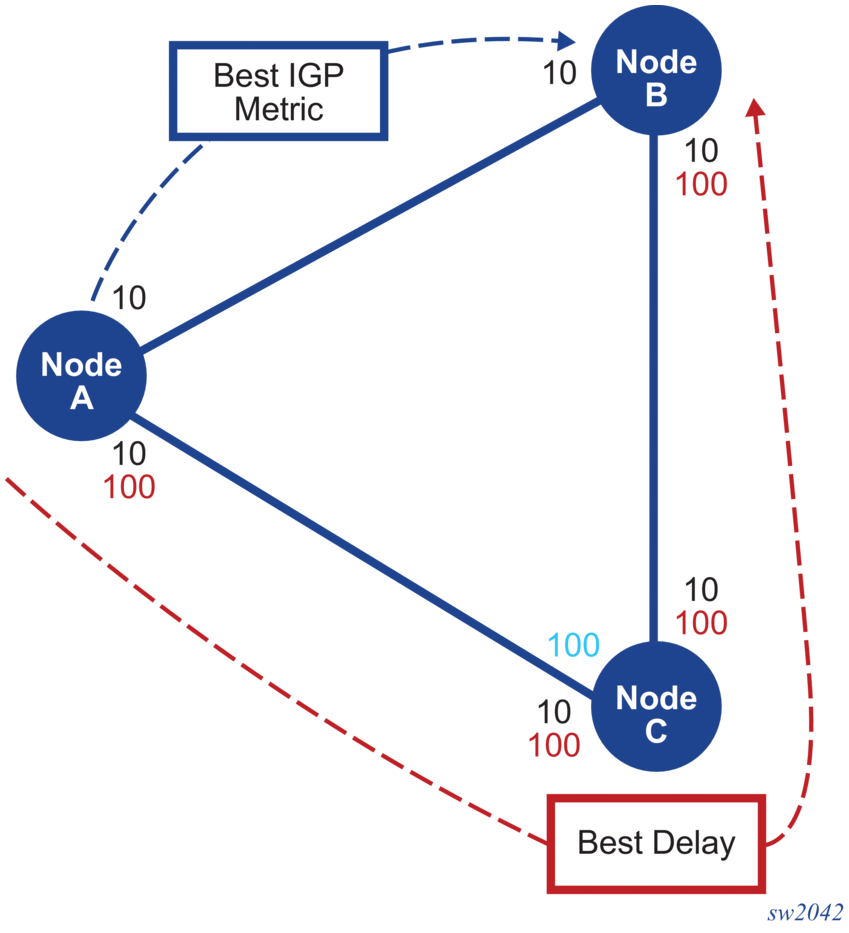
For example, algorithm 128 has been configured to use the delay metric, and consequently forwards traffic using the lowest delay through the network. In Figure 33, Node B is configured with IP address 10.20.1.2/32, the A-B path has the best default IGP metric, and the A-C-B path has the best delay.

Figure 33:  Selecting the Lowest Delay Path 
The following output is an example of the tunnel-table command:

A:Dut-A# show router tunnel-table
===============================================================================
IPv4 Tunnel Table (Router: Base)
===============================================================================
Destination           Owner     Encap TunnelId  Pref   Nexthop        Metric
   Color
-------------------------------------------------------------------------------
10.10.10.2/32         isis (0)  MPLS  524298    11     10.10.10.2     0
10.10.10.6/32         isis (0)  MPLS  524292    11     10.10.10.6     0
10.20.1.2/32          isis (0)  MPLS  524296    11     10.10.10.2     10
10.20.1.2/32          isis (0)  MPLS  524306    11     10.10.10.6     200
10.20.1.3/32          isis (0)  MPLS  524294    11     10.10.10.6     10
10.20.1.3/32          isis (0)  MPLS  524307    11     10.10.10.6     100
-------------------------------------------------------------------------------
Flags: B = BGP or MPLS backup hop available
       L = Loop-Free Alternate (LFA) hop available
       E = Inactive best-external BGP route
       k = RIB-API or Forwarding Policy backup hop
===============================================================================
A:Dut-A#

The following output is an example of the detail option of the tunnel-table command:

A:Dut-A# show router tunnel-table 10.20.1.2/32 detail
===============================================================================
Tunnel Table (Router: Base)
===============================================================================
Destination      : 10.20.1.2/32
NextHop          : 10.10.10.2
Tunnel Flags     : entropy-label-capable
Age              : 18h21m35s
CBF Classes      : (Not Specified)
Owner            : isis (0)             Encap            : MPLS
Tunnel ID        : 524296               Preference       : 11
Tunnel Label     : 20002                Tunnel Metric    : 10
Tunnel MTU       : 1560                 Max Label Stack  : 1
-------------------------------------------------------------------------------
Destination      : 10.20.1.2/32
NextHop          : 10.10.10.6
Tunnel Flags     : entropy-label-capable
Age              : 02h01m32s
CBF Classes      : (Not Specified)
Owner            : isis (0)             Encap            : MPLS
Algorithm        : 128
Tunnel ID        : 524306               Preference       : 11
Tunnel Label     : 20012                Tunnel Metric    : 200
Tunnel MTU       : 1560                 Max Label Stack  : 1
-------------------------------------------------------------------------------
Number of tunnel-table entries          : 2
Number of tunnel-table entries with LFA : 0
===============================================================================
A:Dut-A#

The following output is an example of the route table with and without the Flex-Algorithm context:

A:Dut-A# show router isis routes
===============================================================================
Rtr Base ISIS Instance 0 Route Table
===============================================================================
Prefix[Flags]                     Metric     Lvl/Typ     Ver.  SysID/Hostname
  NextHop                                                MT     AdminTag/SID[F]
-------------------------------------------------------------------------------
10.10.10.0/30                     10         1/Int.      65    Dut-A
   0.0.0.0                                                 0       0
10.10.10.4/30                     10         1/Int.      42    Dut-A
0.0.0.0                                                 0       0
10.10.10.8/30                     20         2/Int.      65    Dut-B
   10.10.10.2                                              0       0
10.20.1.1/32                      0          1/Int.      42    Dut-A
   0.0.0.0                                                 0       0/1[NnP]
10.20.1.2/32                      10         2/Int.      65    Dut-B
   10.10.10.2                                              0       0/2[NnP]
10.20.1.3/32                      10         2/Int.      42    Dut-C
   10.10.10.6                                              0       0/3[NnP]
-------------------------------------------------------------------------------
No. of Routes: 6 (6 paths)
-------------------------------------------------------------------------------
Flags        : L = LFA nexthop available
SID[F]       : R  = Re-advertisement
               N  = Node-SID
               nP = no penultimate hop POP
               E  = Explicit-Null
               V  = Prefix-SID carries a value
               L  = value/index has local significance
===============================================================================
A:Dut-A#
A:Dut-A# show router isis routes flex-algo 128
===============================================================================
Rtr Base ISIS Instance 0 Flex-Algo 128 Route Table
===============================================================================
Prefix[Flags]                     Metric     Lvl/Typ     Ver.  SysID/Hostname
  NextHop                                                MT     AdminTag/SID[F]
-------------------------------------------------------------------------------
10.20.1.2/32                      200        2/Int.      82    Dut-C
   10.10.10.6                                              0       0/12[NnP]
10.20.1.3/32                      100        2/Int.      82    Dut-C
   10.10.10.6                                              0       0/13[NnP]
-------------------------------------------------------------------------------
No. of Routes: 2 (2 paths)
-------------------------------------------------------------------------------
Flags        : L = LFA nexthop available
SID[F]       : R  = Re-advertisement
               N  = Node-SID
               nP = no penultimate hop POP
               E  = Explicit-Null
               V  = Prefix-SID carries a value
               L  = value/index has local significance
===============================================================================
A:Dut-A#

The following output is an example of the detail option for the route table, with and without the Flex-Algorithm context:

A:Dut-A# show router isis routes 10.20.1.2 detail
===============================================================================
Rtr Base ISIS Instance 0 Route Table (detail)
===============================================================================
Prefix           : 10.20.1.2/32
Status           : Active               Level              : 2
NextHop          : 10.10.10.2
Metric           : 10                   Type               : Internal
SPF Version      : 65                   SysID/Hostname     : Dut-B
MT               : 0                    AdminTag           : 0
SID              : 2                    SID-Flags          : NnP
-------------------------------------------------------------------------------
No. of Routes: 1 (1 path)
-------------------------------------------------------------------------------
SID[F]       : R  = Re-advertisement
               N  = Node-SID
               nP = no penultimate hop POP
               E  = Explicit-Null
               V  = Prefix-SID carries a value
               L  = value/index has local significance
===============================================================================
A:Dut-A#
 
A:Dut-A# show router isis routes 10.20.1.2 flex-algo 128 detail
===============================================================================
Rtr Base ISIS Instance 0 Flex-Algo 128 Route Table (detail)
===============================================================================
Prefix           : 10.20.1.2/32
Status           : Active               Level              : 2
NextHop          : 10.10.10.6
Metric           : 200                  Type               : Internal
SPF Version      : 82                   SysID/Hostname     : Dut-C
MT               : 0                    AdminTag           : 0
SID              : 12                   SID-Flags          : NnP
-------------------------------------------------------------------------------
No. of Routes: 1 (1 path)
-------------------------------------------------------------------------------
SID[F]       : R  = Re-advertisement
               N  = Node-SID
               nP = no penultimate hop POP
               E  = Explicit-Null
               V  = Prefix-SID carries a value
               L  = value/index has local significance
===============================================================================
A:Dut-A#

4.8.5. Configuration and Usage Considerations for Flex-Algorithms

The following considerations must be taken into account when configuring and using Flex-Algorithms.

  1. IS-IS algorithms 128 to 255 can program only the tunnel table, while IS-IS for algorithm 0 can program both the tunnel and the IP routing tables. For operational simplicity, the show>router>isis>routes command displays the correct egress interface.
  2. To prevent the accidental creation of an overload of local FADs, the operator is only allowed to configure a maximum of 256 local FADs on a router.
  3. A router can participate in a maximum of five Flex-Algorithms. Each algorithm has the capability to advertise a single locally configured FAD.
  4. The SR OS implementation assumes that the participation of a specific flex-algo command includes its participation in Flex-Algorithms in all enabled IGP areas. For example, on an IS-IS Level 1 and Level 2 capable router (default router), the same FAD participates and is advertised on both levels. To advertise a FAD only at Level 1 or Level 2, the operator should configure a Level 1-only or Level 2-only router to advertise the FAD. Alternatively, an additional flex-algo can be used; for example, algorithm 129 in Level 1 and algorithm 128 in Level 2.
  5. All Flex-Algorithm participating nodes must advertise the locally used FADs and optionally advertise node participation when the winning FAD is supported.
  6. The winning FAD on a router is select ed based on the following tie-breaker:
    1. select the FAD with the highest priority
    2. select the FAD with the highest system ID
  7. If redundant, the local router does not support the winning FAD (because it is locally advertised or it is advertised by a remote router), the router should remove itself from the flex-algo topology by not advertising algorithm participation in the IS-IS router capability. In such a case, no path delay is computed and any prefix SID of that flex-algo is removed from the routing and tunnel tables.
  8. When the FAD selects a metric type, only links that include the same metric type in their attributes are considered for the flex-algo topology.
  9. Leaking of a FAD on an ABR is not supported.
  10. When advertising the FAD, the SR OS router always sets the M-flag, which forces the IS-IS routers to use Flex-Algorithm aware metrics for inter-area routing. The enforced M-flag ensures that the best ABR, according to the Flex-Algorithm, is selected to exit the area outside the local IGP area. Without the M-flag, the wrong ABR may be selected and cause routing loops or a traffic blackhole. This handling assumes that an ABR must advertise the IS-IS Flex-Algorithm prefix metric sub-TLV when leaking prefixes and associated SIDs.
  11. SR OS supports the Administrative Groups (AGs) as defined in RFC 5305. The following considerations apply:
    1. up to 32 link colors can be used
    2. Flex-Algorithm feature reuses the existing AGs in combination with application-specific TLV extensions
      Note:

      Although the same AG can be used for Flex-Algorithm and LFA policies, Nokia recommends that AGs that are used for LFA policies should be avoided.

    3. SR OS provides the following limited Extended Administrative Group (EAG) support for Flex-Algorithm.
      1. The Nokia implementation supports only AG advertisement; EAG advertisement is not supported. The IS-IS TLV types used for an AG and an EAG are different.
      2. For backward compatibility, vendors may use only the first 32 colors in the EAG.
      3. If EAG is used to add a color on the links, the link attribute size can be 4 octets (or a multiple of 4 octets) long.
      4. The EAG for Flex-Algorithms is forwarded for appropriate ASLA encoding in accordance with draft-ietf-isis-te-app-14.txt.
      5. When an EAG ASLA link attribute is received, the SR OS router handles it as follows.
        SR OS provides limited EAG support and only parses EAGs that are 4 octets long. The EAG represents a traditional 4-octet AG to support backward compatibility.
        SR OS treats the ASLA-encoded EAG as opaque information when the EAG size is a multiple of 4 octets long (that is, 4, 8, and so on).
        Due to limited EAG support, a new trap is not sent if the AG and EAG link attributes are inconsistent. In such a case, the AG attributes are used in accordance with RFC 7308.
      6. The receipt of a Flex-Algorithm FAD that contains an include/exclude EAG ASLA link attribute is handled as follows.
        If the SR OS router receives a FAD where the AG TLV length is 4 octets, the FAD can be used for flex-algo and it is treated as an AG.
        If the SR OS router receives a FAD where the AG TLV length is greater than 4 octets and bits are set to 1 in the first 4 octets only (the remaining bits are set to 0), the FAD participates assuming that the AGs have been configured as a result of EAG backward compatibility.
        If the SR OS router receives a FAD where the length of the AG TLV is greater than 4 octets and has bits set to 1 beyond the first 32 bits, the router will block this FAD. SR OS does not support EAG bits beyond the first 32 bits.
  12. Flex-Algorithm uses the IS-IS unidirectional link delay sub-TLV as defined in RFC 8570. This delay is set through the static configuration.
  13. SR OS allows the user to enable and disable Flex-Algorithm Loop Free Alternate (LFA) paths.
  14. Operators can protect links and nodes using the LFA fast-convergence technology. If the primary path is constrained by a specific flex-algo topology, the LFA SPF calculation is executed within the flex-algo topology. This calculation identifies the correct LFA, R-LFA or TI-LFA bounded by this topology. Consequently, the constraints of a specific flex-algo topology are respected even during failure scenarios.
    1. Enabling or disabling the flex-algo dependent LFA, R-LFA, or TI-LFA is aligned with enabling the LFA within the router flex-algo context.
    2. A new configuration node LFA is added in the IGP parameter within the Flex-Algorithm configuration. The shutdown and no shutdown commands are also added to this node.
    3. The LFA parameter allows the user to disable or enable loopfree alternates for this flex-algo. The rlfa and tlfa parameters are received from algorithm 0.
    4. The Flex-Algorithm LFA exclude policy configuration is copied from the flex-algo 0 configuration.
    5. The Flex-Algorithm aware LFA may cause additional resource consumption (for example, in memory and in CPU).
    6. SR OS Flex-Algorithm support for LFA policies (for example, protection type, exclude and include groups) is restricted to SRLG. A template that is used by Flex-Algorithms excludes the following CLI commands:
      1. configure>router>route-next-hop-policy>template>exclude-group
      2. configure>router>route-next-hop-policy>template>include-group
      3. configure>router>route-next-hop-policy>template>nh-type
      4. configure>router>route-next-hop-policy>template>protection-type
  15. Interaction with SR-LDP mapping server
    1. Flex-Algorithms are not compatible with the SR-LDP mapping server. SR OS only supports mapping-server TLV with algorithm 0.
  16. Interaction with SR-TE policy
    1. Flex-Algorithms have no impact on how SR-TE LSPs are used. Applications that support the use of SR-TE LSPs continue to be supported. All SR-TE resolution mechanisms are supported.
    2. SR-TE changes as follows as a result of Flex-Algorithm support.
      1. When an SR-TE path is constructed through manual router configuration or received from the PCE, the sequence of SR-TE SIDs may include one or more Flex-Algorithm prefix node SIDs.
      2. At the SR-TE head-end router, the sequenced SR-TE label stack (the sequence of SIDs) is imposed upon the payload and the packet is forwarded using the NHLFE from the top label or SID.
    3. Validity of a specific SR-TE LSP is the same as without Flex-Algorithm support.
  17. Interaction with SR policies
    1. Similar to SR-TE LSPs, SR policies are only influenced by Flex-Algorithms due to construction of the segment list. The segment list may be constructed using one or more Flex-Algorithm prefix node label SIDs. All applications capable of using SR policies will have opaque awareness if a segment list is constructed using Flex-Algorithm labels or SIDs.
  18. Flex-Algorithm and adjacency SID protection
    1. During fast-reroute process, local repair of the links to reach the Q-node from the P-node will be determined by the sub-topology defined by the Flex-Algorithm. Therefore, the used link will include the correct AGs and so on.
    2. However, the adj-sid backup is based upon algo=0, since adj-sids are not advertised using a Flex-Algorithm. Consequently, there is a risk to violate the Flex-Algorithm if the related link breaks while it is in use as backup for a Flex-Algorithm path. This Flex-Algorithm SLA break can be avoided if adj-sids are configured with no backup capability.
  19. Duplicate SID handling
    1. IS-IS uses the first learned remote SID and generates a trap for duplicate entries.
  20. Interaction with IGP shortcut and forwarding adjacency features
    1. To select the optimal shortest path within a constrained topology, Flex-Algorithm paths are carefully crafted using the constraints specified in the FAD. If the constrained topology includes logical RSVP-TE links that conceal FAD constraints, the Flex-Algorithm may send traffic wrongly over out-of-profile physical links.
    2. To avoid the use of Flex-Algorithm in the range of 128 to 255, which causes data plane traffic to be sent over tunnels that hide physical link properties, the following features are not supported:
      1. SR-LDP stitching
      2. IGP shortcut
      3. forwarding adjacency; forwarding adjacencies are not considered in the flex-algo topology.
  21. Multi-level area Flex-Algorithms are supported with the following limitations.
    To enable the Flex-Algorithm backups or unnumbered interfaces capability on an IS-IS router in the network, all routers in the network must be configured as either level-1 or level-2 routing capability.
    Therefore, all routers in the IS-IS network must be configured using the configure>router>isis>level-capability>level-1 or configure>router>isis>level-capability>level-2 commands before one of the following commands can be configured on the Flex-Algorithm enabled router:
    1. configure>router>interface>unnumbered
    2. configure>router>isis>flexible-algorithms>flex-algo>loopfree-alternates
  22. Interaction with EVPN services
    Flex-Algorithm cannot be deployed if the following command is configured on the node:
    1. configure>router>bgp>family>evpn
  23. Flex-Algorithm considerations regarding anycast SID
    Flex-Algorithm cannot be deployed on a node where the following CLI commands are configured on the node:
    1. configure>router>isis>interface>ipv4-node-sid>index>clear-n-flag
    2. configure>router>isis>interface>ipv4-node-sid>label>clear-n-flag
    3. configure>router>isis>interface>ipv6-node-sid>index>clear-n-flag
    4. configure>router>isis>interface>ipv6-node-sid>label>clear-n-flag
  24. Relationship between Flex-Algorithm and algorithm 0 configuration
    A configured router with Flex-Algorithm should also advertise an algo 0 SID by using one of the following commands:
    1. configure>router>isis>interface>ipv4-node-sid
    2. configure>router>isis>interface>ipv6-node-sid
  25. Considerations for IES service interfaces
    Flex-Algorithm cannot not be deployed on a node if IS-IS is enabled on an IES interface. IS-IS is enabled on an IES node using the following commands:
    1. configure>service>ies>interface X
    2. configure>service>isis>interface X
  26. Interaction of Flex-Algorithm aware nodes and FAD flags-TLV
    When Flex-Algorithms are enabled, SR OS advertises FAD flags-TLV in IGP to signal the mandatory use of Flex-Algorithm aware performance metrics for optimal SPF path calculation. For correct Flex-Algorithm operation, it is expected that Flex-Algorithm aware nodes support FAD flags-TLV interpretation.