2. Mirror Services
When troubleshooting complex operational problems, customer packets can be examined as they traverse the network. Nokia’s service mirroring provides the capability to mirror customer packets to allow for trouble shooting and offline analysis. One way to accomplish this is with an overlay of network analyzers established at multiple PoPs, together with skilled technicians to operate them to decode the data provided. This method of traffic mirroring often requires setting up complex filters in multiple switches or routers. These, at best, are only able to mirror from one port to another on the same device.
Nokia’s service mirroring extends and integrates these capabilities into the network and provides significant operational benefits. Each router can mirror packets from a specific service to any destination point in the network, regardless of interface type or speed.
This capability also extends beyond troubleshooting services. Telephone companies can obtain itemized calling records and wire-taps where legally required by investigating authorities. The process can be very complex and costly to carry out on data networks. Service mirroring greatly simplifies these tasks, as well as reduces costs through centralization of analysis tools and skilled technicians.
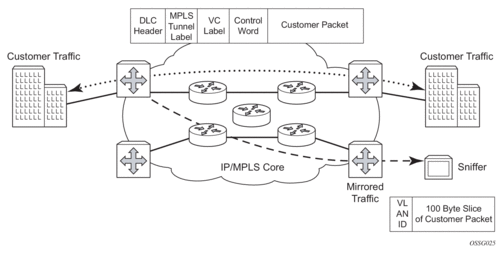
Nokia routers support service-based mirroring. While some Layer 3 switches and routers can mirror on a per-port basis within the device, Nokia routers can mirror on an n-to-1 unidirectional service basis and re-encapsulate the mirrored data for transport through the core network to another location, using either IP or MPLS tunneling as required (Figure 1).
Original packets are forwarded while a copy is sent out the mirrored port to the mirroring (destination) port. Service mirroring allows an operator to see the actual traffic on a customer’s service with a sniffer sitting in a central location. In many cases, this reduces the need for a separate, costly overlay sniffer network.
The mirrored frame size that is to be transmitted to the mirror destination can be explicitly configured by using slicing features. This enables mirroring only the parts needed for analysis. For example, only the headers can be copied for analysis, protecting the integrity and security of customer data, or conversely, copying the full packet, including customer data.
Figure 1: Service Mirroring
2.1. Mirror Implementation
Mirroring can be implemented on SAPs or ingress network interfaces. The Flexible Fast Path processing complexes preserve the original packet throughout the forwarding and mirroring process, making any necessary packet changes, such as adding encapsulation, on a separate copy.
Mirroring supports multiple types of destinations including local SAPs, remote tunnels, and FTP servers in PCAP format.
Nokia’s implementation of packet mirroring is based on the following assumptions:
- Ingress and egress packets are mirrored as they appear on the wire. This is important for troubleshooting encapsulation and protocol issues.
- When mirroring at ingress, the Flexible Fast Path network processor array (NPA) sends an exact copy of the original ingress packet to the mirror destination while normal forwarding proceeds on the original packet.
- When mirroring is at egress, the system performs normal packet handling on the egress packet, encapsulating it for the destination interface. A copy of the forwarded packet is forwarded to the mirror destination. Because the mirror copy of the packet is created before egress queuing, the mirrored packet stream may include copies of packets that are discarded in egress queues, such as during congestion or rate limiting.
- Remote destinations are reached by encapsulating the ingress or egress packet within an SDP, like the traffic for distributed VPN connectivity services. At the remote destination, the tunnel encapsulation is removed and the packet is forwarded out a local SAP.
2.1.1. Mirror Components
Mirroring a packet consists of two components.
- Mirror destinations: where to send the mirrored packet. Various mirror destinations are available and each mirror destination consists of a service ID. Mirrored packets can be sent to a single mirror destination only.
- Mirror sources: specify the packets to be mirrored. A mirror source can be configured through debug or service commands.
2.1.2. Mirror Source
Mirror sources have the following properties:
- When config>mirror>mirror-source and debug>mirror-source reference the same mirror source (for example, sap 1/1/1), config always takes precedence over debug, and config removes the debug configuration.
- A mirror source can only be mirrored once. It is not possible to send a mirror source to two different mirror destinations.
Ports configured as host ports for satellite and ESA applications are not supported as mirror-source.
Internal ports such as ISA and ESA internal ports do not support config>mirror>mirror-source and there is only limited support for debug>mirror.
2.1.2.1. Types and Sources
The following commands are supported for debug configuration.
- ingress-label
- ip-filter
- ipv6-filter
- isa-aa-group
- mac-filter
- port
- sap
- subscriber
The following commands are supported for config>mirror>mirror-source.
- ip-filter
- ipv6-filter
- mac-filter
- port
- sap
- subscriber
Subscriber Mirroring
Subscriber mirroring applies only to the 7750 SR, 7450 ESS, 7750 SR-s, 7750 SR-e and 7750 SR-a platforms. Enhanced subscriber management associates subscriber hosts with queuing and filtering resources in a shared SAP environment. Mirroring used in subscriber aggregation networks for lawful intercept and debugging is required. Subscriber mirroring capability allows the match criteria to include a subscriber ID.
Subscriber mirroring can also be based on the IP family and host type. The IP family determines if only IPv4 or IPv6 addresses should be mirrored and the host type determines if only IPoE or PPP hosts should be mirrored from the subscriber. To use the IP family and host type, the SAP anti-spoof filter must be set to ip-mac. If subscriber mirroring is performed on the L2TP LAC and the IP family is configured as IPv6, no traffic is mirrored for the PPPoE session, even if the LAC subscriber is dual stack. For L2TP LAC, it is recommended that the IP family not be configured or be configured for IPv4 only.
Subscriber mirroring creates a mirror source with subscriber information as match criteria. Specific subscriber packets can be mirrored when using ESM with a shared SAP without prior knowledge of their IP or MAC addresses and without concern that they may change. The subscriber mirroring decision is more specific than a SAP. If a SAP (or port) is placed in a mirror and a subscriber host of which a mirror was configured is mirrored on that SAP, packets matching the subscriber host are mirrored to the subscriber mirror destination.
The mirroring configuration can be limited to specific forwarding classes used by the subscriber. When a forwarding class (FC) map is placed on the mirror, only packets that match the specified FCs are mirrored. A subscriber can be referenced in maximum two different mirror-destinations: one for ingress and one for egress.
Subscriber-based criteria in a mirror source remains in the mirror or LI source configuration even if the subscriber is deleted, removed, or logged off. When the subscriber returns (is configured, created, or logged in) the mirroring resumes. This also implies that a subscriber can be configured as a mirror or LI source before the actual subscriber exists on the node and before the subscriber ID is active (the mirroring starts once the subscriber is created or logs in and the subscriber ID becomes active).
ATM Mirroring
ATM mirror functionality allows 7750 SR users to mirror AAL5 packets from a source ATM SAP to a destination ATM SAP connected locally or remotely. This can be used to monitor ATM traffic on a specific ATM SAP. In both the local and remote scenarios, the source and destination SAPs must be ATM SAP type.
All ingress and egress AAL5 traffic at the source ATM SAP is duplicated and sent toward the destination ATM SAP. Mirroring the ingress traffic only, egress traffic only, or both, can be configured. ATM OAM traffic is not mirrored toward the destination ATM SAP.
IP filters used as a mirror source are supported on ATM SAPs based on the IP filter applicability for different services.
ATM mirroring on an ATM SAP extends the service mirroring feature to include mirror sources with SAP type of ATM. Mirroring is supported on the following services:
- IES
- VPRN
- VPLS
- Epipe
- Ipipe
- Apipe VLL service with the AAL5 SDU mode (atm-sdu type for spoke SDP)
Characteristics of ATM mirroring include:
- support only ATM MDAs and on the Any Service Any Port (ASAP) MDA
- mirror destinations for ATM mirroring can be ATM SAPs but cannot be part of an APS group, an IMA bundle, or an IMA Bundle Protection Group (BPGRP)
- a mirror source can be an ATM SAP component of an IMA bundle but cannot be part of an IMA BPGRP
- ATM SAPs of an Apipe service with N:1 cell mode (atm-vcc, atm-vpc, and atm-cell types for spoke SDP); these cannot be ATM mirror sources
In Figure 2, CE 3 is connected to PE1 on ATM SAP 2/1/1/:0/100 as part of an IES service. The traffic on ATM SAP 2/1/1/:0/100 is mirrored locally to CE4 device through ATM SAP 1/2/1:1/101. In this scenario, all AAL5 packets arriving at SAP 2/1/1/:0/100 are duplicated and send towards ATM SAP 1/2/1:1/101.
Figure 2: Example of an ATM Mirror Service
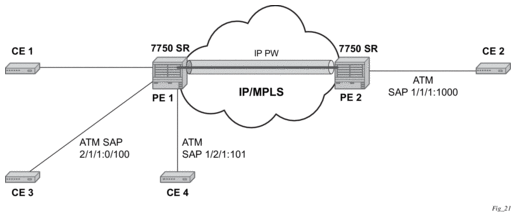
In the case where the destination ATM SAP is on a remote node PE2, then the AAL5 traffic arriving at ATM SAP 2/1/1/:0/100 is duplicated and sent across the IP/MPLS network to PE2. At PE2, the traffic is forwarded to ATM SAP 1/1/1:0/1000 towards the ATM traffic-monitoring device.
2.1.2.2. Mirror Source Priority
An operator can configure multiple mirror source services, each asking for the same packets. For instance, using two different mirror source services for a filter and SAPs from the same port. A packet is only mirrored once and in such cases the system selects the highest priority mirror. The mirror source priority, from lowest to highest priority for access ports, is defined below.
- Port mirroring
- SAP mirroring
- Subscriber mirroring
- Filter mirroring
As an example, when mirroring is enabled on a port for both filter and SAP, packets that matches filter entries rule are mirrored first to the mirror destination for the filter. The rest of the packets that do not match the filter are mirrored to the mirror destination specified for the SAP.
The mirror source priority, from lowest to highest priority for network ports, is defined below.
- Port mirroring
- Label mirroring
- Filter mirroring
2.1.3. Mirror Destination
Mirror destinations have the following characteristics.
- Mirror destinations can terminate on egress virtual ports which allows multiple mirror destinations to send to the same packet decode device, delimited by IEEE 802.1Q (referred to as Dot1q) tags. This is helpful when troubleshooting a multi-port issue within the network.When multiple mirror destinations terminate on the same egress port, the individual dot1q tags can provide a DTE/DCE separation between the mirror sources.
- Packets ingressing a port can have a mirror destination separate from packets egressing another or the same port (the ports can be on separate nodes).
- Multiple mirror destinations are supported (local and/or remote) on a single chassis.
- The operational state of a mirror destination depends on the state of all the outputs of the mirror. The mirror destination goes operationally down if all the outputs are down (for example, all mirror-dest>sap and mirror-dest>spoke-sdp objects are down, and all gateways configured under mirror-dest>encap do not have a known route by which they can be reached). The state of a mirror destination does not depend on inputs such as SDPs configured under mirror-dest>remote-source, debug>mirror-source entries, or configure>li>li-source entries. Some examples of outputs include mirror-dest>sap and mirror-dest>spoke-sdp.
- configure>mirror-source and li>li-source can re-use the mirror-destination service that is currently in use by a debug>mirror-source. In this scenario, the system automatically cleans up the debug>mirror-source entries before it can be re-used. From Release 19.10.R1 onward, config and LI must reference different mirror destinations.
In classic CLI mode, mirror destination supports the following mirror-type values.
- ether
- frame-relay
- ppp
- ip-only
- atm-sdu
- satop-e1
- cesopsn
- cesopsn-cas
In mixed and MD-CLI mode, only the following mirror-type values are supported: ether and ip-only.
To switch from classic to mixed or MD-CLI mode, all mirror types other than ether and ip-only must be manually removed first.
The following mirror destinations are supported.
- sapMirroring to a local SAP
- spoke-sdpMirroring to a remote location using a SDP. The remote location uses the remote source to terminate the spoke SDP.
- remote-sourceUsed at the remote location that is terminating the spoke SDP mirroring tunnel
- pcapMirroring to an FTP server as a PCAP file
- encapMirroring to a remote location as an IP encapsulated packet
- endpointTunneling redundancy support
2.1.3.1. General Local and Remote Mirroring
Mirrored frames can be copied and sent to a specific local destination or service on the router (local mirroring) or copies can be encapsulated and sent to a different router (remote mirroring). This functionality allows network operators to centralize not only network analyzer (sniffer) resources, but also the technical staff who operate them.
The router allows multiple concurrent mirroring sessions so traffic from more than one ingress mirror source can be mirrored to the same or different egress mirror destinations.
Remote mirroring uses an SDP which acts as a logical way of directing traffic from one router to another through a unidirectional service tunnel. The SDP terminates at the far-end router which directs packets to the correct destination on that device.
The SDP configuration from the mirrored device to a far-end router requires a return path SDP from the far-end router back to the mirrored router. Each device must have an SDP defined for every remote router to which it wants to provide mirroring services. SDPs must be created first, before services can be configured.
2.1.3.2. Mirror Destination Type IP-Only
The IP mirroring capability for the 7750 SR and 7950 XRS allows a mirror to be created with a parameter that specifies that only the IP packet is mirrored without the original ATM/FR/POS/Ethernet DLC header. This results in the mirrored IP packet becoming media-agnostic on the mirror service egress.
This option is configurable on SAP mirrors for IES, VPRN and VPLS services, Ipipe services, and subscriber mirrors. It is not supported on VLL services such as Apipe, Epipe, Fpipe, or on ports.
Remote Mirroring Termination
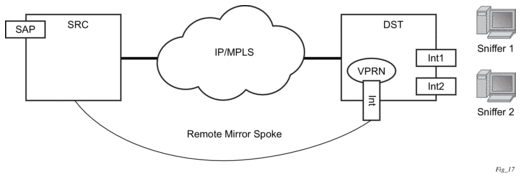
With remote mirroring, the mirror destination configuration can allow IP packets to be mirrored from a source router. The packets are delivered to the destination in a spoke-terminated interface created in a VPRN service. IES interfaces are not supported. The interface can be configured with policy-based routing filters to allow sniffer selection based on incoming mirrored destination IP addresses. The interface cannot send traffic out as it is a destination-only feature. Packets arriving at the interface are routed based on the routing information within the VPRN. Policy-based routing should always be used unless only a sniffer is connected to the VPRN.
Figure 3: Remote Mirroring Termination
Local Mirroring Termination
Local mirroring is like remote mirroring but the source and destination of the mirror exist in the same local IP mirroring node. The configuration must include the source address and destination MAC addresses for the packets going to the sniffer. The destination SAP must be Ethernet.
2.1.3.3. Mirror Destination Type PPP with Port-ID Insertion
Operators that use mirroring for statistics collection make use of VLANs or DLCIs for customer separation. Since PPP offers no such separation, the maximum number of PPP circuits may be identified (one per destination). This provides a proprietary mechanism to allow a single mirror to be used and only applies to the 7450 ESS and 7750 SR.
Port-ID-enabled PPP mirroring includes the port ID of the system in the mirrored packet. An operator using this flag in a PPP mirror can identify the end customer circuit by finding the system port ID (which can be made persistent) and correlating it to the port ID in the mirrored packet.
This mirroring does not change the priority of the mirror order (port, SAP, sub, filter). LI mirrors can use the port ID flag and their priority is also maintained.
Since the inclusion of the port ID flag is set on the mirror destination, all mirrored packets of all sources include the port ID. For remote mirroring, the mirror destination service at the source node must be configured with this flag.
The following restrictions apply to the port ID flag.
- This flag can only be used with a PPP mirror destination.
- This flag is mutually exclusive with a remote-source.
- This flag cannot be enabled on an IP mirror type.
2.1.3.4. Layer 3 Encapsulation
The routable encapsulation feature allows mirrored packets to be placed in a routable IP/UDP header and then forwarded in a routing context (either base or VPRN). An additional shim header is also added before the mirrored packet to provide additional context to the collector receiving the packets and contains the direction, mirror type, filter action, interface type, and interface value.This routable encapsulation is available using the layer-3-encap ip-udp-shim-sampled command and is supported for ingress and egress mirroring. It can be combined with mirror sampling, slicing, mirror-type ether, and ip-only. Figure 4 shows the routable mirror encapsulation and Figure 5 shows the shim header format.
Figure 4: Routable Mirror Encapsulation
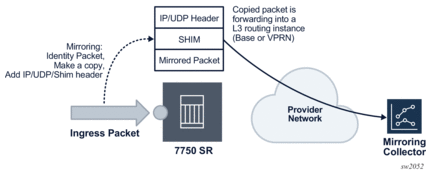
Figure 5: Shim Header Format
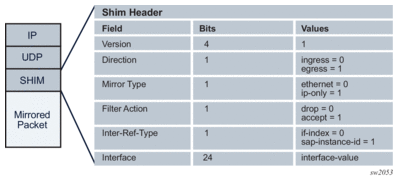
The encoding of the shim header is as follows:
- Version: 4 bitsDescribes the shim header version. The only supported version is 1.
- Direction: 1 bitDescribes if the packet was mirrored ingress or egress.
- Ingress = 0
- Egress = 1
- Mirror type: 1 bitDescribes the mirror type.
- Ethernet = 0
- IP-Only = 1
- Filter action: 1 bitDescribes the result of the line card filter action as dropped or accepted. This can be further used by the collector for telemetry purposes.
- Drop = 0
- Accept = 1
- Interface-Ref-Type: 1 bitDescribes if the interface represents an interface index or a SAP instance.
- if-index = 0
- sap-instance-id = 1
- Interface: 24 bitsCan be either a sap-instance-id or the if-index value depending on the interface-ref-type value.
The if-index is used in the following mirror source cases:
- network interface, IES/VPRN SAP interface, or interface binding (spoke SDP IP interface): interface if-index is used
- MPLS transit and spoke/mesh-SDP in Layer 2 services: if-index of the network interface the traffic is received from is used
- R-VPLS IP packets to the router interface MAC as well as broadcast and multicast: R-VPLS interface if-index is used
- ESM: the subscriber interface if-index is used
The sap-instance-id is used for Layer 2 service SAPs and is an internal reference for the SAP string. The mapping table between the SAP instance ID and SAP strings can be obtained by using the SNMP table tMirrorSourceSapShimTable. The sap-instance-id found in the shim header can be correlated offline by the collector with tMirrorSourceSapShimTable in order to identify the SAP string and service the packet was mirrored from.
Filter action, interface-ref-type, and interface values are 0 in the case of egress mirroring.
The following restrictions apply to ip-udp-shim-sampled encapsulation.
- FP2- and FP3-based cards are not supported as mirror source endpoints. Traffic from these endpoints is not mirrored if they are configured as a mirror source.
- IP UDP shim sampled encapsulation is not applicable to frame relay, PPP, ATM-SDU, SAToP, or CESoPSN mirror-dest types.
- IP UDP shim encapsulation is only supported over IPv4 transport (it is not supported over IPv6 transport).
- Forwarding of routable encapsulated packets from an R-VPLS interface is not supported. Routable encapsulated packets that arrive at the egress of an R-VPLS interface are discarded.
- On the source node where LI mirroring occurs, the operator must configure the mirror destination to inject into the routing instance (that is, base or VPRN) in which the actual destination address is reachable without having to hop into a different instance using GRT leaking. In other words, the interface out of which the packet travels must exist in the routing instance that is configured in the mirror destination.
2.1.3.5. PCAP Packet Capture
Packet capture is a troubleshooting tool that uses both mirroring and debugging. A user’s CLI profile must have debug privileges in order to perform packet capture. To enable packet capture perform the following steps.
- Set up the mirror destination (in this case, a PCAP). Specify the file URL to which the packet captures are to be sent using the mirror-dest command. The packet captures are packaged into the libpcap file format.The file URL requires the full path, including both username and password, and the filename. When configured, the system performs a syntax check, including an FTP connection test. The configured file URL is rejected if the syntax check fails.
- Specify the source for packet capture. Using either the debug mirror-source or config mirror mirror-source CLI commands, specify the source to be captured. All mirror sources are supported, including IP-filter, subscriber, SAP, and ports.The debug mirror-source service-id must match the mirror-dest service-id for the PCAP.
- Begin the capture using the debug pcap session-name capture start CLI command. The following conditions apply.
- Previous captures with the same filename are overwritten. To avoid a file overwrite, create a new capture with a new filename. This can be accomplished by either renaming the file on the FTP server or by renaming the filename in the mirror destination.
- This CLI command restarts the file transfer session with the remote FTP server.
- If the remote FTP server is unreachable, the command prompt can pause while attempting to re-establish the remote FTP session. The total wait time can be up to 24 seconds (after four attempts of approximately six seconds each).
- If the debug command pauses, verify the following items:
- the connectivity to the server through the FTP port
- the FTP user permissions on the FTP server
- that the FTP server is functional
- The file capture continues indefinitely until the user manually specifies for the packet capture to stop.
- If the file capture fails to start, enter the show pcap session-name detail command to see the status of the capture. The detail prompt notifies the operator of the error, and it may require the operator to stop and re start the capture again.
- End the capture. To stop the capture, enter the debug pcap session-name capture stop CLI command. This command stops the file transfer session and terminates the FTP session.
- If the FTP server is unreachable, the command prompt rejects further input while it attempts to re-establish the remote FTP session. The total wait time can be up to 24 seconds (4 attempts of approximately 6 seconds each).
- If the debug command pauses, check the following items:
- the connectivity to the server through FTP port
- the FTP user permissions on the FTP server
- that the FTP server is functional
The mirrored packets are placed in a buffer in the CPM before they are transferred over FTP or TFTP. The buffer holds a maximum of 20 Mb. The FTP transfer is performed every 0.5 seconds. Each packet that is transferred successfully is flushed from the buffer. Therefore, to ensure all packets are captured successfully, the capture rate must not exceed 20 Mb in 0.5 seconds and the FTP transfer must not exceed 320 Mb/s of bandwidth (20 Mb per 0.5 seconds).
In the following show pcap output, the statistics, the session state, write failure, read failures, process time bailouts, and dropped packets are key elements for identifying whether the packet capture on the FTP server is reliable.
Packet capture is a troubleshooting tool. Therefore, all CLI commands except for the FTP URL destination are located under debug. This allows the administrator to set up a CLI profile specifically for packet capture with debug privileges.
The packet capture uses FTP for file transfer and can be routed to the destination using the management port or through the IOM port. If the FTP server destination is routed through the management port, consider the maximum bandwidth available.
 | Caution: Typically, the management port is used for logging, SNMP, SSH/Telnet, AAA, and other management services. A high-throughput packet capture may disrupt these management services. Therefore, use packet capture transfers using the management port with caution. |
Mechanisms are built in to prevent mirroring or packet captures that result in loops or daisy-chains. However, it is possible to form a loop or daisy-chain if routing re routes or configuration changes. When a packet capture becomes looped or daisy-chained, the packet capture stops.
 | Note: When executing an admin rollback for a configuration under the config mirror mirror-dest service-id pcap CLI context, the pcap must first be stopped by executing the debug pcap session-name capture stop command. If the pcap is not stopped, the rollback fails. |
2.1.3.6. Mirrored Traffic Transport using MPLS-TP SDPs
Bidirectional MPLS-TP spoke SDPs with a configured pw-path-id can transport a mirrored service. Mirror services are not supported on static PWs with an MPLS-TP pw-path-id bound to an SDP that uses an RSVP-TE LSP.
Mirror services using MPLS-TP spoke SDPs can be configured using CLI in the context mirror-dest>remote-source. For both the CPM and IOM, this enables reuse of spokes for mirror services and other services such as pipes.
Control channel status signaling is supported with PW redundancy on spoke SDPs in a mirror context.
The following is an example of PW redundancy for a mirror service. In this case, MPLS-TP spoke SDPs are used.
Figure 6: Mirroring with PW Redundancy using MPLS-TP
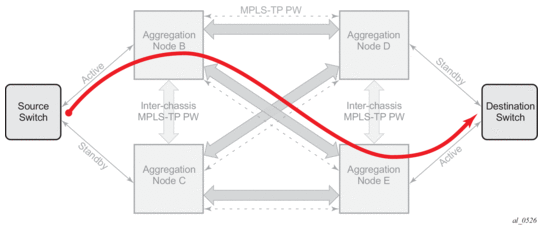
Note that mirroring traffic is usually unidirectional, flowing from “source” nodes (B or C) to “destination” nodes (D or E). However, in case of MPLS-TP, the control channel status packets may flow in the reverse direction.
The following is an example of a mirror service configuration using MPLS-TP spoke SDPs:
Source Node B
Destination Node C
Source Node D
Destination Node E
2.1.3.7. Slicing and Sampling
Slicing and sampling are available to all mirror destinations.
Slicing
Slicing copies a specified packet size of each frame. This is useful to monitor network usage without having to copy the actual data. Slicing enables mirroring larger frames than the destination packet decode equipment can handle. It also allows conservation of mirroring resources by limiting the size of the stream of packet through the router and the core network.
When a mirror slice size is defined, a threshold that truncates a mirrored frame to a specific size is created. For example, if a value of 256 bytes is defined, up to the first 256 bytes of the frame are transmitted to the mirror destination. The original frame is not affected by the truncation. Mirrored frames, most likely, become larger as encapsulations are added when packets are transmitted through the network core or out the mirror destination SAP to the packet or protocol decode equipment. Slice size is not supported by CEM encap-types or IP mirroring.
The transmission of a sliced or non-sliced frame is also dependent on the mirror destination SDP path MTU and the mirror destination SAP physical MTU. Packets that require a larger MTU than the mirroring destination supports are discarded if the defined slice size does not truncate the packet to an acceptable size.
Sampling
Mirror sampling rate defines a packet sampling rate for a mirror service. The sampling rate is applicable to all endpoints in the mirror source ingress and egress and supported on FP4-based cards.
This capability can be useful for analytics purposes such as DDoS telemetry to provide a subset of traffic while still maintaining statistical accuracy using packet sampling.
Packet sampling can be configured concurrently with mirror slicing in order to further limit the amount of traffic sent to the collector.
For endpoints in the mirror source on FP2- and FP3-based cards, all the packets are mirrored without sampling.
2.1.4. Mirroring Performance
Replication of mirrored packets can, typically, affect performance and should be used carefully. Nokia routers minimize the impact of mirroring on performance by taking advantage of its distributed Flexible Fast Path technology. Flexible Fast Path forwarding allows efficient mirror service scaling and, at the same time, allows a large amount of data to be mirrored with minimal performance impact. When a mirror destination is configured, the packet slice option can truncate mirrored packets to the destination, which minimizes replication and tunneling overhead.
2.2. Lawful Intercept
Lawful Intercept (LI) describes a process to intercept telecommunications by which law enforcement authorities can un-obtrusively monitor voice and data communications to combat crime and terrorism with higher security standards of lawful intercept capabilities in accordance with local law and after following due process and receiving proper authorization from competent authorities. The interception capabilities are sought by various telecommunications providers.
As lawful interception is subject to national regulation, requirements vary from one country to another. -Nokia’s implementation satisfies most national standard’s requirements. LI capability is configurable for all Nokia service types.
LI mirroring is configured by an operator that has LI permission. LI mirroring is hidden from anyone who does not have the right permission.
In Release 19.10.R1 and higher config and LI must use different mirror destinations.
2.2.1. LI Activation Through RADIUS
In addition to CLI and SNMP control, RADIUS messages also activate LI sessions for subscriber-host targets. Activation through RADIUS is equivalent to adding or removing a set of subscriber-host entries in an LI source.
| Note: The term “activation” in this section represents both “activation and de-activation”. |
The activation of an LI session via RADIUS applies to the 7450 ESS and 7750 SR and can occur in one of two ways:
- When the RADIUS Access-Accept message is received by the 7450 ESS or 7750 SR.The target (either a host or a set of hosts) is implicit. The target acts as the same host (or set of hosts) that is within the scope of the Access-Accept and interception occurs for this entire set of hosts (or a single host).
- Through RADIUS CoA messagesThe target (set of hosts) is identified through one of the following methods:
- Acct-Session-Id (which can represent a single host or a collection of hosts)
- a sap-id;ip-addr carried in the NAS-Port-Id (attr 87) and the Framed-Ip-Address (attr 8).” for IPv4 hosts
- a sap-id;IPv6_addr carried in the NAS-Port-ID (attr 87) and one of Alc-Ipv6-Address, Framed-Ipv6-Prefix, or Delegated-Ipv6-Prefix for IPv6 hosts
- Alc-Subsc-ID-Str
The following set of VSAs is used to activate LI sessions via RADIUS:
- Alc-LI-Action – ON/OFF/NONE
- Alc-LI-Destination - <string> and has two options:
- the mirror destination service ID
- at real time, specify the IP destination, the UDP port, and the router instance of the LI mediation deviceThe format for the VSA is ip-address [:port] [router instance]. The IP address must be of type IPv4 and is the only mandatory parameter.
- Alc-LI-Direction – INGRESS/EGRESS
- Alc-LI-FC – be/l1/l2/af/ef
- (optional) Alc-LI-Use-Outside-IPUse this VSA when the subscriber is an L2-aware NAT subscriber and uses the outside IP address instead of the private IP address for packet mirroring. Refer to L2-Aware NAT for more details.
The Alc-LI-FC VSA can be present several times if more than one forwarding class (FC) is subject to LI.
The VSAs Alc-LI-Direction and Alc-LI-FC are optional. If either is not included, both directions (ingress and egress) as well as all FCs are mirrored.
The Alc-LI-Destination VSA can be used in one of the following ways.
- A mirror destination must first be provisioned on SR. To use the mirror destination, the VSA specifies the mirror destination service ID in the Access-Accept message or a CoA.
- The VSA specifies the IP address of the mirror destination through the Access-Accept message or a CoA. The reserved range of service IDs and the mirror destination template must be configured first. This VSA provisions the mirror destination using a combination of parameters from the LI template and RADIUS VSAs. The following should be considered when using this VSA.
- Only Layer 3 encapsulation is supported as the mirror destination.
- The VSA has the format ipv4-address [:port] [router {Base | svc-id}]. The VSA must include the LI destination IPv4 address, while the port and the routing instance are optional. If the destination port and routing instance are not specified in the VSA, the configuration from the LI mirror destination template is used.
- With the LI mirror destination reservation, a list of service IDs is reserved for configuring the mirror destination via RADIUS. The LI mirror destination is shared with the mirror destination used for debugging purposes. Therefore, it is suggested to reserve enough for LI purposes, and leave enough for debugging and configuration. The VSA triggers the creation of a mirror destination automatically and uses one of the service IDs in the reservation range. An LI source that matches the IP source, IP destination, UDP destination, UDP source, and direction bit, reuses the same LI mirror destination service ID. The LI mirror destination reservation range can be expanded or reduced in real time. The range can be changed completely when there are no LI sources referenced in the mirror reservation range.
- The LI mirror destination template specifies the parameters for the Layer 3 encapsulation. It is mandatory to provision the IP source, IP destination, UDP source, and UDP destination parameters.
- It is possible to configure up to eight LI mirror destination templates. The mirror destination template can be switched in real time, if, for example, a parameter such as the source IP address is to be updated.
- The system can block RADIUS from generating the mirror destination by removing a template reference under the config>li>radius context.
VSAs in the Access-Accept messages also activate LI for a newly-created host. In this case, the LI activation is not addressed by the Acct-Session-Id, as this is not yet known during session authorization.
Different attributes can be used in a CoA to identify one or more subscriber hosts. Typically, only a single attribute or set of attributes is used to target a host or several: NAS-Port-Id + IP, Acct-Session-Id, or Alc-Subsc-ID-Str. In the case where “NAS-Port-Id + IP” is used in a Wholesale or Retail model, the Alc-Retail-Serv-Id VSA must be included in the CoA.
The ability to delete all li-source entries from a mirror service is also available via RADIUS. This function may be useful when an LI mediation device loses synchronization with the SR OS state and needs to reset a mirror service to a known state with no LI sessions. This clear function is performed by sending the following attributes in a RADIUS CoA. If the CoA does not contain exactly the following three VSAs (each with a valid value matching the configuration on SR OS), the CoA is silently dropped without a NAK:
- Alc-LI-ActionAlc-LI-Action = ‘clear-dest-service’
- Alc-LI-DestinationThe destination can specify the service ID of the mirror destination or it can pass the VSA in the mirror destination IP, where the mirror destination IP was automatically created by RADIUS.
- Alc-LI-Destination = service-id, if a mirror destination service ID was used for LI
- Alc-LI-Destination = ip-address [:port] [router instance]. The system deletes RADIUS auto-generated mirror destinations based on three parameters: the IP destination, the UDP destination port, and the router instance. These parameters can be passed in from the Alc-LI-Destination VSA. If the VSA provides only some of the parameters, for example, only the destination IP, the parameters from the mirror destination template is used (from config>li>mirror-dest-template). The three parameters determine the mirror service ID to delete and any combination of the IP source, UDP source port, and direction bit can be deleted. It is possible that a template change can prevent the VSA from deleting the mirror destination service. To manually delete a mirror destination, a CLI command is provided under clear li radius mirror-dest svc-id. To determine the service ID to delete, a manual login is required.
- Alc-Authentication-Policy-NameThis VSA is only required in a certain configuration. The VSA is not required when a RADIUS server policy is configured under configure subscriber-mgmt authentication-policy and the RADIUS server policy servers are used as CoA servers.This VSA is required in the configuration where the servers configured inside the authentication policy are used as CoA servers, with the following:
- a list of servers is configured under config>subscr-mgmt>auth-plcy>radius-auth-server
- accept-authorization-change is enabled under config>subscr-mgmt>auth-plcy
- the authentication policy does not reference the RADIUS server policy
When the above conditions are met, the Alc-Authentication-Policy-Name VSA is required and must reference the authentication policy that contains the IP address of the LI CoA client.
The LI-related VSAs cannot be combined in one CoA message with other action-related VSAs (force renew, change of SLA profile, and so on). The only exception to this rule is for the CoA used to create a new subscriber host. In this case, LI-related VSAs can be included, along with other VSAs.
If LI is activated through CLI or SNMP, the activation through RADIUS takes precedence. The precedence in this context means that RADIUS activation of LI fully overrides whatever was configured at CLI or SNMP level for this host. If the RADIUS LI is de-activated, the CLI or SNMP configuration becomes active again.
The LI-related VSAs are not shown in debug messages. The show li li-source command shows all sub-hosts for which LI was activated using RADIUS VSAs. This command is only accessible to CLI users with LI privileges.
2.2.2. Routable Lawful Intercept Encapsulation
The Routable LI encapsulation feature allows LI mirrored packets to be placed into a routable (for example, IP/UDP) header and then forwarded in a routing context (base or VPRN). An LI-shim inserted before the customer packet allows correlation of packets to LI sessions at the downstream LI Mediation device (LIG).
Figure 7: Routable Lawful Intercept Encapsulation
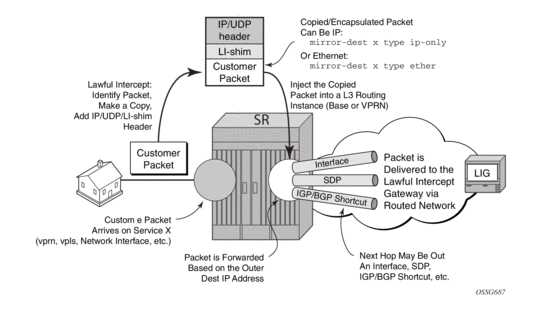
Figure 8: Routable Encapsulation Format
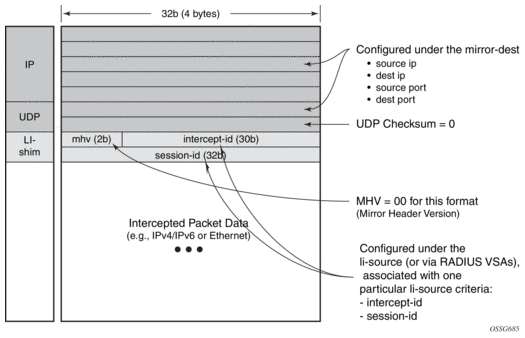
Some of the supported attributes and scenarios for the routable LI encapsulation feature include the following:
- The part of the customer packet that is copied and placed into the routable encapsulation can be either the IP packet (with none of the original Layer2 encap) or an Ethernet packet by selecting either ip-only or ether as the mirror-dest type.
- The ability to inject into the Base routing instance (for forwarding out network interfaces or IES SAPs for example) or a VPRN service.
- The ability to forward the encapsulated packets out VPRN SDPs, IGP/BGP shortcuts and SDP spoke interfaces.
- Options to use ip, udp, li-shim or ip, gre routable encapsulation (applies to the 7450 ESS and 7750 SR).
- An optional direction bit in the li-shim.
- If the use of the direction bit is configured, then a bit from the intercept-id (configure under mirror-dest) is “stolen”. Only a 29b intercept-id is allowed for li-source entries if the mirror destination is configured to use a direction bit.
Figure 9: LI-Shim Version 01 with a Direction Bit

- The encoding of the direction (d) bit is as follows:
- 0 = ingress
- 1 = egress
- For NAT based LI, ingress means the traffic arriving at the node from the subscriber host (applies to the 7450 ESS and 7750 SR).
- User configurable intercept-id and session-id per li-source entry that is placed into the li-shim (a total max of 62 configurable bits).
- Configuration via CLI/SNMP or RADIUS (applies to the 7450 ESS and 7750 SR). For RADIUS configuration the following VSAs are used:
- Alc-LI-Action, Alc-LI-Direction, Alc-LI-Destination, Alc-LI-FC (See LI Activation Through RADIUS).
- Alc-LI-Intercept-Id: specifies the intercept-id to place in the LI shim. Only applicable if the mirror-dest (as specified by the Alc-LI-Destination) is configured with routable encap that contains the LI-Shim. A value of 0 is used if this VSA is not present.
- Alc-LI-Session-Id: specifies the session-id to place in the LI-Shim. Only applicable if the mirror-dest (as specified by the Alc-LI-Destination) is configured with routable encap that contains the LI shim. A value of 0 is used if this VSA is not present.
- A LI session configured via RADIUS takes precedence over a session configured via CLI, but the CLI mirror is re-instated if the RADIUS mirror request is later removed (applies to the 7450 ESS and 7750 SR)
- ip, udp and li-shim encap is available for ether and LI shim mirror-dest types (note that ip-only supports, amongst other formats, packets that are reassembled from ATM cells).
- ip | udp | li-shim encap is available for all li-source entry types: sap, filter, subscriber and nat.
- Note that for NAT based Lawful Intercept, routable LI encap is available, as well as the MAC or Layer 2-based encapsulation for NAT LI as configured under config>li>li-source>nat>ethernet-encap (applies to the 7450 ESS and 7750 SR)
- Fragmentation of the resulting mirror packet is supported. Note that fragmentation is supported for NAT LI with the routable encapsulation, but fragmentation is not supported for NAT LI with Ethernet encapsulation (applies to the 7450 ESS and 7750 SR).
The following restrictions apply to the routable LI encapsulation feature:
- Only applicable to Lawful Intercept and is not available for debug or MS-ISA based Application Assurance mirrors. MS-ISA based Application Assurance is applicable to the 7450 ESS and 7750 SR.
- Not applicable to frame-relay, PPP, ATM-SDU, SAToP, or CESoPSN mirror-dest types.
- IPv4 transport only (the routable encapsulation cannot be IPv6).
- On the mirror source node, forwarding of routable encapsulated LI packets out of an R-VPLS interface is not supported. A mirror destination configured with routable encapsulation can be bound to a routing instance that also has an R-VPLS bound to it, but the operator must ensure that the destination of the LI packets is not reachable via any R-VPLS interfaces. Any routable encapsulated LI packets that arrive at the egress of an R-VPLS interface are discarded. Parallel use of routable LI encapsulation and R-VPLS in the same routing instance is supported if the mirrored packets do not egress out of the R-VPLS interface.
- ip | gre encap is supported for the ip-only mirror destination type only, and only for subscriber li-source entries (CLI, SNMP, or RADIUS based). Subscriber management is not supported on the 7950 XRS.
- The contents of the GRE header are all zeros (all optional bits zero, no optional headers/fields like checksum, offset, key, seq, and so on) except for the Protocol field which contains 0x0800 for IPv4 packets or 0x86DD for IPv6 packets. The far-end receiver of the intercepted packets must be configured to expect no GRE options (that is, no key, no checksum, and so on).
- On the source node where LI mirroring occurs, the operator must configure the mirror-dest to inject into the routing instance (that is, base or VPRN) in which the actual destination address is reachable without having to hop into a different instance using GRT leaking. In other words, the interface out, which the packet travels, must exist in the routing instance that is configured in the mirror-dest.
- For example, if the LIG is at 110.120.130.140 and is in the base instance, but VPRN-1 has a default route to the GRT (for example, 0.0.0.0->GRT) then the operator must configure the mirror destination to inject into the base (even though theoretically address 110.120.130.140 is reachable from VPRN-1). If the operator attempts to configure the mirror destination to inject into VPRN-1, and VPRN-1 itself does not have reachability to 110.120.130.140 out an interface that is part of the VPRN, then the mirror destination is operationally down.
Care must be taken in the configuration of LI mirrors and the destination IP address for the routable LI encapsulation. Incorrect selection of the destination IP could send packets to unintended destinations (for example, configuring the encapsulation with a subscriber's IP address), and combinations of mirrors and routable encapsulation can create loops in the network.
2.2.3. Lawful Intercept and NAT
2.2.3.1. Carrier Grade NAT
LI for NAT is supported to mirror configured subscriber’s traffic to a mirror destination. When active, packets are mirrored from the perspective of the NAT outside interface (after NAT translations have occurred). All traffic for the specified subscriber, including traffic associated with static port-forwards, is mirrored. This feature is supported for 7450 ESS and 7750 SR only.
A simplified Ethernet encapsulation (with an optional Intercept ID) is used for all NAT traffic. When mirroring NAT traffic, the mirror destination must be of type ether. The customer packet from the (outside) IP header onwards (including the IP header) is mirrored. The operator has the configuration option of embedding the intercept ID into the LI packet using an explicit intercept-id command. Both packet formats are described below:
Figure 10: Ethernet Mirror Examples
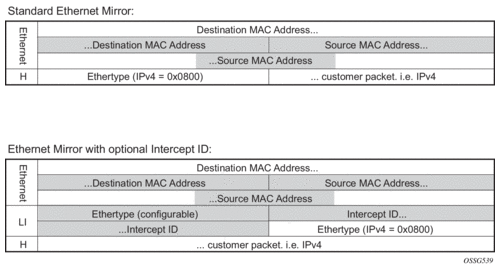
The contents of the highlighted fields are configurable using the following CLI:
The default Ethernet-header is to use etype 0x600 and system MAC address for both the source and destination addresses. The configurable Ethertype and Intercept ID is only added when an intercept ID is present for the subscriber in the NAT configuration.
2.2.3.2. L2-Aware NAT
When Layer 3 encapsulation is configured as the mirror destination for an L2-Aware NAT subscriber, the mirror destination must be of type ip-only and the encapsulation must be of type ip-udp-shim. For L2-Aware NAT, it is possible to assign the same inside IPv4 private IP address to all subscribers. It is preferable to intercept the L2-Aware NAT subscriber using the outside IP address instead. This can be accomplished from both RADIUS and CLI as described in the following table.
Table 3: Use of Inside and Outside IPs for LI
Lawful Intercept to use host inside IP address | Lawful Intercept to use host outside IP address | |
CLI access |
The command config>li>use-outside-ip-address does not apply to CLI configured LI targets. | Configure the subscriber ID under config>li>li-source>nat>l2-aware-sub. The command config>li>use-outside-ip-address does not apply to CLI configured LI targets. |
RADIUS access |
|
|
When the RADIUS VSA Alc-LI-Use-Outside-IP is used, the configuration config>li>use-outside-ip-address is ignored.
Alc-Use-Outside-IP is only supported when the mirror destination service is configured with Layer 3 encapsulation.
L2-Aware subscribers do not support the LI RADIUS VSAs Alc-LI-FC and Alc-LI-Direction. When an L2-Aware subscriber is subjected to LI via CLI or RADIUS, dual stack traffic is mirrored.
2.2.4. Lawful Intercept Management Interfaces
LI can be managed using classic management interfaces (for example, classic CLI or SNMP) or model-driven management interfaces (MD-CLI or NETCONF). Management of LI is similar across all interfaces.
Refer to “Classic and Model-Driven Management Interfaces” in the 7450 ESS, 7750 SR, 7950 XRS, and VSR System Management Guide for more information about management interfaces and setting the configuration mode.
2.2.4.1. LI Management using the Classic CLI Engine
With the advent of support for both classic and mixed configuration modes for LI management, the classic engine supports the following additional features in classic configuration mode.
Classic CLI Mode Features for LI Management
- LI filter names, as well as filter IDs, under li-filter-associations, including ip-filter-name, ipv6-filter-name, and mac-filter-name
- Operators can choose between IDs and names (mutually exclusive).
- IDs must be hard references and can only refer to filters (IP, IPv6, MAC) that already exists.
- Names can be loose references and can refer to filters (IP, IPv6, MAC) that do not exist.
- LI filter names, as well as filter IDs, under li-filter-block-reservation, including ip-filter-name, ipv6-filter-name, and mac-filter-name
- Operators can choose between IDs and names (mutually exclusive).
- IDs must be hard references and can only refer to filters (IP, IPv6, MAC) that already exists.
- Names can be loose references and can refer to filters (IP, IPv6, MAC) that do not exist.
- router-name in mirror destination template
- Operators can choose between IDs and names (mutually exclusive).
- IDs must be hard references and can only refer to router IDs (VPRNs) that already exists.
- Names can be loose references and can refer to router IDs (VPRNs) that do not exist.
- router-name in NAT li-source
- Operators can choose between IDs and names (mutually exclusive).
- IDs must be hard references and can only refer to router IDs (VPRNs) that already exists.
- Names can be loose references and can refer to router IDs (VPRNs) that do not exist.
Classic CLI Engine Properties for LI Management
Table 4 lists the Classic CLI engine properties for classic and mixed configuration mode.
Table 4: Classic CLI Engine Properties for Classic and Mixed Configuration Mode
Config CLI Tree | Classic Mode | Mixed Mode |
li>li-filter-lock-state |
|
See Configurable Filter Lock for Lawful Intercept for more information |
li>li-source | ID with name | ID with name |
li>li-source>nat>classic-lsn-sub>router li>li-source>nat>dslite-lsn-sub>router li>li-source>nat>nat64-lsn-sub>router | ID or name (router and router-name are mutually exclusive) | ID or name (router and router-name are mutually exclusive) |
li>mirror-dest-template>router | ID or name (router and router-name are mutually exclusive) | ID or name (router and router-name are mutually exclusive) |
li>li-filter-associations>li-ip-filter>ip-filter li>li-filter-associations>li-ipv6-filter>ipv6-filter li>li-filter-associations>li-mac-filter>mac-filter | ID or name (ID and name are mutually exclusive) | Name only |
li>li-filter-block-reservation>li-reserved-block>ip-filter li>li-filter-block-reservation>li-reserved-block>ipv6-filter li>li-filter-block-reservation>li-reserved-block>mac-filter | ID or name (ID and name are mutually exclusive) | Name only |
Table 5 lists the reference types for classic and mixed configuration mode.
Table 5: Reference Types for Classic and Mixed Configuration Mode
Config CLI Tree | Classic Mode | Mixed Mode |
li>li-source>sap | Loose reference 1 | Loose reference |
li>li-source>nat>classic-lsn-sub li>li-source>nat>dslite-lsn-sub li>li-source>nat>nat64-lsn-sub |
(router and router-name are mutually exclusive) |
(router and router-name are mutually exclusive) |
li>li-source>subscriber li>li-source>nat l2-aware-sub li>li-source>wlan-gw>dsm-subscriber | Loose reference | Loose reference |
li>li-filter-associations>li-ip-filter>ip-filter li>li-filter-associations>li-ipv6-filter>ipv6-filter li>li-filter-associations>li-mac-filter>mac-filter | Hard reference | Hard reference |
li>li-filter-block-reservation>li-reserved-block>ip-filter li>li-filter-block-reservation>li-reserved-block>ipv6-filter li>li-filter-block-reservation>li-reserved-block>mac-filter |
|
|
li>li-source>ip-filter li>li-source>ipv6-filter li>li-source>mac-filter | Hard reference | Not supported |
li>li-source>li-ip-filter li>li-source>li-ipv6-filter li>li-source>li-mac-filter | Hard reference | Hard reference |
- Note: Loose reference means that the referenced object does not have to exist before it can be referenced. In addition, the referenced object can be deleted at any time. For example, li-source references subscriber-1 even if subscriber-1 is not created on the system. With loose reference, an LI administrator can become completely independent from regular administrators. An LI administrator can provision a list of targets for LI without having to wait for the regular administrator to create them (such as SAP and subscribers). In reverse order, when the regular administrator wants to remove SAPs, there is no need to wait for the LI administrator to remove the reference beforehand. Loose reference allows LI independence and is the recommended model for LI provisioning.
- Note: Hard reference means that the object must first be created in the system before it can be referenced. In addition, once an object is referenced by LI, the object must be unreferenced before it can be removed. For example, ip-filter 10 must first exist in the system before it can be referenced using the li>li-source>ip-filter command.
Notes:
2.2.4.2. LI Management using the MD-CLI Engine
The MD-CLI engine for mixed and model-driven configuration modes only allows names for filters, router instances, and services; IDs are not supported.
Table 6 lists key differences between classic CLI and MD-CLI.
Table 6: Key Differences between Classic CLI and MD-CLI
Classic CLI Engine for Mixed Mode | MD-CLI Engine for Mixed and Model-Driven Mode |
li>li-source (ID with name) | /li/li-source (name only) |
li>li-source>nat>classic-lsn-sub>router li>li-source>nat>dslite-lsn-sub>router li>li-source>nat>nat64-lsn-sub>router (router ID or name) | /li/li-source/nat/nat44 /li/li-source/nat/dslite /li/li-source/nat/nat64 (router name only) |
li>mirror-dest-template>layer-3-encap>router (router ID or name) | /li/mirror-dest-template/layer-3-encap (router name only) |
Compared to classic configuration mode, mixed and model-driven configuration modes primarily use loose references, where the object referenced does not have to exist in the system before it is referenced. For example, subscriber-1 is referenced in li-source but does not need to be created on the system beforehand.
In classic configuration mode, when an LI filter (li-ip-filter, li-ipv6-filter, and li-mac-filter) is configured:
- LI filter entries can be referenced even if the LI filter is not associated (under the config>li>li-filter-associations context) with a filter in the config>filter context.
- Once an LI filter entry is referenced in the li-source, the LI filter association that contains the specified LI filter cannot be deleted. Therefore, the LI filter association can only be deleted if the LI filter entries are no longer referenced in the li-source.
- When an LI filter entry is not referenced in li-source:
- If li-filter-associations associates an LI filter name with a filter ID, the deletion of either the filter ID or the LI filter name, also deletes the li-filter-associations.
- Once li-filter-associations associates an LI filter name with filter name, the deletion of either the LI filter name or the filter name is always denied and no roll back to a configuration mode is completed without the LI filter name or the filter name.
In mixed configuration mode:
- An LI filter entry can be referenced in li-source, when the LI filter is first associated with a filter in the config>filter context under the config>li>li-filter-associations context.
- LI filter association between an LI filter name and a filter ID is not allowed.
- Once an LI filter entry is referenced in the li-source, the LI filter association that contains the specified LI filter cannot be deleted. Therefore, the LI filter association can only be deleted if the LI filter entries are no longer referenced in the li-source.
- When an LI filter entry is not referenced in li-source:
- Once li-filter-associations associates an LI filter name with filter name, the deletion of either the LI filter name or the filter name is always denied and no roll back to a configuration mode is completed without the LI filter name or the filter name.
2.2.4.3. Lawful Intercept in NETCONF
LI can be managed using NETCONF.
The LI configuration is located in separate data stores that are distinct from the rest of the general configuration data.
Refer to “NETCONF” in the 7450 ESS, 7750 SR, 7950 XRS, and VSR System Management Guide for more information about LI and NETCONF.
2.2.4.4. Lawful Intercept in gNMI
The default AAA profiles do not block SET, GET, or SUBSCRIBE access to LI state data. Creating a new AAA profile is recommended to control gNMI user access to LI state data.
2.2.4.5. CLI Configuration Mode Migration
Lawful Intercept can be managed in classic, mixed, or model-driven configuration mode.
| Note: The LI administrator should coordinate configuration mode migrations with the network administrator, who is normally expected to perform the configuration mode migrations. |
In LI there are two configuration modes of operations dictated by using the bof li-separate command.
- When li-separate is enabled, the LI management is controlled by the LI administrator who is given “access li” rights to access the LI region. It is highly recommended to consider adjusting the member profile.
- See Mandatory LI Profile Migration for information about profiles.
- When li-separate is disabled (no li-separate), “access li” no longer determines who has access to LI. Instead, access to the LI region is governed by the “AAA profile” (MD-CLI) or “profile” (Classic CLI) applied against the user. Inside the “AAA profile” there are CLI filters, for example, configure, show, and clear, to permit or deny which CLI commands can be accessed. It is highly recommended to consider the following when operating with no li-separate.
- A good practice is to add “access li” to users who require access to LI.
- See Mandatory LI Profile Migration for information about profiles.
| Note: When performing a configuration mode migration from classic to mixed or model-driven configuration mode, migration steps might be required (see Configuration Mode Migration Check List). Migrating from mixed or model-driven configuration mode to classic configuration mode does not require any migration steps. |
2.2.4.5.1. Configuration Mode Migration Check List
When performing a configuration mode change from classic to mixed or model-driven configuration mode, operators are highly recommended to perform the following migration procedures:
- LI profile migration
- Configuration migration
- How to complete the configuration mode migration
2.2.4.5.1.1. Mandatory LI Profile Migration
LI administrators must update the profile for model-driven configuration access to the LI region. Without the update, the LI administrator cannot provision LI in MD-CLI.
This step must be performed prior to a configuration mode migration from classic to mixed or model-driven configuration mode. The existing profile for LI under the config>system>security>profile context can only provide LI access to the LI administrator or the LI users for the classic CLI engine.
| Note: The “li access” profile is not a default profile created by SR OS. It is a profile created by the administrator. Search for entries with configure li, show li, admin save li, and clear li inside created profiles. A profile that allows LI access typically allows these commands. It is highly recommended that only users who have access rights to LI apply the LI profile. It is also highly recommended that all other profiles deny configure li, show li, admin save li, and clear li commands for all other users. |
Profiles are not automatically updated for MD-CLI commands. The administrator is responsible for creating an LI filter list for the MD-CLI that is equivalent to the classic CLI. This is highly recommended for the li-separate and no li-separate commands. This step must be performed prior to the configuration mode migration.
The existing profile for LI access should, at a minimum, include the following:
At minimum, add the following MD-CLI commands to the existing LI profile that grants user access to LI commands.
It is recommended to block the following access for all other users. This is accomplished either through default-action deny or through explicit deny commands. The following are the recommended MD-CLI commands that deny access to specific users:
2.2.4.5.1.2. Configuration Mode Migration
Switching from classic configuration mode to mixed or model-driven configuration mode is normally performed by the network administrator using the configure system mgmt-itf configuration-mode [mixed | model-driven] command. The LI administrator can use the tools perform system management-interface configuration-mode [mixed | model-driven] check li command to test the LI configuration for a configuration mode migration. Only the LI administrator can use the tools command. When li-separate is not set, the user must have access to the LI and this is determined by the user profile. Within the user profile, the user must have access to configure li CLI commands. When li-separate is set, the user must have access li and also have configure li included in the user profile.
If the network administrator attempts to perform the configuration mode migration and the LI configuration requires migration, the following message appears:
Action required: LI configuration requires updating before configuration mode switch
To track details of the LI migration steps for a configuration mode migration, the LI administrator’s configuration must include “access li”. The LI administrator can then use the tools perform system mgmt-itf>configuration-mode [mixed | model-driven] check li command. This command serves two purposes:
- verifies the steps necessary for the configuration mode migration
- ensures all configuration can be migrated
The LI administrator should follow the instruction returned by the tools command to prepare the LI configuration for migration. See Migrating from Classic to Mixed or Model-Driven Configuration Mode for information about the list of migration steps. After completing the migration steps, the network administrator can execute the config system mgmt-itf configuration-mode [mixed | model-driven] command, and then the configuration mode migration immediately takes effect.
2.2.4.5.1.3. Configuration Mode Migration Completion
If the li-local-save command is enabled on the BOF, saving the LI configuration is highly recommended after every configuration mode change.
The main configuration file (default: config.cfg) determines the system bootup configuration mode, specifically from the command line configure system management-interface configuration-mode. When the administrator executes the configuration mode change, the LI configuration file format remains as the last saved format until an admin save li command is executed. For example, when migrating from classic to model-driven configuration mode, the LI configuration in the file li.cfg remains in the classic format until the admin save li command is executed to update the file format to a model-driven format.
| Note: Failing to execute the admin save li command after a configuration mode migration might cause LI configuration bootup failure. |
If the LI configuration fails to boot because the admin save li command is not performed immediately after a configuration mode migration, both log 99 and console dump inform the LI configuration field to load because the LI format does not match the primary configuration format file. The format of both the li.cfg file and the main configuration must match. To recover, the main configuration must be rolled back to the previous configuration mode to match the li.cfg file saved format (as indicated by console dump or log 99), and then rebooted.
It is important not to perform a save li command when there is a configuration mode mismatch between the main configuration (default config.cfg) file and the li.cfg file. Saving the li.cfg file creates a new file without any configuration. The previously generated li.cfg file is archived as li.cfg.1 file. If a save li command is accidentally executed, perform the following steps.
- roll back to the previous configuration mode in which the li.cfg.1 file is saved (as indicated by console dump or log 99)
- reboot the system
- restore the li.cfg.1 file using the exec li.cfg.1 command
2.2.4.5.1.4. Migrating from Classic to Mixed or Model-Driven Configuration Mode
The following are the migration procedures necessary to migrate from classic configuration mode to mixed or model-driven configuration mode.
- Under the config li li-filter-block-reservation li-reserved-block command:
- If the filter uses IDs, then all IDs must be referenced in an existing filter ID. All loose references (filter IDs that do not exist in the main configuration region), must be removed. This does not impact any existing LI services since unreferenced filters are not in use.
- If the filter uses names, no migration step is needed.
- Under the config li li-filter-lock-state command:
- If the state is configured with unlocked-for-li-users, this must be changed to unlocked-for-all-users or locked. See Configurable Filter Lock for Lawful Intercept for information about lock states. Changing the lock state does not impact the LI services.
- Under configure>li>li-source>[{ip-filter | ipv6-filter | mac-filter}]
- If any of these filters must be removed, an LI-based filter (li-ip-filter, li-ipv6-filter, li-mac-filter) can be used in place of direct referenced filters. It is possible for the LI-based filter to reference the same reference filter. For example, li-source has ip-filter 1 entry 1 applied. It is possible to have li-ip-filter “one” associated with ip-filter 1, and then apply li-ip-filter “one” entry 1 to li-source. Then remove the ip-filter from li-source and remove the entry from the ip-filter 1 to make li-ip-filter effective. This migration can help minimize the disruption to the LI service.
2.2.4.5.1.5. Further Information and Recommendations on LI
- In mixed configuration mode, all users (LI and non-LI users) should only use private candidate for configuration, to allow classic interfaces such as SNMP to manage the router.
- Other model-driven interfaces such as NETCONF can perform an exclusive lock on the LI configuration. This prevents direct CLI configuration and therefore, the best way to configure LI is to use a single model-driven interface.
- Command auto-completion has limited support for all configuration modes.
- When the li-separate command is enabled, the MD-CLI does not support the load or rollback commands for both of the main configuration regions.
- If the LI configuration file fails to boot, the admin show config li command can be used to view the LI configuration file by the LI administrator.
2.2.5. Configuring Lawful Intercept in MD-CLI
The MD-CLI supports two configuration work flows for LI:
- Implicit configuration work flow:
- Navigation is restricted to the li branch and its descendants.
- Operational commands require an absolute path and error when incomplete.
- The li {private | exclusive | read-only} command enters the configuration mode and navigates in the li branch. There is no default configuration mode.
- The exit all command leaves the configuration mode and navigates to the operational root.
- Explicit configuration work flow:
- Navigation is unrestricted while in configuration mode.
- Operational commands while in the li branch require an absolute path and navigate when incomplete.
- The edit-config li {private | exclusive | read-only} command enters the configuration mode without navigating. There is no default configuration mode.
- The quit-config command leaves the configuration mode without navigating. The quit-config command is not available in the configure branch.
Refer to the 7450 ESS, 7750 SR, 7950 XRS, and VSR MD-CLI Quick Reference Guide and the 7450 ESS, 7750 SR, and 7950 XRS MD-CLI Command Reference Guide for more information about data stores, transactions, candidates, and using configuration commands in the MD-CLI.
2.3. Pseudowire Redundant Mirror Services
This section describes the implementation and configuration of redundant Mirror/Lawful Intercept services using redundant pseudowires.
Regardless of the protection mechanism (MC-LAG, STP, or APS) the source switch only transmits on the active link and not simultaneously on the standby link. As a result, when configuring a redundant mirror or LI service or a mirror service where the customer has a redundant service but the mirror or LI service is not redundant the mirror source must be configured on both (A and B) PE nodes. In either case, the PE with a mirror source establishes a pseudowire to each eligible PE where the mirror / LI service terminates.
Figure 11: State Engine for Redundant Service to a Redundant Mirror Service
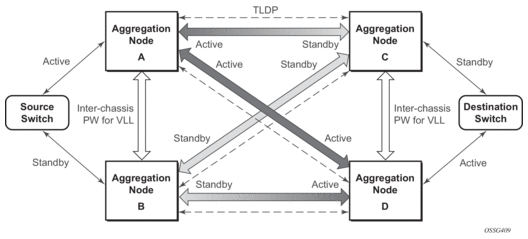
It is important to note that to provide protection if the active SDP between node A and D fails and the need to limit the number of lost data for LI the ICB between node A and B must be supported. As a result, when the SDP connecting nodes A and D fails the data on its way from the source switch to node A and the data in node A must be directed by the ICB to node B and from there to node D.
This functionality is already supported in when providing pseudo wire redundancy for VLLs and must be extended to mirror or LI service redundancy.
Figure 12: State Engine for Redundant Service to a Non-Redundant Mirror Service
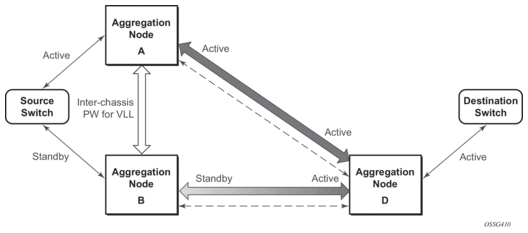
The notable difference with scenarios standard pseudo wire redundancy scenarios is that provided the customer service is redundant on nodes A and B (Figure 11 and Figure 12) both aggregation node A and Aggregation node B maintain an active Pseudo wire to Node D who in turn has an active link to the destination switch. If in the sample in Figure 11, the link between D and the destination switch is disconnected then both aggregation A and B must switch to use pseudowire connection to Node C.
Figure 13: State Engine for a Non-Redundant Service to a Redundant Mirror Service
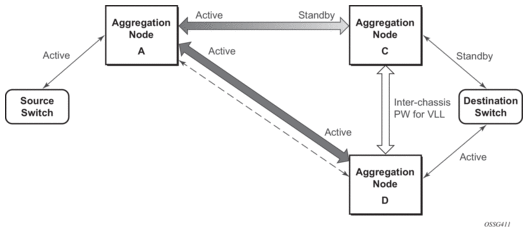
In the case where a non-redundant service is being mirrored to a redundant mirror service (Figure 13) the source aggregation node (A) can only maintain a pseudo wire to the active destination aggregation node (D). Should the link between aggregation node D and the destination switch fail then the pseudo wire must switch to the new active aggregation node (C).
2.3.1. Redundant Mirror Source Notes
A redundant remote mirror service destination is not supported for IP mirrors (a set of remote IP mirror destinations). The remote destination of an IP mirror is a VPRN instance, and an “endpoint” cannot be configured in a VPRN service.
A redundant mirror source is supported for IP mirrors, but the remote destination must be a single node (a set of mirror source nodes, each with a mirror destination that points to the same destination node). In this case the destination node would have a VPRN instance with multiple ip-mirror-interfaces.
Multi Chassis APS (MC-APS) groups cannot be used as the SAP for a redundant remote mirror destination service. APS cannot be used to connect the remote mirror destination SR nodes to a destination switch.
Multi Chassis APS (MC-APS) groups can be used as the SAP for a redundant mirror service source. APS can be used to redundantly connect the source of the mirrored traffic to the SR nodes that are behaving as the mirror-sources.
2.4. Configuration Process Overview
Mirroring can be performed based on the following criteria:
Configuring mirroring is like creating a uni-direction service. Mirroring requires the configuration of:
- Mirror source — The traffic on a specific point(s) to mirror.
- Mirror destination — The location to send the mirrored traffic, where the sniffer is to be located.
Figure 14 shows a local mirror service configured on ALA-A.
- Port 2/1/2 is specified as the source. Mirrored traffic ingressing and egressing this port is sent to port 2/1/3.
- SAP 2/1/3 is specified as the destination. The sniffer is physically connected to this port. Mirrored traffic ingressing and egressing port 2/1/2 is sent here. SAP, encapsulation requirements, packet slicing, and mirror classification parameters are configured. SDPs are not used in local mirroring.
Figure 14: Local Mirroring Example
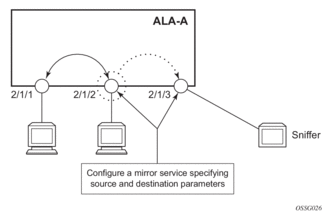
Figure 15 shows a remote mirror service configured as ALA B as the mirror source and ALA A as the mirror destination. Mirrored traffic ingressing and egressing port 5/2/1 (the source) on ALA B is handled the following ways:
- Port 5/2/1 is specified as the mirror source port. Parameters are defined to select specific traffic ingressing and egressing this port.Destination parameters are defined to specify where the mirrored traffic is to be sent. In this case, mirrored traffic is sent to a SAP configured as part of the mirror service on port 3/1/3 on ALA A (the mirror destination).ALA A decodes the service ID and sends the traffic out of port 3/1/3.The sniffer is physically connected to this port (3/1/3). SAP, encapsulation requirements, packet slicing, and mirror classification parameters are configured in the destination parameters.
Figure 15: Remote Mirroring Example
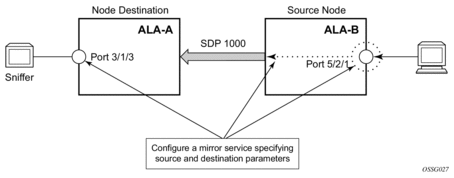
Figure 16 shows the process to provision basic mirroring parameters.
Figure 16: Mirror Configuration and Implementation Flow
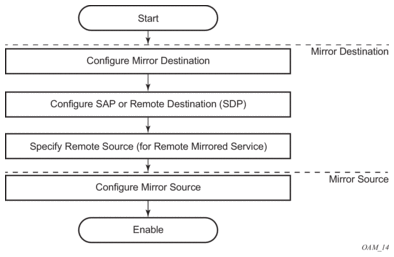
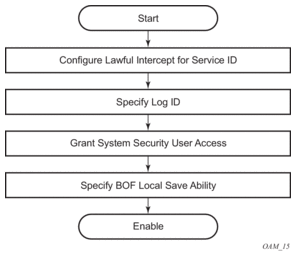
Figure 17 shows the process to provision LI parameters.
Figure 17: Lawful Intercept Configuration and Implementation Flow
2.5. Configuration Notes
This section describes mirroring configuration caveats.
- Multiple mirroring service IDs (mirror destinations) may be created within a single system.
- A mirrored source can only have one destination.
- Both destination mirroring service IDs (including service parameters) and config mirror source (defined in config>mirror>mirror-source) are persistent between router (re)boots and are included in the configuration saves.Debug mirror source (defined debug>mirror>mirror-source) and lawful intercept source (defined in config>li>li-source) criteria configurations are not preserved in a configuration save (admin save). Debug mirror source configuration can be saved using admin>debug-save. Lawful intercept source configuration can be saved using config>li>save.
- Subscriber based lawful intercept source criteria is persistent across creation/existence of the subscriber. Filter or SAP-based LI source criteria is removed from the LI source configuration if the filter entry or SAP is deleted. Applies to the 7450 ESS and 7950 SR.
- Physical layer problems such as collisions, jabbers, and so on, are not mirrored. Typically, only complete packets are mirrored.
- Starting and shutting down mirroring:Mirror destinations:
- The default state for a mirror destination service ID is shutdown. Execute a no shutdown command to enable the feature.
- When a mirror destination service ID is shutdown, mirrored packets associated with the service ID are not accepted from its mirror source or remote source. The associated mirror source is put into an operationally down mode. Mirrored packets are not transmitted out the SAP or SDP. Each mirrored packet is silently discarded. If the mirror destination is a SAP, the SAP’s discard counters are incremented.
- Issuing the shutdown command causes the mirror destination service or its mirror source to be put into an administratively down state. Mirror destination service IDs must be shut down first to delete a service ID, or SAP, or SDP association from the system.
Mirror sources:- The default state for a mirror source for a given mirror-dest service ID is no shutdown. Enter a shutdown command to deactivate (disable) mirroring from that mirror-source.
- Mirror sources do not need to be shutdown to remove them from the system. When a mirror source is shutdown, mirroring is terminated for all sources defined locally for the mirror destination service ID.
The following are lawful intercept configuration caveats.
Network management — Operators without LI permission cannot view or manage the LI data on the node nor can they view or manage the data on the Network Management platform.
Entries within LI filters (li-ip-filter, li-ipv6-filter, and li-mac-filter) are typically used to match a specific IP or MAC address as LI targets. When these LI filters are associated to a filter in the main configuration region (ip-filter, ipv6-filer, or mac-filter), the system does not insert the entries in a sequence for performance reasons. For example, it is possible that filter entry 2 can take place before filter entry 1. This does not affect the LI functionality. However, in cases where the entries overlap, it is possible for a latter entry to first match the IP or the MAC address.
LI mirroring does not allow the configuration of ports and ingress labels as a source parameter.